ROBOT CONFIGURATION CUSTOMIZATION
51
Comau Robotics Product Instruction
h. Perform the calibration of the
virtual machine as indicated
below; the following steps will
allow you to align the position of
e.DO virtual model present in
the Simulated Desk to the
actual position of the previously
calibrated “physical” Robot.
Failure to carry out the
calibration procedure
could generate untimely
movements of the Robot
(movement at maximum
speed, until reaching the
position set on the Teach
Pendant) at the time of
the switch from the tablet
to the Teach Pendant.
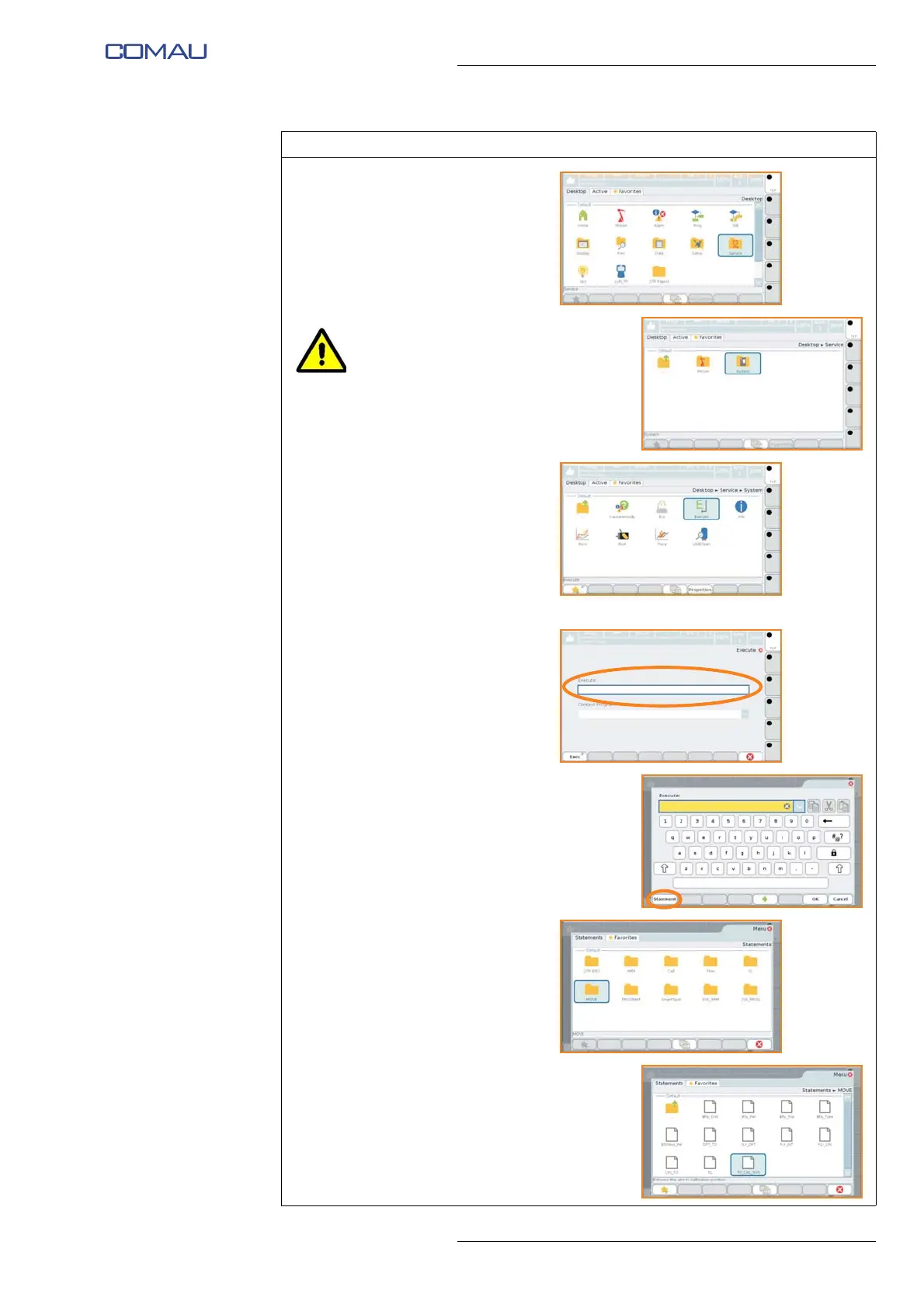
i. Select, in order, the items
“Service”, “System”, “Execute”.
j. Inside the “Execute”
environment, write the
instruction “MOVE ARM[1] TI
$CAL_SYS” or select it from the
instruction library, as follows:
• select “Statement” on the
lower left side of the
window;
• select “MOVE” folder
• select “TO_CAL_SYS”
instruction.
Operating procedure (Continued)





 To Next Page