EasyManua.ls Logo

Commodore 128D - Page 365

Commodore 128D
427 pages
Print Icon
To Next Page IconTo Next Page
To Previous Page IconTo Previous Page
Loading...
Rear
Connections
4.
Disk
Drive
Reset
Button—Resets
disk
drive.
5.
Reset
Button—Resets
computer
and
disk
drive
(warm
start).
6.
Expansion
Port—This
rectangular
slot
is
a
parallel
port
that
accepts
program
or
game
cartridges
as
well
as
special
interfaces.
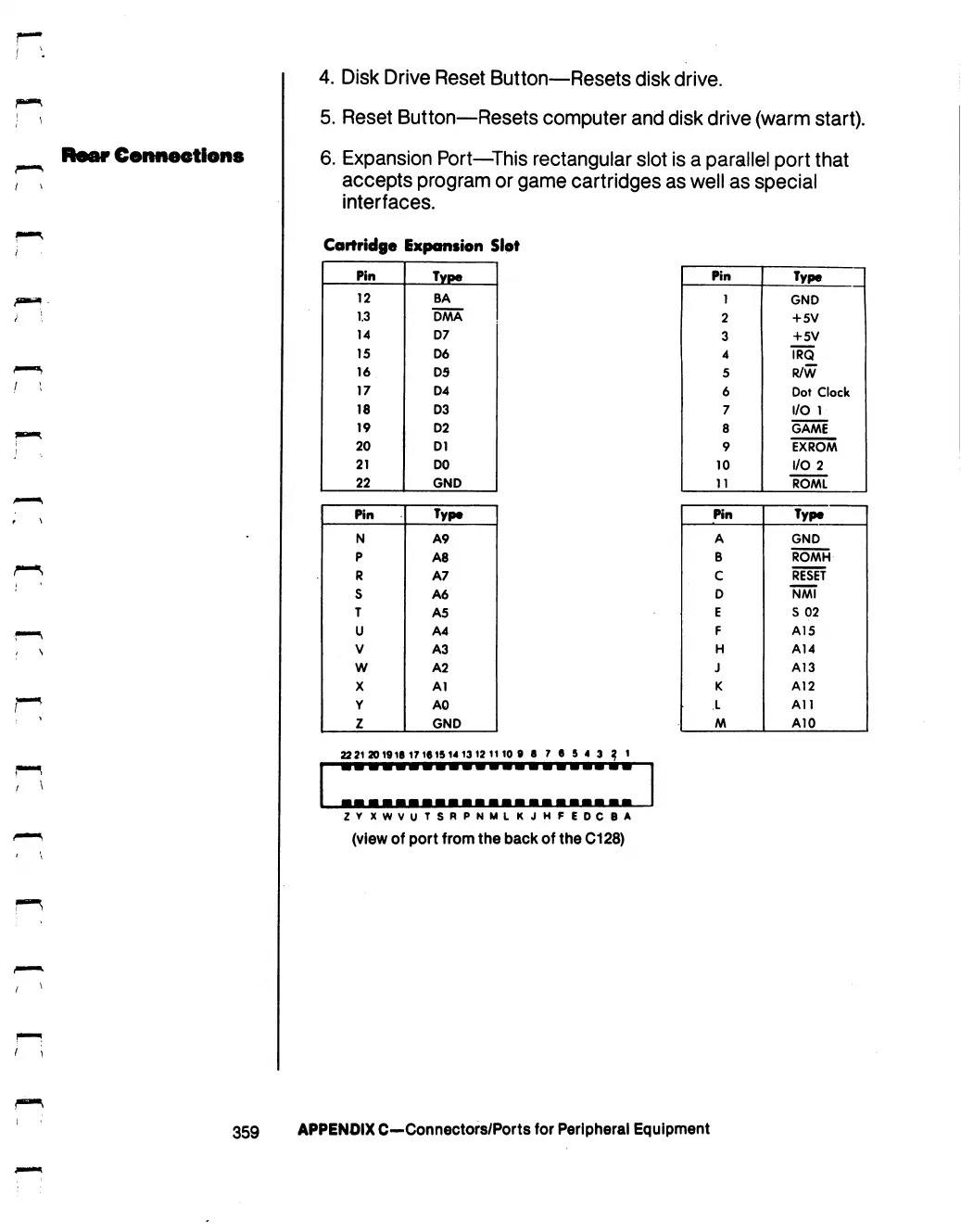
Cartridge
Expansion
Slot
Pin
12
1.3
14
15
16
17
18
19
20
21
22
Pin
N
P
R
S
T
U
V
w
X
Y
z
Type
BA
DMA
D7
D6
DS
D4
D3
D2
D1
DO
GND
Type
A9
A8
A7
A6
A5
A4
A3
A2
Al
A0
GND
22
21201918
17161514
1312
1110
9 8
7
6
5 4
3
Z
V
XWVUTSRPNMLK
JHFEDCBA
(view
of
port
from
the
back
of
the
C128)
Pin
1
2
3
4
5
6
7
8
9
10
11
Pin
A
B
C
D
E
F
H
J
K
L
AA
Type
GND
+5V
+5V
IRQ
R/W
Dot
Clock
I/O
1
GAME
EXROM
I/O
2
ROAAL
Type
GND
ROMH
RESET
NMI
S
02
A15
A14
A13
A12
All
A10
359
APPENDIX
C—Connectors/Ports
for
Peripheral
Equipment

Table of Contents

Other manuals for Commodore 128D

Related product manuals