EasyManua.ls Logo

Commodore 128D - Page 367

Commodore 128D
427 pages
Print Icon
To Next Page IconTo Next Page
To Previous Page IconTo Previous Page
Loading...
r—s
9.
Channel
Selector—Use
this
switch
to
select
which
TV
channel
(L
=
channel
3,
H
=
channel
4)
the
computer's
picture
will
be
displayed
on
when
using
a
television
instead
of
a
monitor.
10.
RF
Connector—This
connector
supplies
both
picture
and sound
to
your
television
set.
(A
television
can
display
only
a
40
column
picture.)
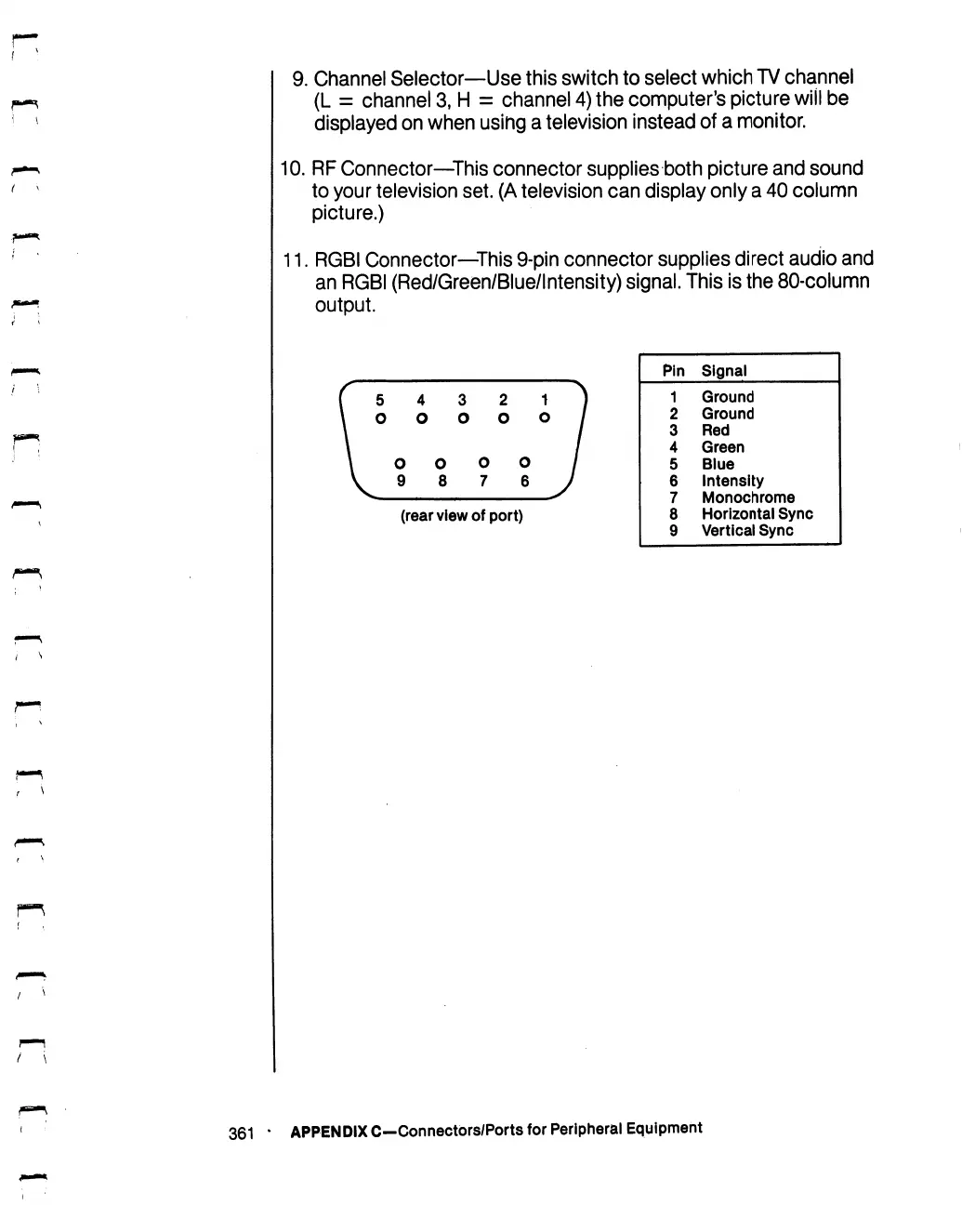
11.
RGBI
Connector—This
9-pin
connector
supplies
direct
audio
and
an
RGBI
(Red/Green/Blue/lntensity)
signal.
This
is
the
80-column
output.
(rear
view
of
port)
Pin
1
2
3
4
5
6
7
8
9
Signal
Ground
Ground
Red
Green
Blue
Intensity
Monochrome
Horizontal
Sync
Vertical
Sync
361
*
APPENDIX
C—Connectors/Ports
for
Peripheral
Equipment

Table of Contents

Other manuals for Commodore 128D

Related product manuals