LPOD C-/Ku-Band Outdoor Amplifier/Block Up Converter Revision 3
Ethernet Management MN-LPOD
4–15
4.5.5.3 Config Pages
4.5.5.3.1 Config | Amplifier
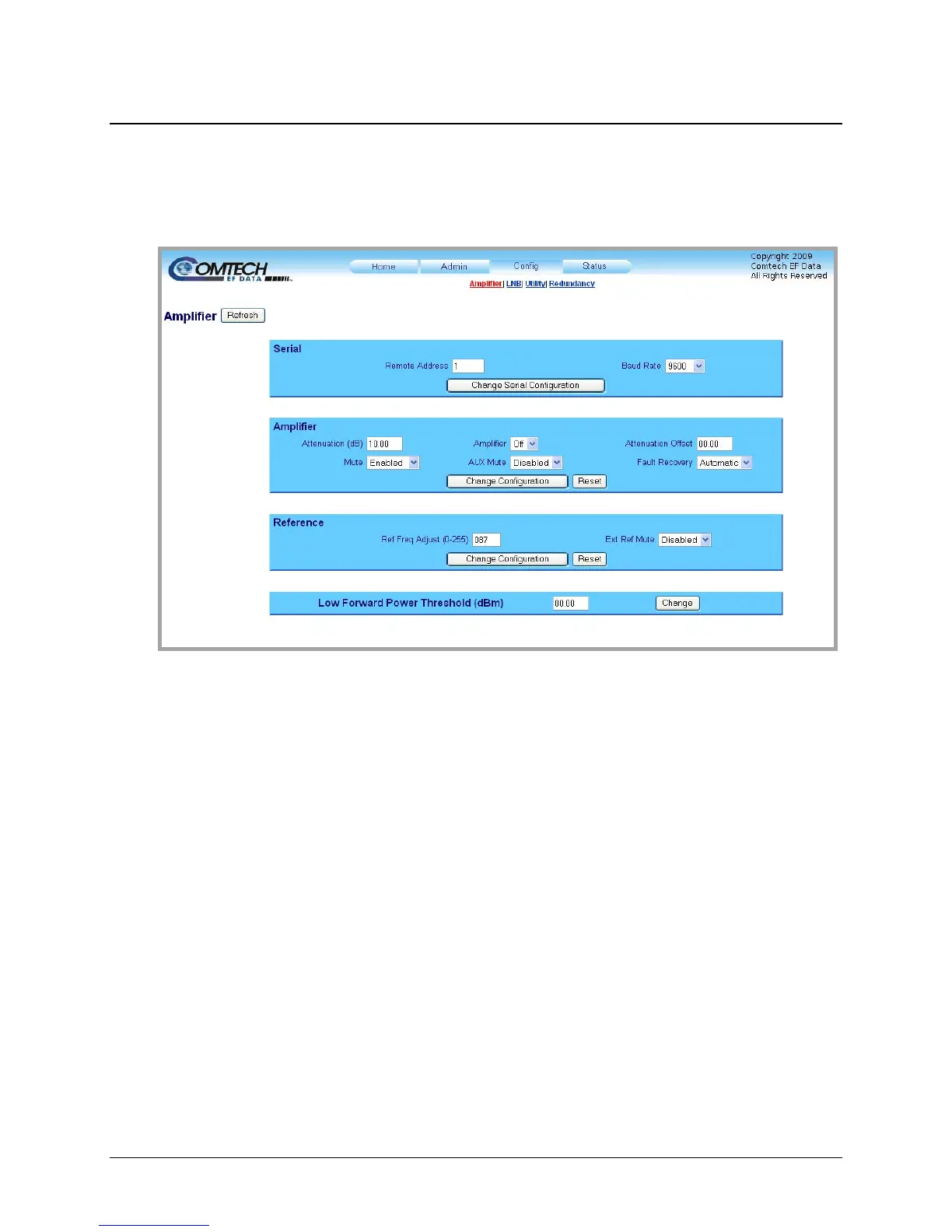
Figure 4-6. Config | Amplifier page
The ‘Config | Amplifier’ page (Figure 4-6)
provides the means to configure the communications ,
operations, and alarms/faults handling for the amplifier.
Serial
• Remote Address: Enter a valid pphysical remote address between 0001 to 9999.
• Baud Rate: Using the drop-down menu, select the operating baud rate as 2400, 4800,
9600, 19200, or 38400 baud
Once the desired configuration settings have been made in this section, the user should then click
[Change Serial Configuration] to save these changes..
Amplifier
• Attenuation (dB): Enter a valid attenuation level (00.00 to 20.00 dB) in 0.25 dB steps.
•
Mute: Using the drop-down menu, select the Mute function as either Enabled or
Disabled.
• Amplifier: Using the drop-down menu, select the amplifier as either On or Off.



 To Next Page