LPOD C-/Ku-Band Outdoor Amplifier/Block Up Converter Revision 3
Ethernet Management MN-LPOD
4–24
• Statistics Averaging: Using the drop-down menu, select either Enable or Disable to set
the Statistics Averaging function When Enabled, statistics data is averaged at a rate of
once per second for 10 seconds. If Disabled, burst values will be logged instead of
averaged values.
Once the statistics configuration parameters have been defined, click [Submit] to execute the choice.
To update the page with the current viewing and operating configuration, click [Refresh].
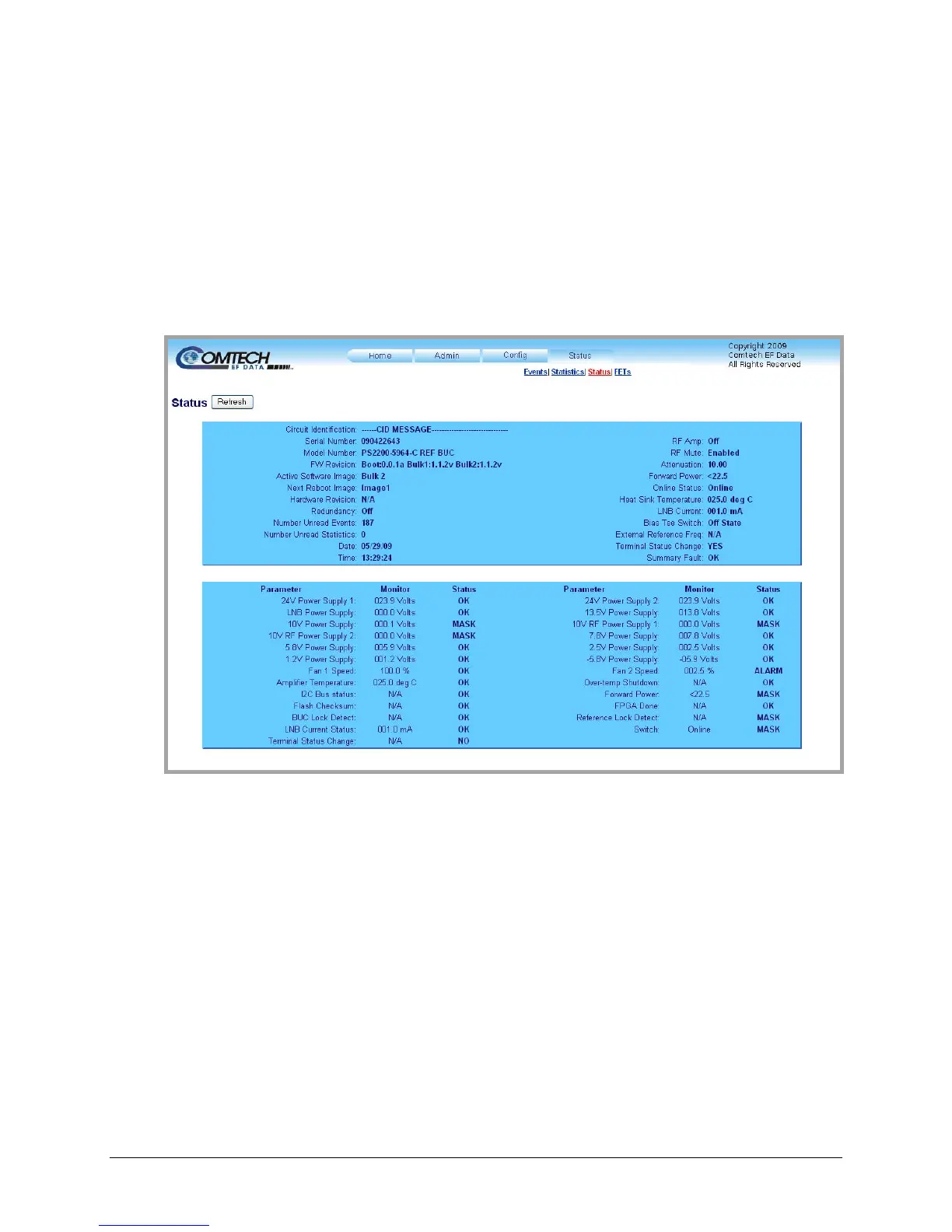
4.5.5.4.3 Status | Status
Figure 4-12. Status | Status page
The ‘Status | Status’ page (Figure 4-12) provides t
he user with all pertinent information about
the LPOD.
Note: Unlike the remaining Web Server pages available through this interface that refresh/update
only when manually selected by the user, the ‘Status | Status’ page automatically updates once
every 10 seconds. Even with this automatic refresh function, the user may click [Refresh] to
update the operational status parameters found on this page.



 To Next Page