LPOD C-/Ku-Band Outdoor Amplifier/Block Up Converter Revision 3
Ethernet Management MN-LPOD
4–12
4.5.5.2 Admin Pages
4.5.5.2.1 Admin | Access
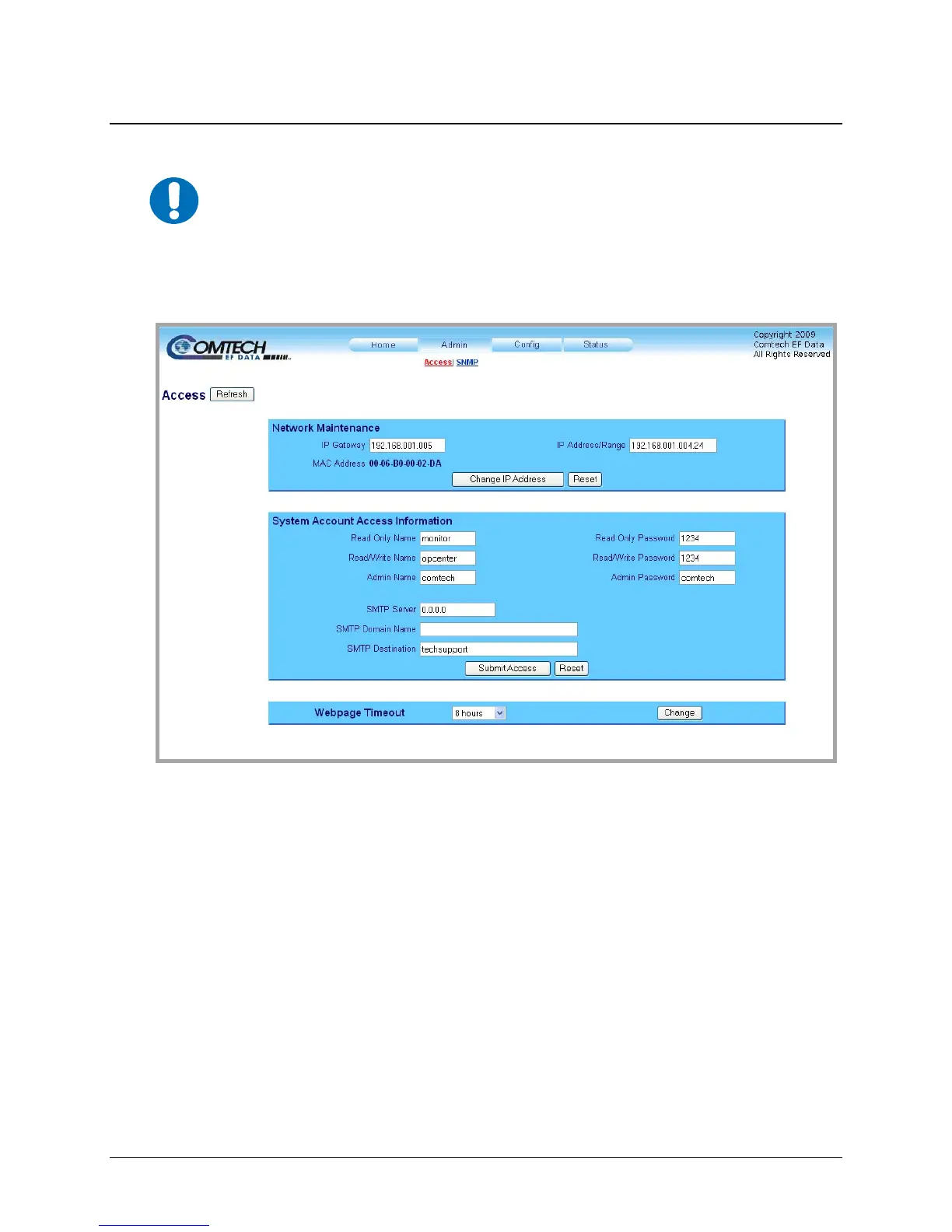
Figure 4-4. Admin | Access page
The ‘Admin | Access’ page (Figure 4-4)
provides the means to set up and maintain user names,
passwords, the e-mail server, and the host IP addresses to facilitate communication with the LPOD
Web Server.
Network Maintenance
• IP Gateway, IP Address/Range: Enter the desired IP Gateway Address and IP Address/
Range in these text boxes.
•
MAC Address (read-only): The MAC is set at the factory to a guaranteed unique address
that cannot be modified by the user.
Once the desired configuration settings have been made in this section, the user should then click
[Change IP Address] to save these changes. If it is desired to revert back to the previously
assigned IP Gateway and IP Address/Range, the user should instead click [Reset].
IMPORTANT
The Admin pages are available only to users who have logged in using the
Administrator Name and Password.



 To Next Page