47 | P a g e
MRCC Setup Examples
In this section we’ll outline some MRCC physical setups. These examples aren’t meant to be exhaustive
but should help with some of the more common ways you’re likely to use MRCC with other hardware and
software.
Hardware Connections
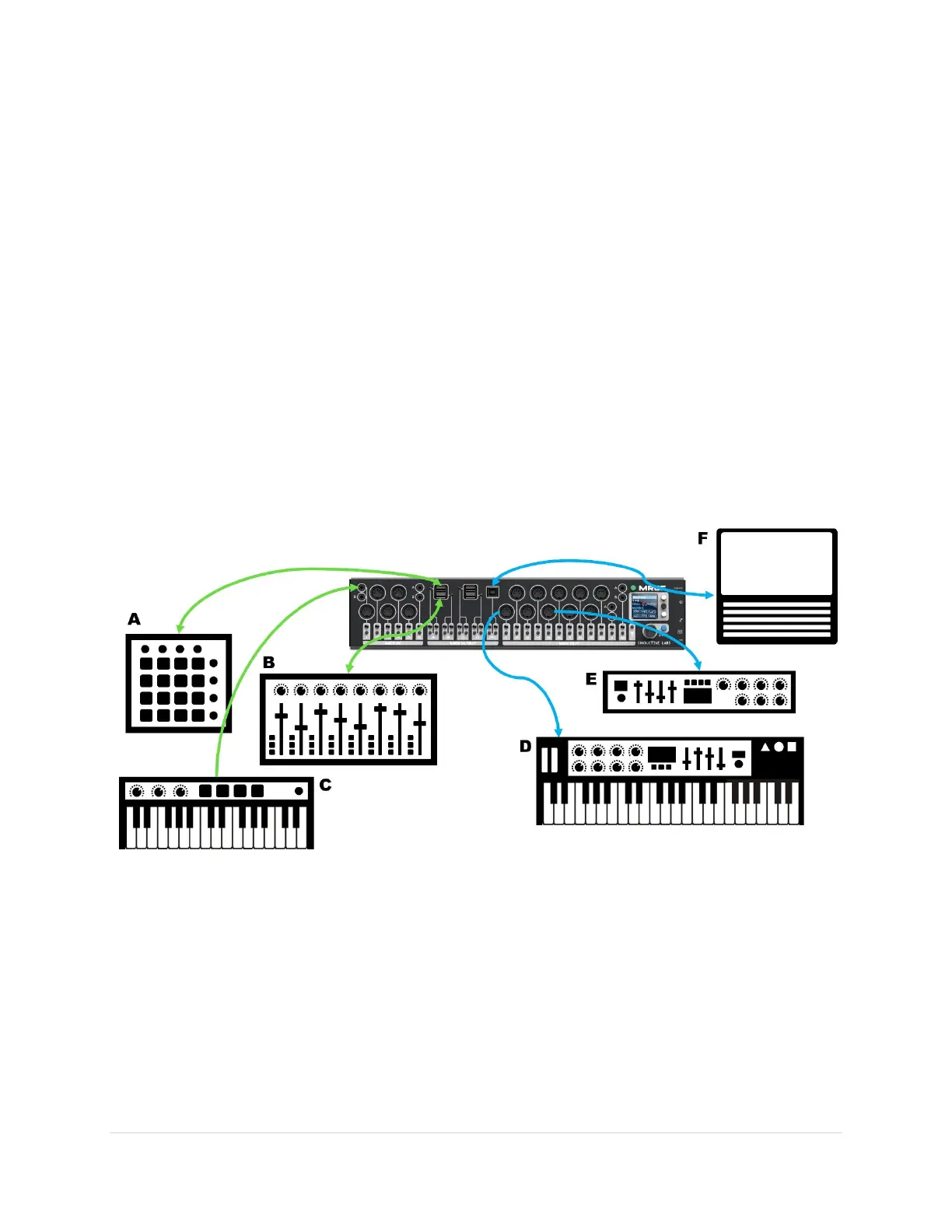
Here is an example of a typical setup. There are controller devices that connect to the in-ports and
synths that connect to out-ports, and a PC that connects to the PC port.
Note that the USB Host and PC ports are bi-directional so controllers A & B and the computer F can send
and receive MIDI data.
As many controllers as you choose can send data to the same device. So you can have controllers B & C
sending MIDI messages to synth E.
Keyboard controller C and be routed to both synths D & E (or to several virtual cables to PC F) with split
and layer modifiers to create deep multi-timbrel voices.



 To Next Page