xStack
®
DES-3500 Series Layer 2 Stackable Fast Ethernet Managed Switch User Manual
225
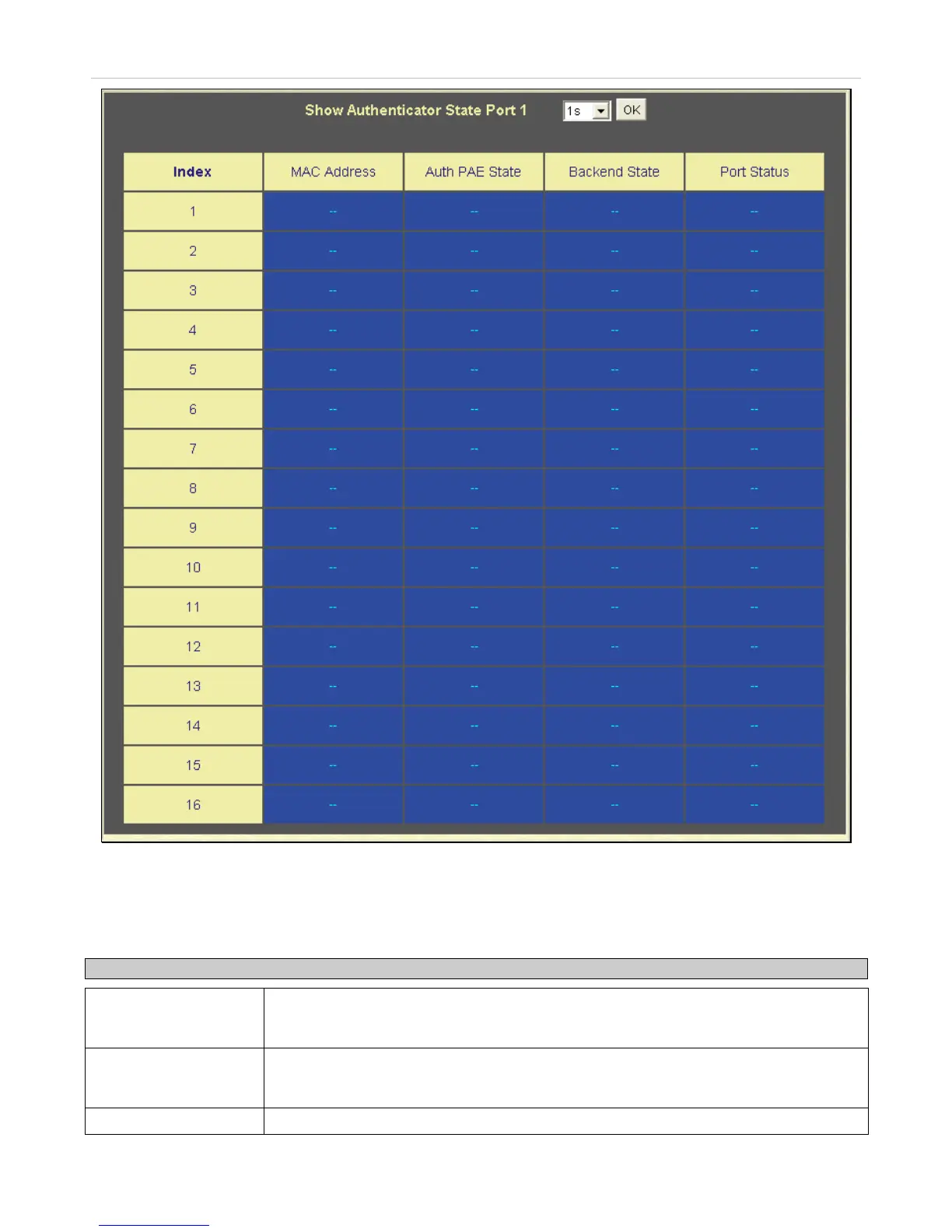
Figure 8- 23. Show Authenticator State window – MAC-Based 802.1x
This window displays the Authenticator State for individual ports on a selected device. To select a unit within the switch stack,
use the pull-down menu at the top of the window and click Apply. A polling interval between 1 and 60 seconds can be set using
the drop-down menu at the top of the window and clicking OK.
The information on this window is described as follows:
Parameter Description
Auth PAE State
The Authenticator PAE State value can be: Initialize, Disconnected, Connecting,
Authenticating, Authenticated, Aborting, Held, Force_Auth, Force_Unauth, or N/A. N/A
(Not Available) indicates that the port's authenticator capability is disabled.
Backend State
The Backend Authentication State can be Request, Response, Success, Fail, Timeout,
Idle, Initialize, or N/A. N/A (Not Available) indicates that the port's authenticator capability
is disabled.
Port Status
Controlled Port Status can be Authorized, Unauthorized, or N/A.







 To Next Page