xStack
®
DES-3500 Series Layer 2 Stackable Fast Ethernet Managed Switch User Manual
32
Port Configuration
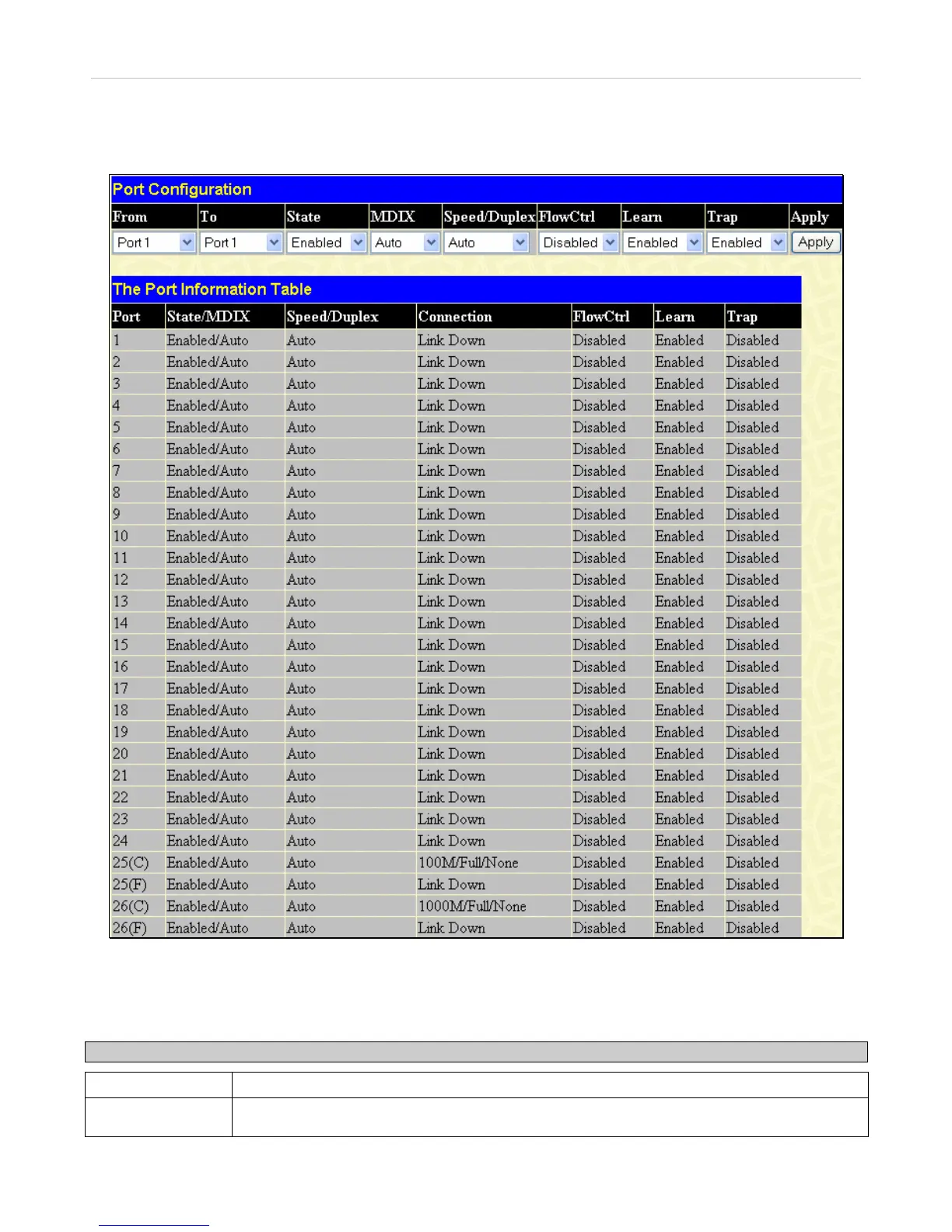
This section contains information for configuring various attributes and properties for individual physical ports and Err-disabled
Ports, including port speed and flow control. To display the following window click, Configuration > Port Configuration.
Figure 6- 4. Port Configuration window
To configure switch ports:
1. Choose the port or sequential range of ports using the From…To… port pull-down menus.
2. Use the remaining pull-down menus to configure the parameters described below:
Parameter Description
State
Toggle the State field to either enable or disable a given port or group of ports.
MDIX
Medium dependent interface crossover is a female port connection on the Switch used to
connect to end stations, servers and hubs. The drop down menu allows the user to choose







 To Next Page