16 • Installing Xtium2-CLHS PX8 Xtium2-CLHS PX8 User's Manual
Xtium2-CLHS PX8 Firmware Loader
The Device Manager-Firmware Loader program automatically executes at the end of the driver
installation and on every subsequent reboot of the computer. It will determine if the Xtium2-CLHS
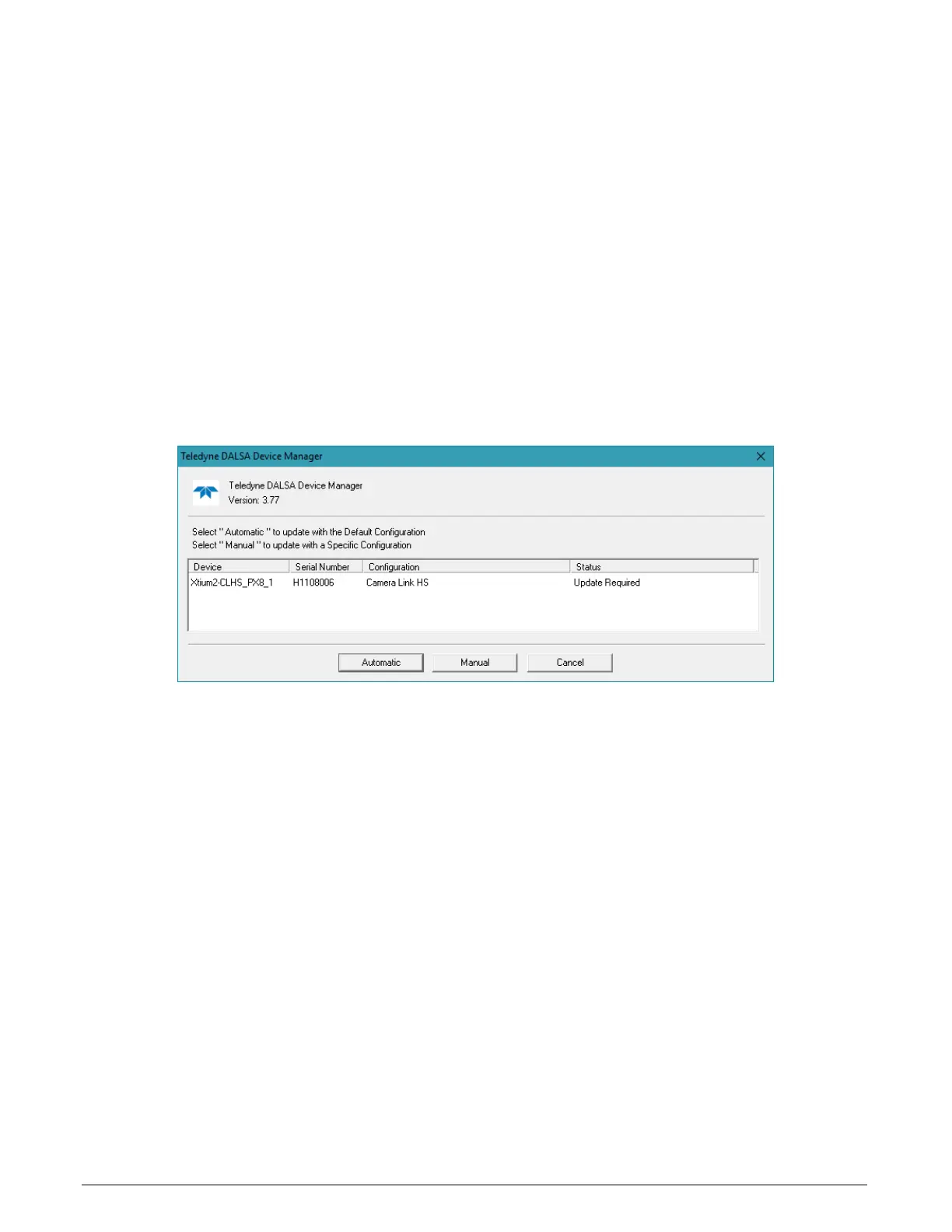
PX8 requires a firmware update. If firmware is required, a dialog displays. This dialog also allows
the user to load alternative firmware if available for the Xtium2-CLHS PX8.
Important: In the rare case of firmware loader errors please see Recovering from a Firmware
Update Error.
Firmware Update: Automatic Mode
Click Automatic to update the Xtium2-CLHS PX8 firmware. The Xtium2-CLHS PX8 currently
supports one firmware configuration.
See User Programmable Configurations for details on all supported modes, selected via a manual
update of alternative firmware.
With multiple Xtium2-CLHS PX8 boards in the system, all boards update with new firmware. If any
installed Xtium2-CLHS PX8 board installed in a system already has the correct firmware version, an
update is not required. In the following screen shot, a single Xtium2-CLHS PX8 board is installed
and ready for a firmware upgrade.
Figure 1: Automatic Firmware Update
Firmware Update: Manual Mode
Select Manual mode to load firmware other then the default version or when, in the case of
multiple Xtium2-CLHS PX8 boards in the same system, if each requires different firmware.
The following figure shows the Device Manager manual firmware screen. Displayed is information
on all installed Xtium2-CLHS PX8 boards, their serial numbers, and their firmware components.


 To Next Page