Xtium2-CLHS PX8 User's Manual Technical Specifications • 85
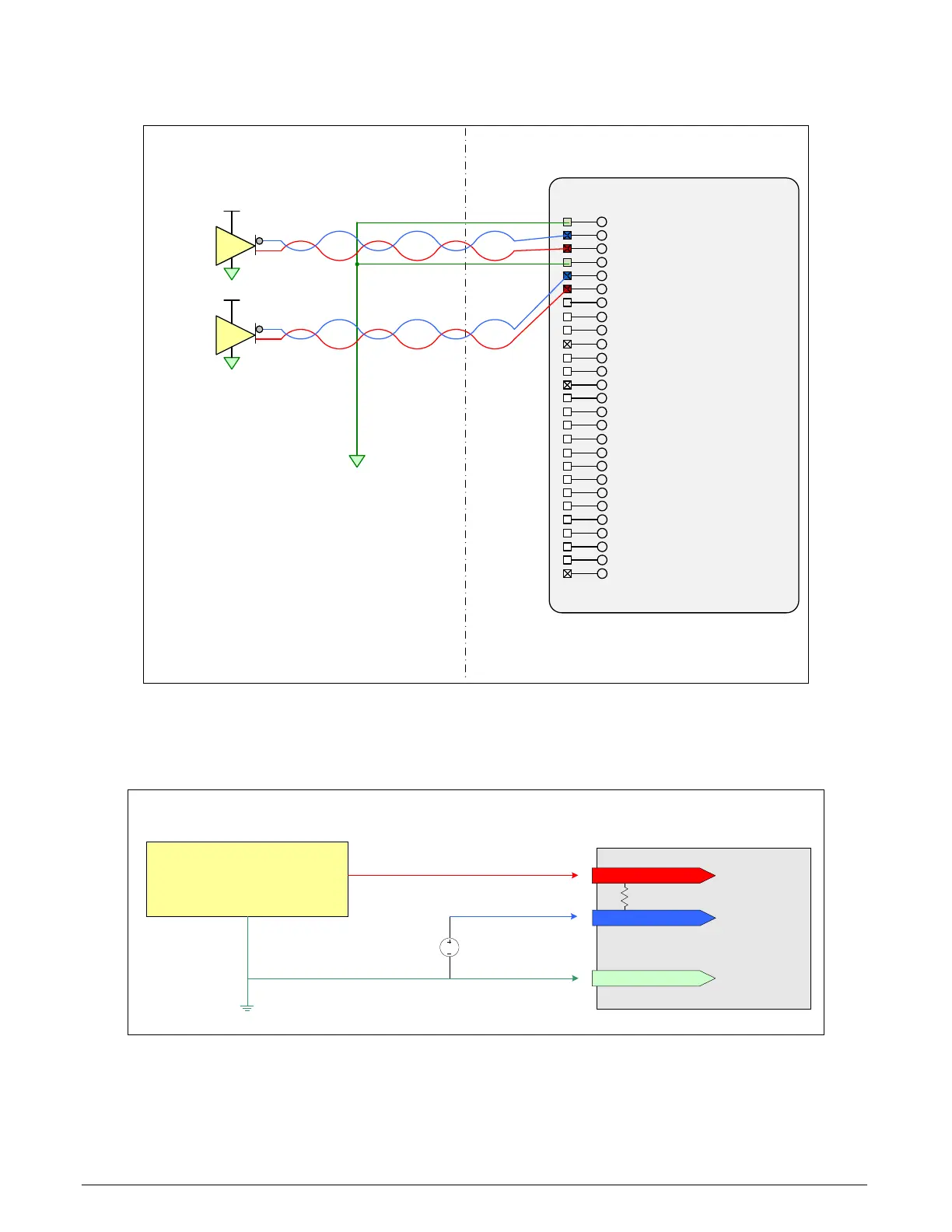
Example: Connecting to the RS-422 Shaft Encoder Block Diagram
J1: External Signals Connector
(DH60-27P)
External Signals Xtium-CLHS PX8
2
V (+)
RS-422
Compatible
Driver
1
V (+)
RS-422
Compatible
Driver
User Shaft Encoder
Signal Ground
Reserved
26
27
:
:
25 :
24 :
23 :
General Output 422 :
General Output 321 :
19
20
:
:
18 :
17 :
General Input 4 (+)16 :
General Input 3 (+)15 :
Power Output (12 Volts)14 :
Ground13 :
General Output 212 :
General Output 1 / Strobe11 :
Ground10 :
General Input 2 / Trigger 2 (+)9 :
General Input 1 / Trigger 1 (+)8 :
7 :
Shaft Encoder B (+)6 :
Shaft Encoder B (-)5 :
Ground4 :
Shaft Encoder A (+)3 :
Shaft Encoder A (-)2 :
Ground1 :
General Input 1 / Trigger 1 (-)
General Input 4 (-)
General Input 3 (-)
Power Output (5 Volts)
General Input 2 / Trigger 2 (-)
General Output 5
General Output 6
General Output 7
General Output 8
Figure 29:External RS-422 Signals Connection Diagram
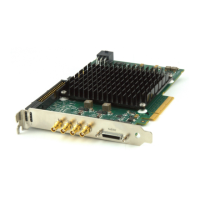
Note 3.2: Interfacing to a TTL (also called Push-Pull) Output
RS-422 (+) input
RS-422 (-) input
FG/system GND
DC
Bias Voltage
+2V
GND
Frame Grabber System
Interfacing TTL Output to RS-422 Inputs
via a Line Buffer/Driver
TTL signal source & Buffer Driver
(example: 74ACT244)
100 ohm
Figure 30: Interfacing TTL to RS-422 Shaft Encoder Inputs
• The graphic shows a single-ended driver signal interfaced to the RS-422 input.
• RS-422 (-) input is biased to a DC voltage of +2 volts.
• This guarantees that the TTL signal connected to the RS-422 (+) input will be detected as a
logic high or low relative to the (-) input.


 To Next Page