ES601Plus OPERATING MANUAL
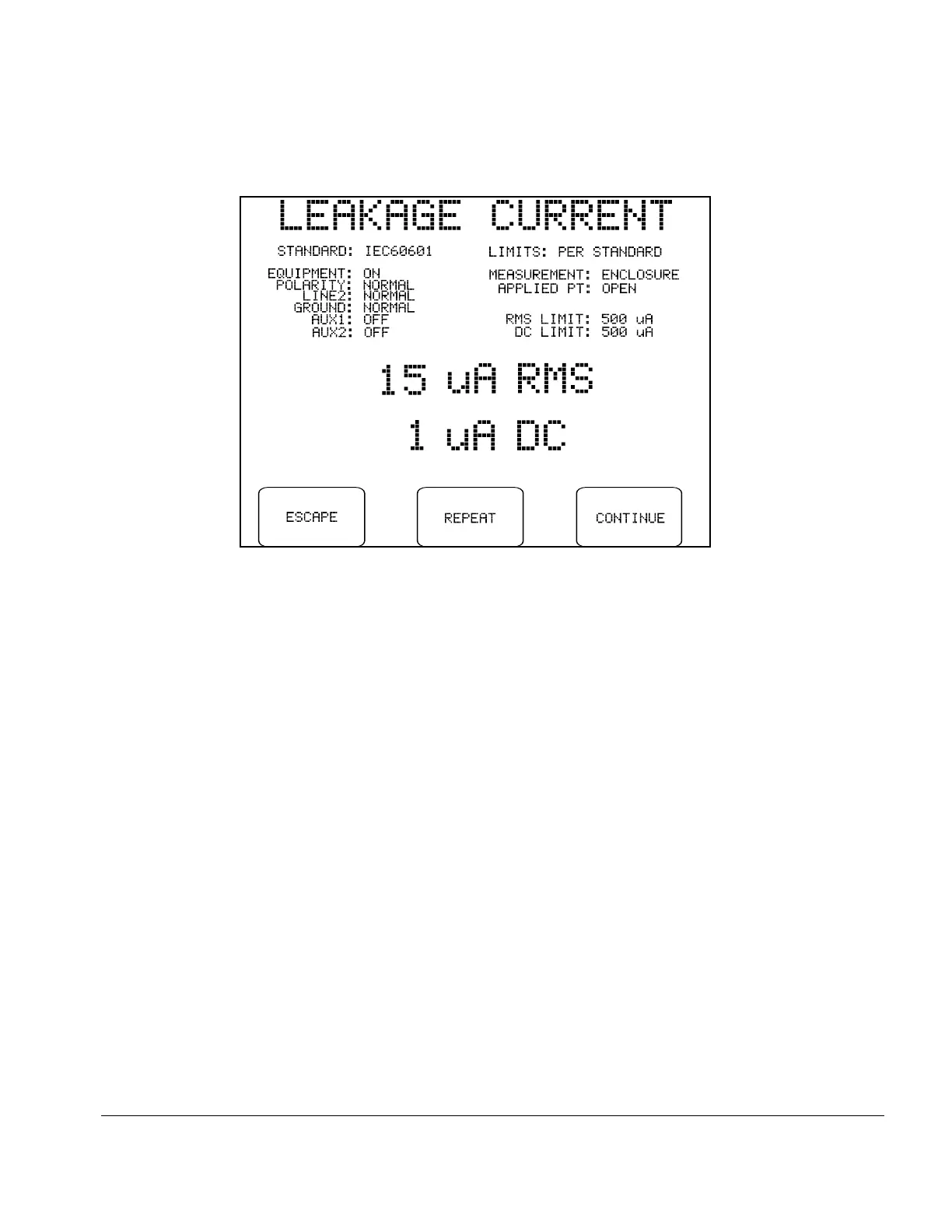
Fig u re 34 - Leakage test paused during sequence.
Individual leakage readings are rapidly made by ES601Plus, each reading usually requiring less than
one second. If it is expected you may want to pause individual values during a test in order review
them, you should set the "PAUSE AFTER..." setting on the Sequence Control menu (Fig u re 31) to
at least 2 seconds, so the time between readings is increased to allow for user reaction time.
"PAUSE AFTER..." can be set from 1 to 5 seconds in steps of one second, or the pause can be
completely disabled, allowing you to trade off operation of the PAUSE button against total
execution time of the leakage test.
If the leakage test is paused, the keypad buttons will be changed to:
ESCAPE:
Aborts the sequence in progress and return to the MANUAL MODE menu. No
new leakage test data is saved to the Clip Record.
REPEAT:
Repeats the measurement for the test conditions listed at the top of the display.
CONTINUE:
Allows the sequence to proceed to the next measurement.
If a value exceeding either of the posted limits is obtained, the sequence is automatically stopped at
that measurement and an audible alarm is produced by ES601Plus. In this case, the display will offer
the same functions described above.
Manual Testing/Chapter 5 # Page 75


 To Next Page
 Loading...