GAVIN-8C Instruction Manual
- 11 -
PWM mode to PPM mode is taken as an example.
Press and hold Bind/Mode button on the receiver, and then power on the
receiver. The mode LED will stay green for 2 seconds and then change into red
on, indicating that the receiver switches to PPM mode, and the mode LED will be
off 5 seconds later.
Connections
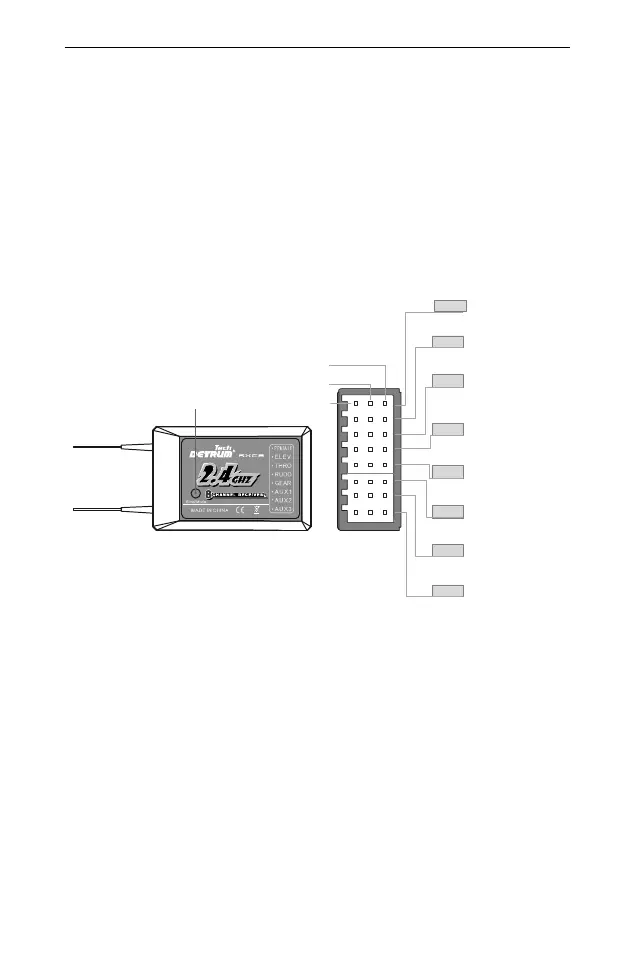
The channels of DETRUM RXC8 receiver are labeled with names, as shown in
the following figure. For each channel, signal wire is close to the top of the
receiver, middle is the positive and bottom is GND.
The RXC8 receiver has a PPM mode and a PWM mode. The connection of the
receiver in two modes is described as follows:
On PWM mode, you can connect the receiver’s channels directly to the servo,
or connect them to the servos via the flight control.
On PPM mode, connect the PPM port of the flight control (supports PPM
signal) to the PPM/AILE port of the receiver, and then connect the output port
of the flight control to the servos.
Installation Precautions for the receiver:
When connecting the receiver, please note the line sequence and securely
insert all of the connectors as far as they will go.
The two antennas of the receiver should be placed at 90 degrees to each
other. Do not place the two antennas twisted together or in parallel.
Bind/Mode Key
AUX3
AUX2
AUX1
GEAR
RUDD
THRO
ELEV
PPM/AILE
PPM Signal
Aileron channel
Elevator channel
Throttle channel
Rudder channel
Gear channel
Auxiliary 1 channel
Auxiliary 2 channel
Auxiliary 3 channel
Signal
+
GND



 To Next Page