GAVIN-8C Instruction Manual
- 9 -
When it is used as a simulator connector, connect the transmitter and
computer by simulator dongle and dongle cable, and then you can learn
flying skills on computer. In order to use this function, you need to purchase
a simulator dongle and the matched simulation software.
When it is used as a trainer connector, connect the instructor and student
transmitter with an optional trainer cable, and then a skilled instructor can
teach a student with flying skills.
USB interface: With a USB interface, it is easy to upgrade the transmitter
firmware to the latest program.
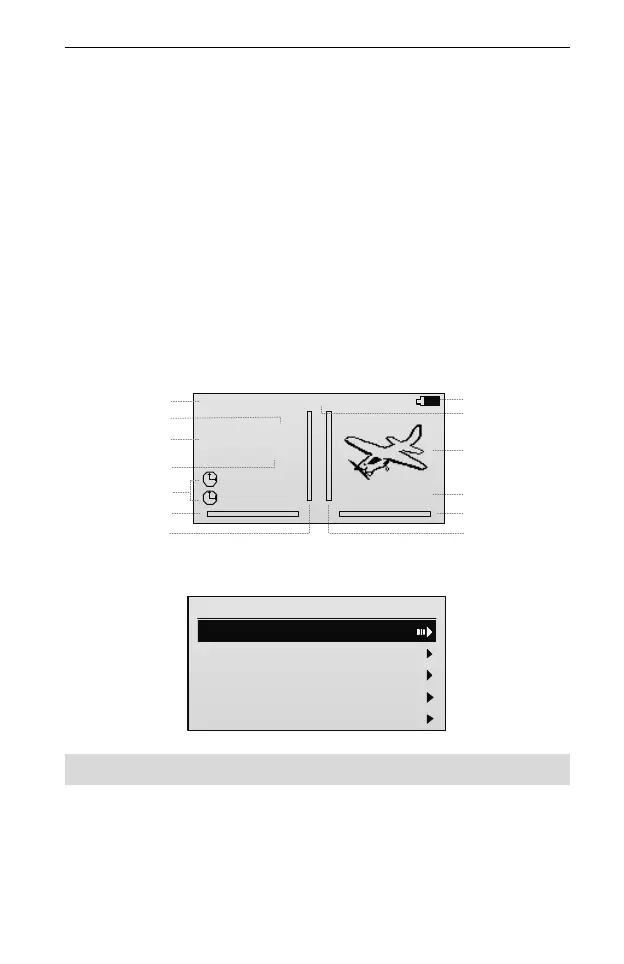
Main Screen
Push the power switch upward to turn on the transmitter and directly enter the
main screen.
. .
. .
0%
00:00
00:00
MODEL01
GAVIN-8C
NORM
00:00:57
86%
Battery Indicator
System Timer
Model Type
Digital Trim
Model Name
Digital Trim
Timer (1, 2)
D/R
Product Model
Flight Mode
Digital Trim
Digital Trim
Current Position
(based on the standard
servo movement)
1.
2.
AIL: D0
ELE: D0
RUD: D0
In the main screen, press ENT key to enter the main menu.
GAVIN-8C
1/5
1. Model Parameter
2.Func Set
3.Model Set
4.Channel Monitor
5.System Set
Receiver
This section is the introductions of DETRUM RXC8 Receiver. If you choose other
receivers, please refer to the instructions of the other receivers.



 To Next Page