User Manual DEV 2194
20 Copyright DEV Systemtechnik GmbH 2013-2017
This means that a Web Interface session is kept open unless the button
is operated or if the web browser (in other words, the connection to the
device) is closed.
It is possible to start a Web Interface session on another computer using the
same user account; naturally, this automatically terminates the session on the
preceding computer.
5.4.3 Status Tab
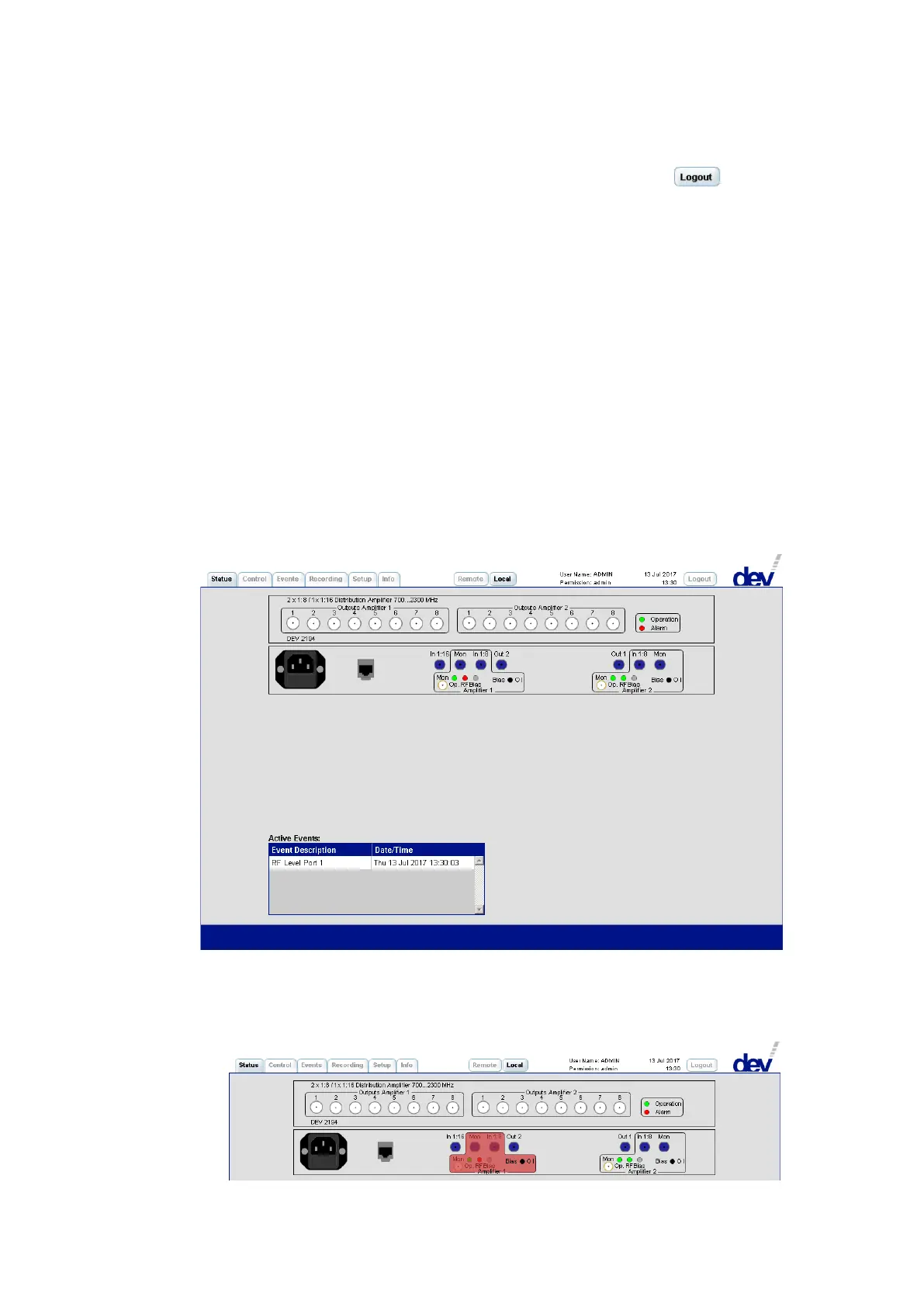
The upper part of the Status Tab shows a simplified representation of the front side
and of the rear side of the device. Thus, a quick overview is provided regarding the
operating status and regarding the health status of the device. The round indicators
are equivalent to the physical LEDs at the device (red = error, green = ok, or gray =
off), please refer to chapter 3.1.1 for details on the indicator information.
In the lower part of the Status Tab, the Active Events Window is located. This
window shows appearing and pending errors with the corresponding error message
and a date/time stamp. The error shown in the following screenshot was triggered
for demonstration purpose by pulling shortly the input RF connector of the first
amplifier. To obtain more details on the errors open the Events Tab (chapter 5.4.5).
Note:
The status indication for the amplifiers in the symbolic representation is equiva-
lent to the physical display on the device. Additionally, if a communication
error is detected, the representation of the amplifier is highlighted in red.



 To Next Page