User Manual DEV 2194
Copyright DEV Systemtechnik GmbH 2013-2017 23
values of these entries may be altered within certain ranges.
The check box "LNB Power Button Enable" can be used to enable (default)
or to disable in Local Mode the functionality of the "Bias" push button of the
corresponding amplifier (chapter 3.1.1).
• The "Surveillance Enable" check box is used to enable (default) or to disable
error messages possibly caused by the specific amplifier.
5.4.5 Events Tab
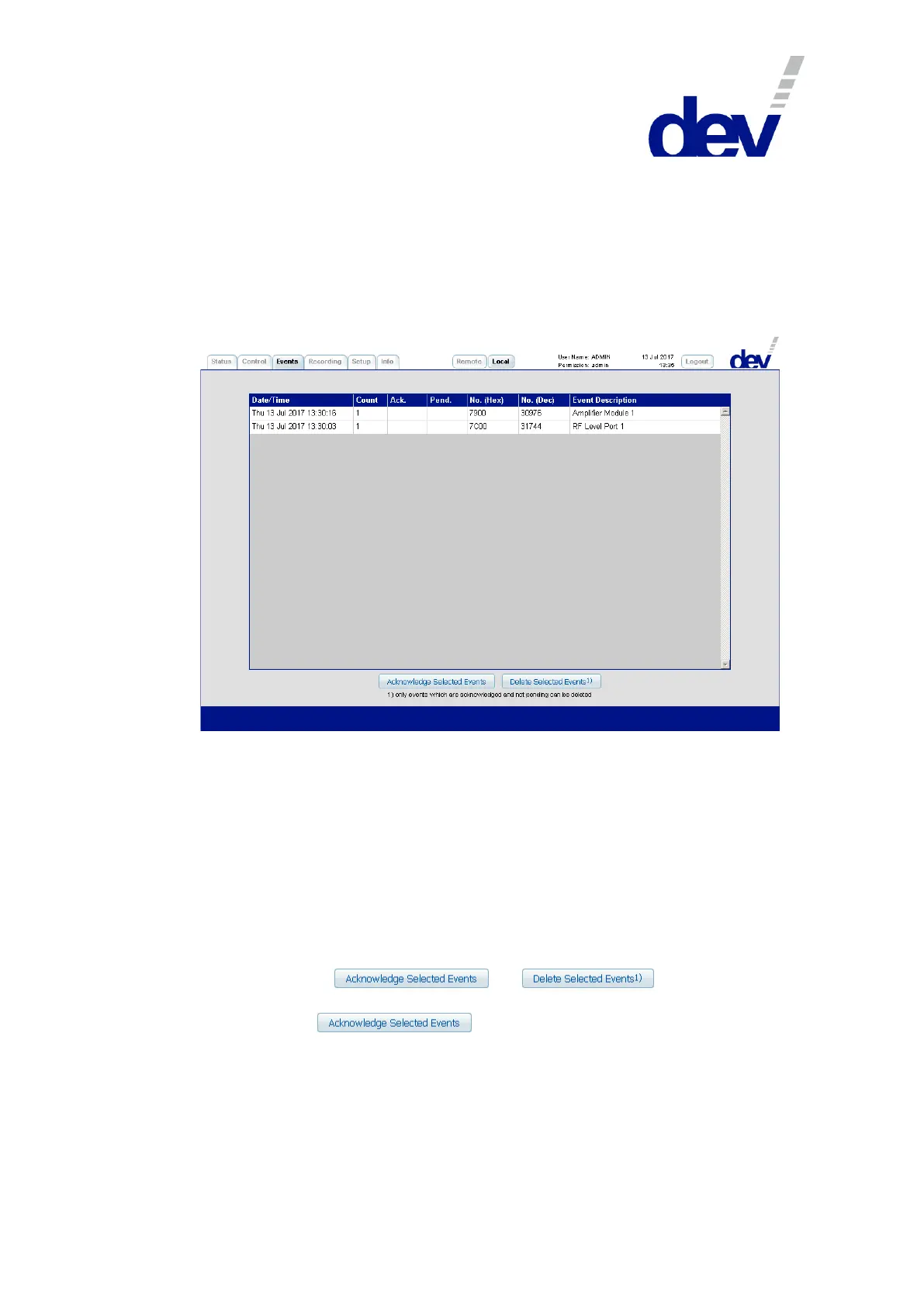
The Events Tab displays a table of the errors, which were detected by the device.
The different errors are listed line-by-line, i.e. each error carries a Date/Time stamp
(in the format: "DDD DD MMM YYYY hh:mm:ss", here e.g. "Thu 13 Jul 2017 13:30:03") informing
about the last occurrence of that error. The second column is a Counter reporting
the number of occurrences of that error (here: "1"). The third column denotes
whether that error is Ack.nowledged ("X") or not (" ") (here: " ", i.e. <space>, meaning
not acknowledged). The fourth column shows whether that error is Pend.ing ("X")
or not (" ") (here: " ", i.e. not pending). The fifth and the sixth column inform about
the error code No. in Hexadecimal (here e.g. "7C00") and in Decimal (here e.g.
"31744") notation; the last column reports the corresponding Event Description
(here e.g. "RF Level Port 1"), please refer to chapter 6.1.
Below, the buttons and are located:
An error can be acknowledged by highlighting (i.e. clicking on) the related line and
by operating the button afterwards. The intention of the
acknowledgement of an error is to provide means to mask out a pending error of
the Active Events Window in the Status Tab (chapter 5.4.3) and to turn the "Alarm"
LED at the front side of the device (chapter 3.1.1) to green if all pending errors in
the table are acknowledged. If a confirmed error occurs again, the counter in the
table is increased and the acknowledgement is reset (i.e. the "X" disappears, the
Active Events Window reports the error again, and the "Alarm" LED becomes red).



 To Next Page