User Manual DEV 2194
Copyright DEV Systemtechnik GmbH 2013-2017 21
5.4.4 Control Tab
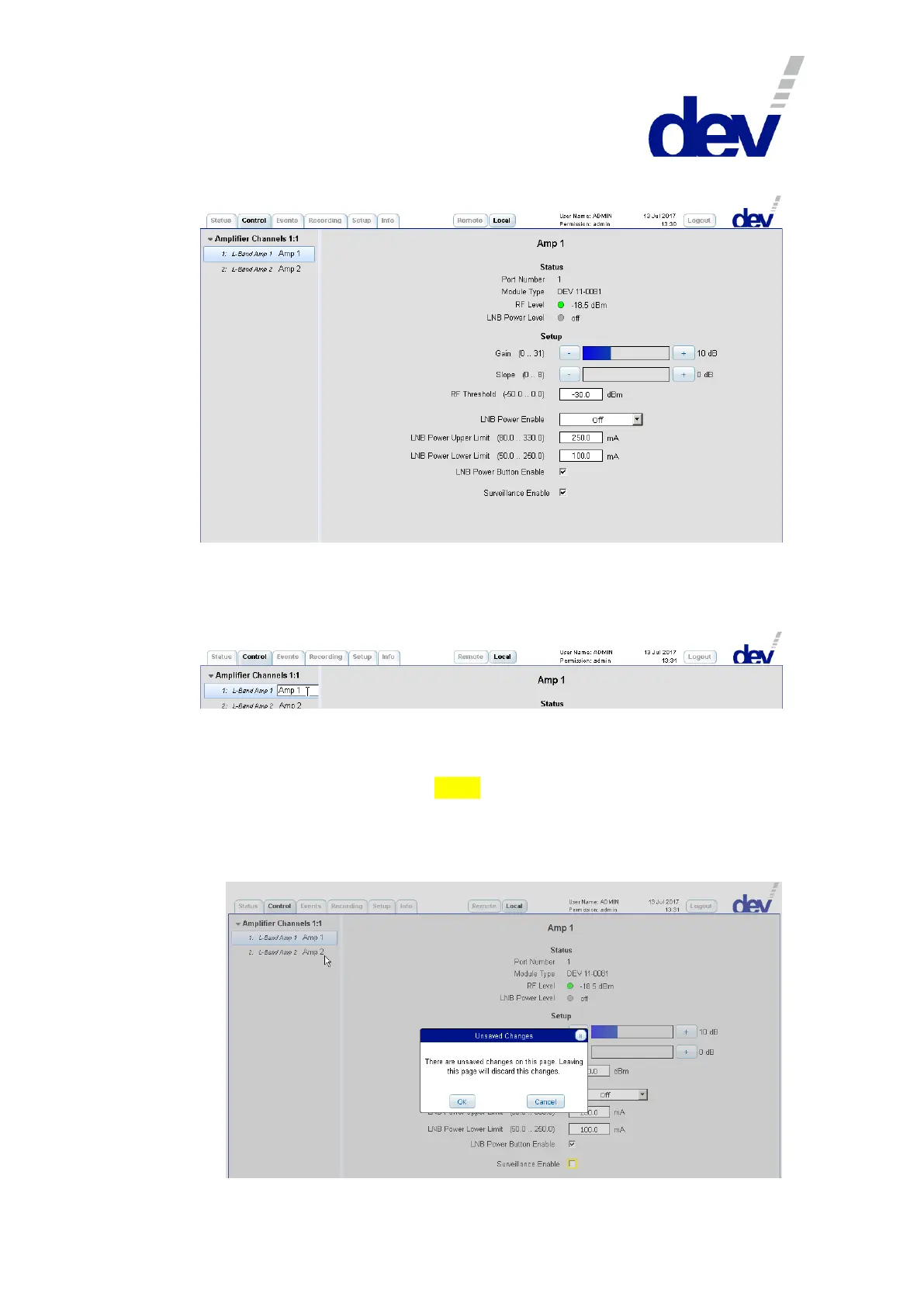
The main purpose of the Control Tab is the change of amplifier specific settings.
On the left side, the "Amplifier Channels 1:1" functionality item contains two entries in
order to select a specific amplifier (panel) of the device. The names ("Amp X") are the
descriptive designators, which can be edited by double-clicking the specific item:
Note:
If changes of settings (which are to be saved explicitly) are applied in a panel of
the Control Tab (or within an entry of the Setup Tab, please refer to chapter
5.4.7), they are highlighted in yellow. If a different panel within the Control Tab
(or if a different entry within the Setup Tab) is selected without saving the
change(s) in the current panel or entry, a corresponding warning message pops
up. The next screenshot shows this situation for selecting the "Amp 2" panel
after deactivating the "Surveillance Enable" check box in the "Amp 1" panel:



 To Next Page