User Manual DEV 2194
34 Copyright DEV Systemtechnik GmbH 2013-2017
5.4.7.4 Software Service
The Software Service menu item on the left side of the Setup Tab provides access
for users with "admin" permission to the Restore Factory Defaults entry, to the
Data Backup entry, and to the Firmware Update entry.
5.4.7.4.1 Restore Factory Defaults
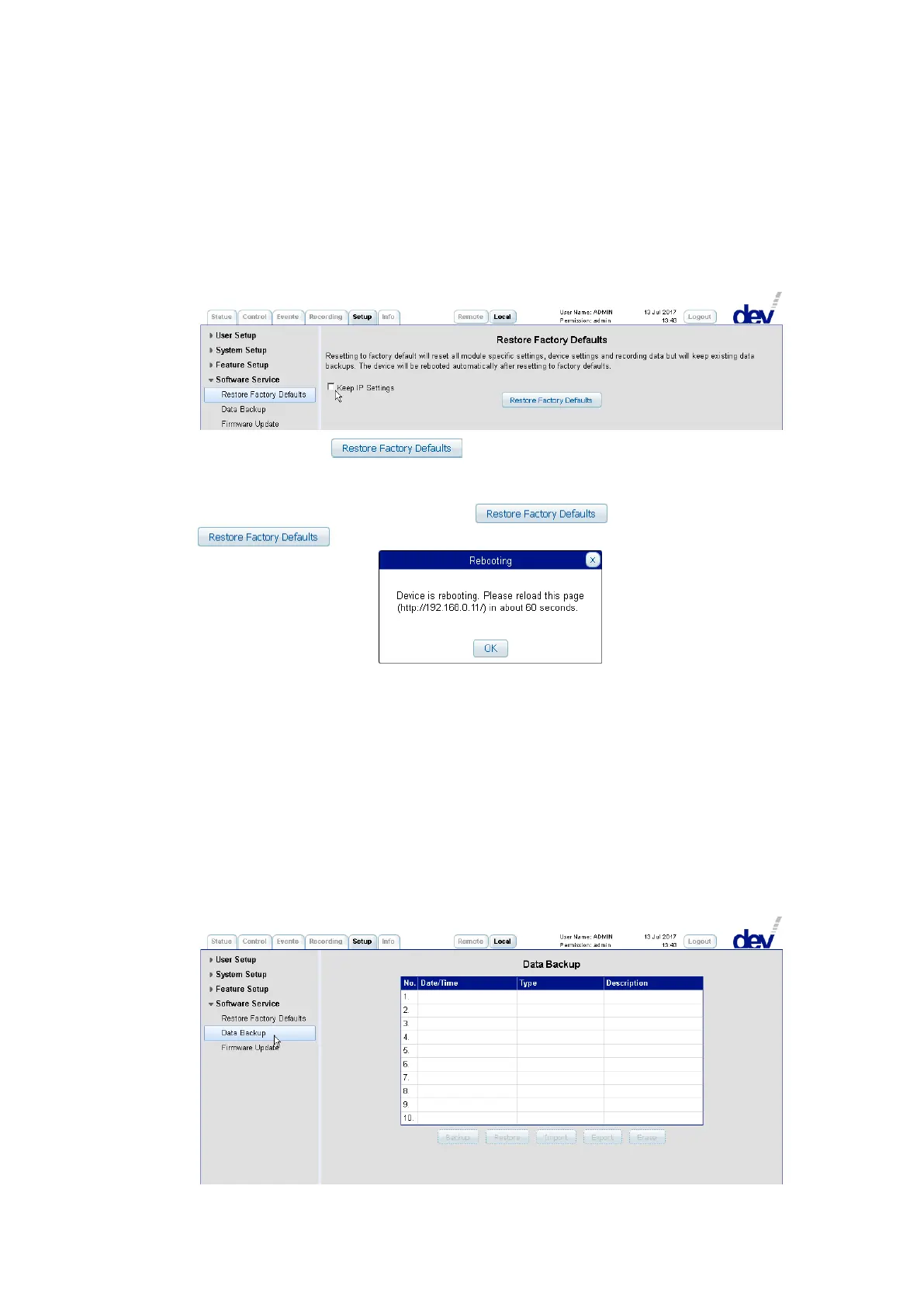
With a click on the button, the settings of the device are reset
to the factory values as described in chapter 4.3 including all changes on the
Web Interface. To maintain the network setup of the device, activate the check box
"Keep IP Settings" before operating the button. After a click on
, a device reset is initiated indicated via a pop up window, e.g.:
Note:
Any data stored via the data backup functionality is not deleted, please refer to
chapter 5.4.7.4.2.
Recorded data (chapter 5.4.6) is deleted only if a different recording interval is
applied than the recording interval default setting (chapter 5.4.7.3.1).
5.4.7.4.2 Data Backup
The data backup functionality provides means to manage various device data.
It is recommended to perform external backups of the device configuration data
("Module Data" and "Device Data", see below) periodically.
The data backup functionality shows up with a table providing ten lines ("slots")
and with five buttons below the table which are grayed out initially.



 To Next Page