Application settings ([COPY FUNCTION])
5
5-12 ineo 164
5.3
5.3.5 [BOOK SEPARATION]
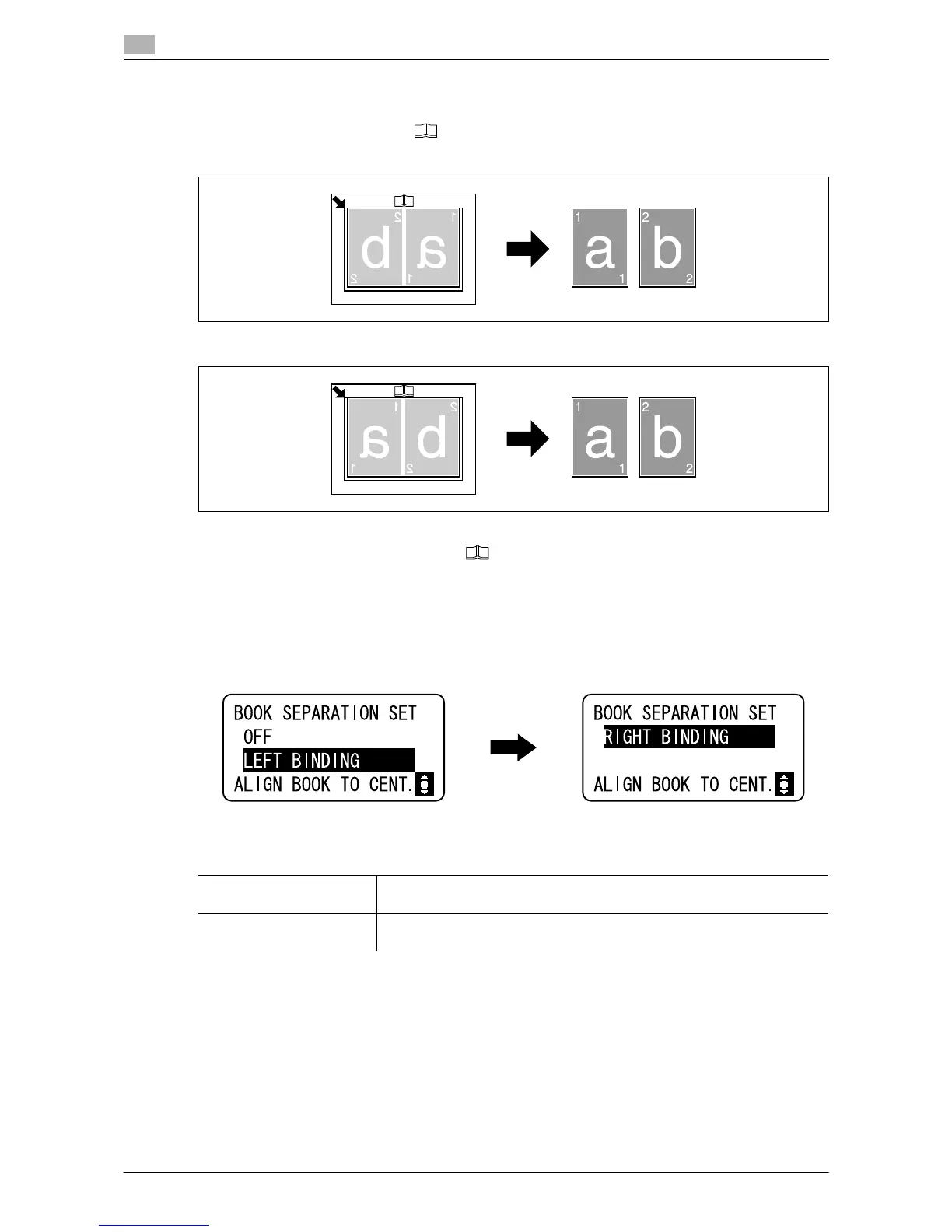
A double-page spread original such as a book or magazine is copied onto two separate pages, the image of
the original being divided about the mark on the Original Scale.
[LEFT BINDING]
[RIGHT BINDING]
0 Place the original so that its upper side faces the back side of the machine.
0 Align the center of the original with the mark on the Original Scale.
0 Place the original with the w orientation and load paper with the v orientation.
0 Load paper that is half the size of the original.
0 The length of the paper that can be loaded should not exceed 216 mm (8-1/2inches).
% Press the Menu/Select key ö [COPY FUNCTION] ö [BOOK SEPARATION].
Settings
[LEFT BINDING] Select this option if the original is bound on the left.
The left-hand page of the double-page spread original is copied first.
[RIGHT BINDING] Select this option if the original is bound on the right.
The right-hand page of the double-page spread original is copied first.











 To Next Page