Printer driver settings
7
7-8 ineo 164
7.2
7.2.5 [Watermark] tab
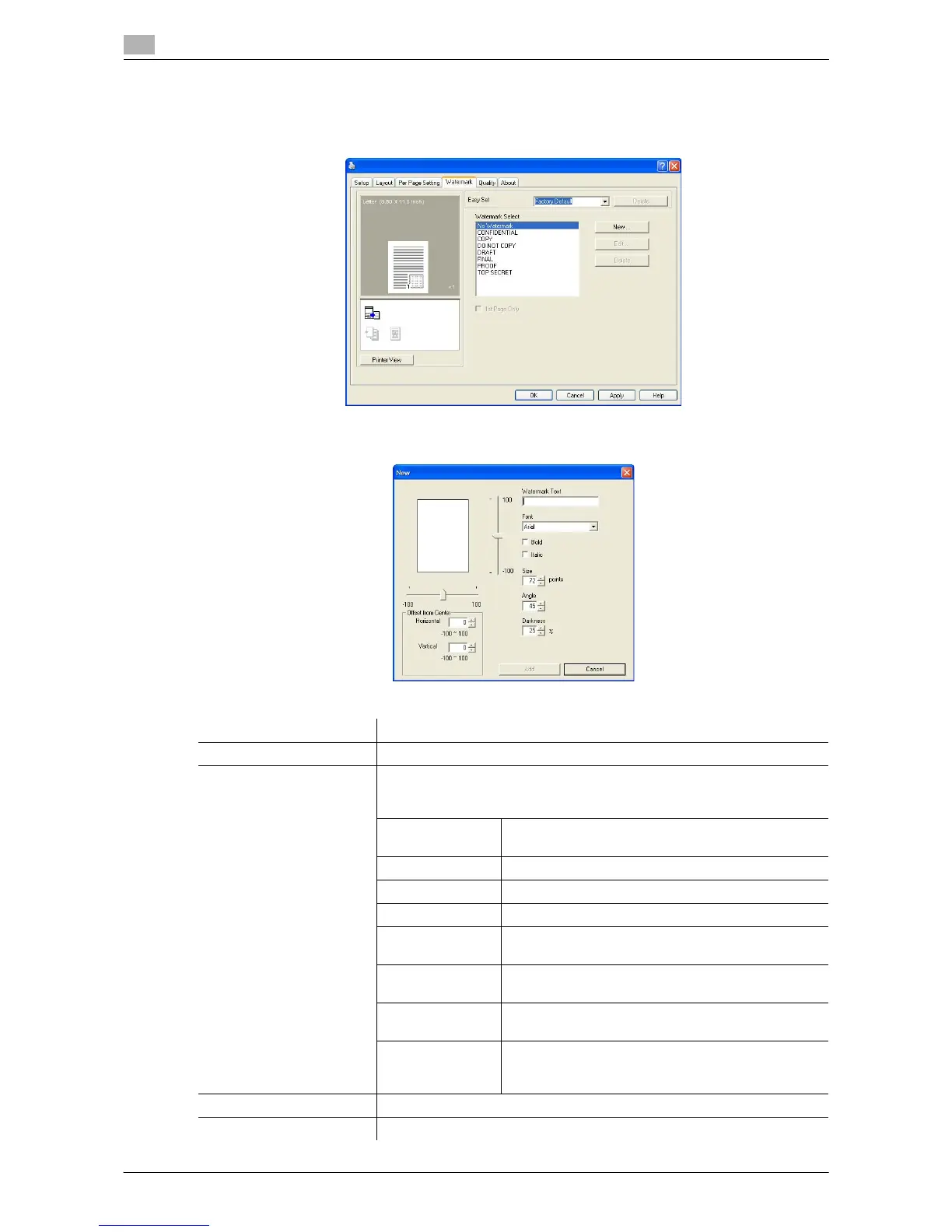
Print the document with a watermark (character stamp) overlapped.
Function name Description
[Watermark Select] Select the watermark to be printed.
[New...]/[Edit...] A new watermark can be registered. A registered watermark can also be
edited or its settings changed.
Up to 32 watermarks can be registered (including [No Watermark]).
[Watermark Text] Enter the text to be printed as the watermark.
You can enter up to 20 characters.
[Font] Select the font.
[Bold] Select to use bold text.
[Italic] Select to use italic text.
[Size] Specify the size.
A setting between 7 and 300 points can be specified.
[Angle] Specify the angle that the text is printed on the paper.
A setting between 0° and 359° can be specified.
[Darkness] Specify the density of the text.
A setting between 10% and 100% can be specified.
[Offset from Cent-
er]
Select the vertical and lateral positions.
You can specify the positions using the scroll bars
provided on the right of and under the image.
[Delete] Click this button to delete the selected watermark.
[1st Page Only] Select this check box to print the watermark only on the first page.











 To Next Page