OPERATOR’S MANUAL
GAC® 2100 Grain Analysis Computer (Blue, Gray, Agri Models)
11001-1688-201609
NAVIGATION 15
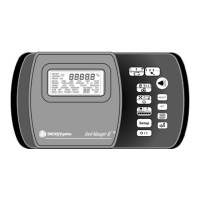
PRINT KEY
Initiates a printout of current information on the screen (e.g., grain moisture
analysis, calibrations data, etc.). If the automatic printout option is selected,
the Print key initiates duplicate copies. Help information does not print.
COM SETUP options allows the Print key to transmit to either the printer
port or the communications/modem port. For example, the system may be
configured to automatically print results through the printer port while the
Print key transfers results to the computer port.
UNLOAD KEY
Dumps the contents from the test cell after a grain test.
LEFT AND RIGHT KEYS
Moves the cursor horizontally during alpha entries and certain functions
during the SETUP mode.
UP AND DOWN KEYS
Moves the cursor vertically during alpha entries and certain functions in the
SETUP mode.
MENU SCREENS
The Main menu displays once the start-up checks are successfully
completed. The Main menu is the “home” screen that all other screens are
accessed. The Main menu displays five major selections or categories.
A number appears next to each Main menu selection. Select the desired
number to access the appropriate menu. Refer to (Figure 11) for a general
configuration of the Menu Tree layout.
Figure 10
Main Menu Selections
MAIN MENU
1: MEASURE MOISTURE 3: CALIBRATION MENU
2: SELECT GRAIN 4: SETUP MENU
5: TESTS MENU
SELECT ITEM NUMBER (NEXT PAGE: STATUS)
STATUS
CYCLE COUNTER: 435
THIS COUNTER INCREMENTS AFTER EACH
SAMPLE MEASUREMENT OR DATA COLLECTION
SEQUENCE IS SUCCESSFULLY COMPLETED


 To Next Page
 Loading...