CT100 inverter Detailed instructions of function parameters
113
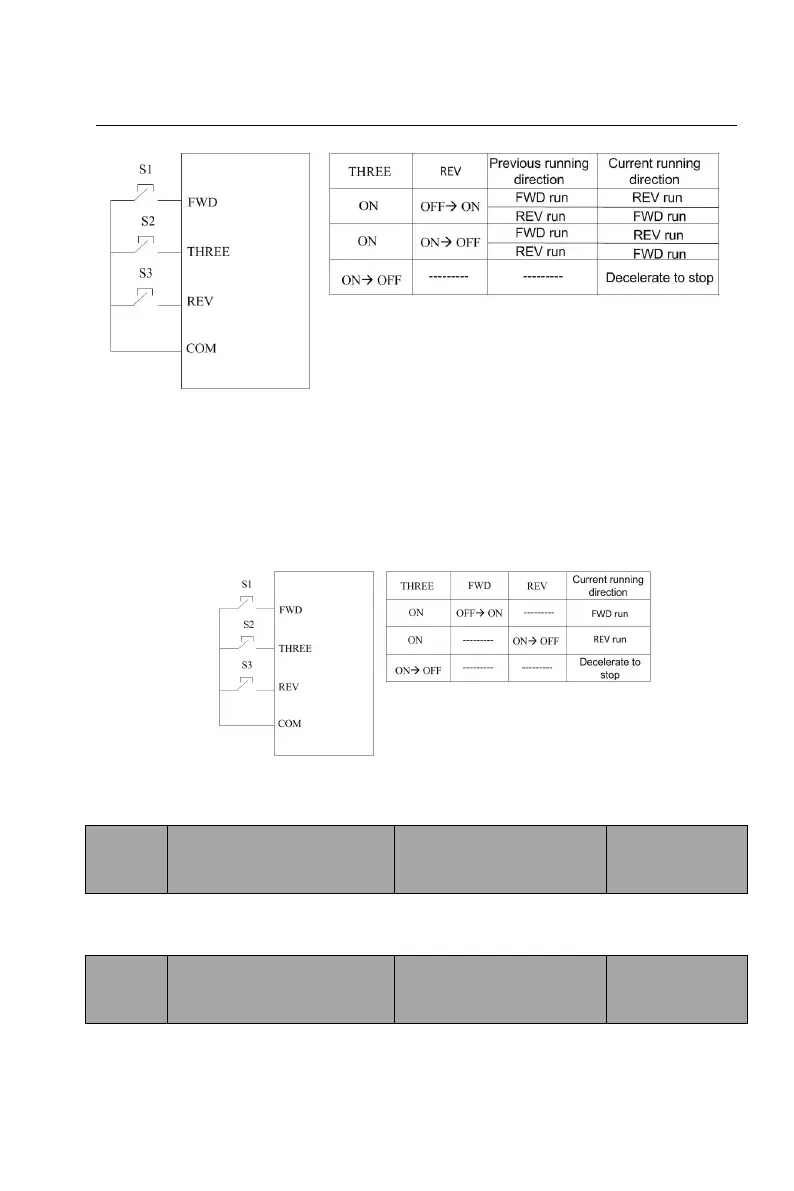
Figure 6-9 three-wire control 1
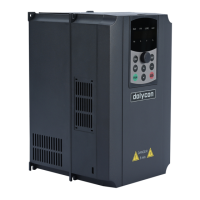
3: three-wire control mode 2
This mode defines the three-wire running terminal (THREE) as the enabling
terminal. The running command will be generated by FWD and REV, and both
control the running direction at the same time. When THREE switches off, the
system will stop.
Figure 6-10 three-wire control 2
Note: S1: FWD running switch S2: stop button S3: REV running switch
Adjust step length of
terminal UP/DOWN
frequency
Setting range:
0.0150.00Hz/s
Use the terminal UP/DOWN to adjust the set frequency, frequency change speed,
that is, the amount of frequency change per second.
Adjust control of keypad
and terminal UP/DOWN
frequency
0: valid, hold on after power off; when the inverter stops, UP/DOWN settings are
saved; after power on again, UP/DOWN settings and the current frequency are


 To Next Page