D439E Service Manual 5. Service Tool
260
DTC Analysis
In DTC Analysis, it shows detected DTC and provides related information. After item repaired related DTC can
be erased in this function.
There are 3 methods to move to DTC Analysis.
• On the main screen, select the
.
→ Move to DTC Analysis of main diagnosis system (
marked in “Selected” zone).
• On “Fault Code Searching” screen, select the
.
→ Move to the DTC Analysis of selected DTC.
• Select the DTC among the menu of
button on “Data Analysis” screen.
→ Dual mode is supported that DTC Analysis and Data Analysis can be shown on the display at one time.
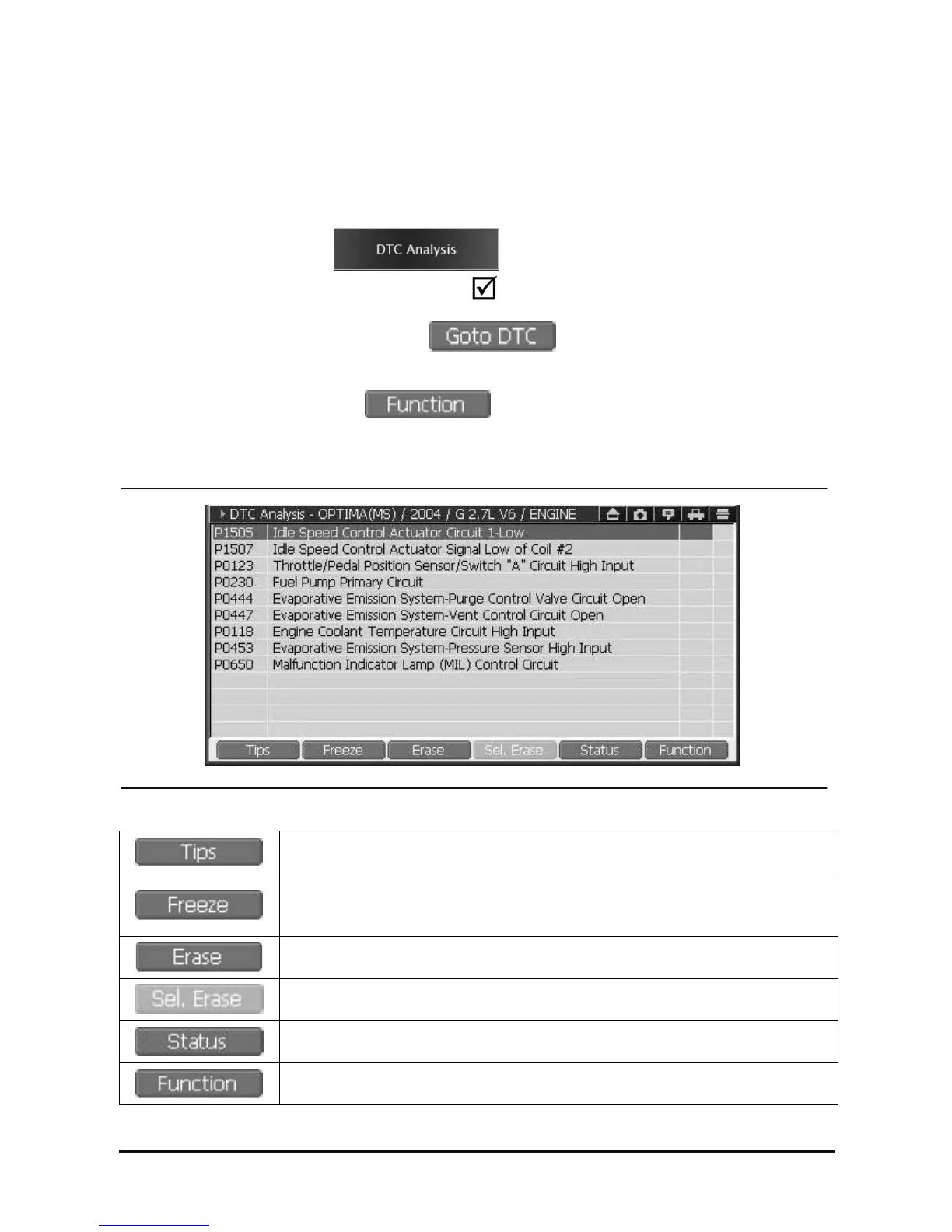
Introduction of DTC Analysis screen
<Figure 1: DTC Analysis Screen>
General Description for fault code
Freeze Frame function, shows the current data of the control module at the time of
DTC Detected
* Availability of this function is subject to control module.
Erase all fault codes saved in the control module
Erase the fault code selectively among the fault codes.
*Availability of this function is subject to control module
Shows detailed information for DTC.
* Availability of this function is subject to control module
Dual mode and other supplementary function available.



 To Next Page
 Loading...