90
7. Adjustment of reference points of respective axes and manual TCP adjustment
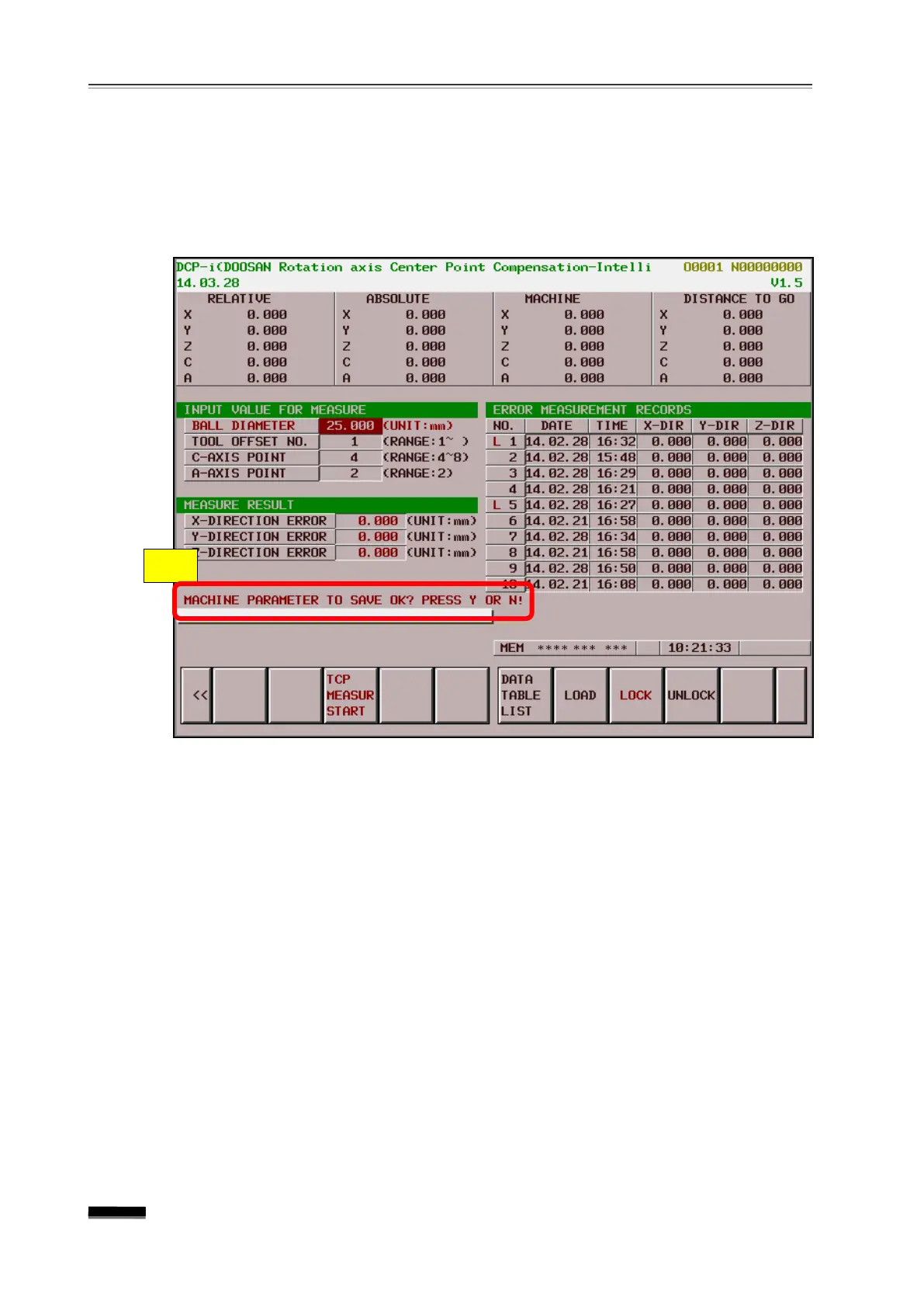
③ After completion of the measurement, the message “
OK? Y OR N!” appears in the figure area (
D
) below. Upon entering
Y
and
pressing the [INPUT] key, the error value is automatically compensated and the
parameter is entered.
▪ If "Y" or "N" is not entered, the screen cannot be switched.
6) Save, Loading and Maintenance function of the measurement data
① The value stored in [DATA TABLE LIST] is automatically saved when "Y" is entered
upon completing the measurement. ( “E” )
② Press the [DATA TABLE LIST] soft key to move the cursor to the data table list. ( “F”
③ The cursor can be moved to the desired data row, and by pressing the [LOAD] soft
key it is possible to enter the stored parameter value using the "Y" or "N" keys. (If
"Y" or "N” key is not entered, the screen cannot be switched) ( “G ” )
④ If you want to memorize the desired data value, press the [LOCK] soft key to
memorize it, and the data value that has been locked is displayed as "L". ( “H ” )
⑤ If you want to erase the memorized data value, you can cancel it by pressing the
[UNLOCK] soft key, whereupon the "L" will disappear. ( “I ” )
“
”


 To Next Page