86
7. Adjustment of reference points of respective axes and manual TCP adjustment
7.5 DCP-i compensation
What is DCP-i compensation?
When applied to 5-Axis machining tools, this function makes it possible for the
workpiece and tool tip positions to remain unchanged regardless of whether the rotation
axis is rotating or not. It uses a touch probe and a mast ball to automatically measure
the measurement and compensation and to minimize geometric errors.
▪ DCP-i : DOOSAN Rotation Axis Center Point Compensation-Inteli
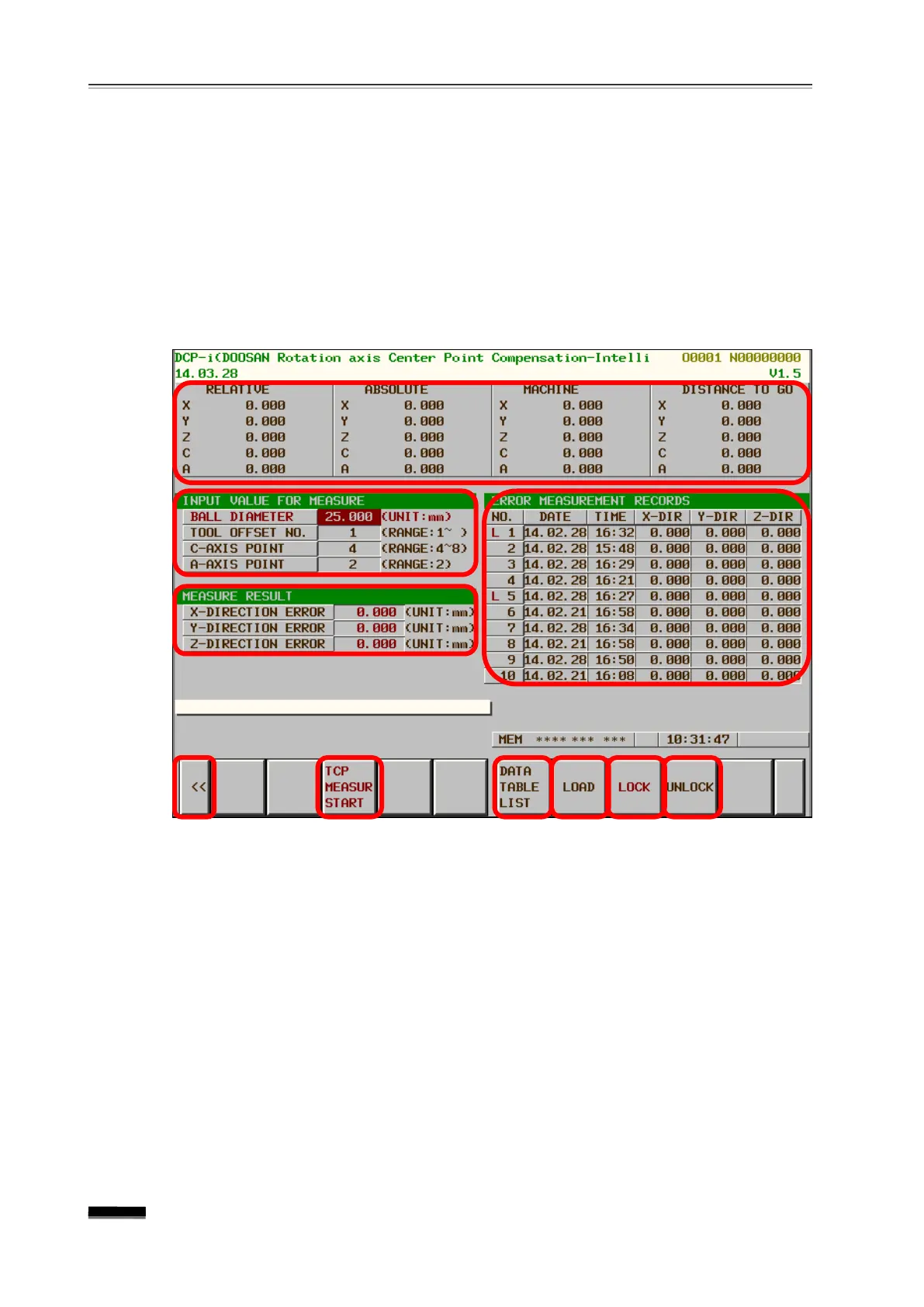
-i Main Screen
① Indicates the relative coordinate system, absolute coordinate system, machine
coordinate system, and moving distance when measuring.
②
The ball radius before measurement, the
touch probe tool number, and the number of
measurements on the C axis / B axis within the range shown on the right can be set.
③ After taking the measurement, the results of any X / Y / Z axis measurement errors
displayed.
④ In the case of Parameter Save “Y ”
for the measured error value, automatically saved
in Data Table. (In the case of (“N”), not saved.)
⑤ Soft key for returning to the Package Software Main Screen.
⑥ Soft key for starting the TCP measurement.
⑦ The cursor can be moved to the stored Data Table on the right.


 To Next Page