Troubleshooting Technical Manual
70 HAC Standard fixing - 02/2018dormakaba c-lever pro
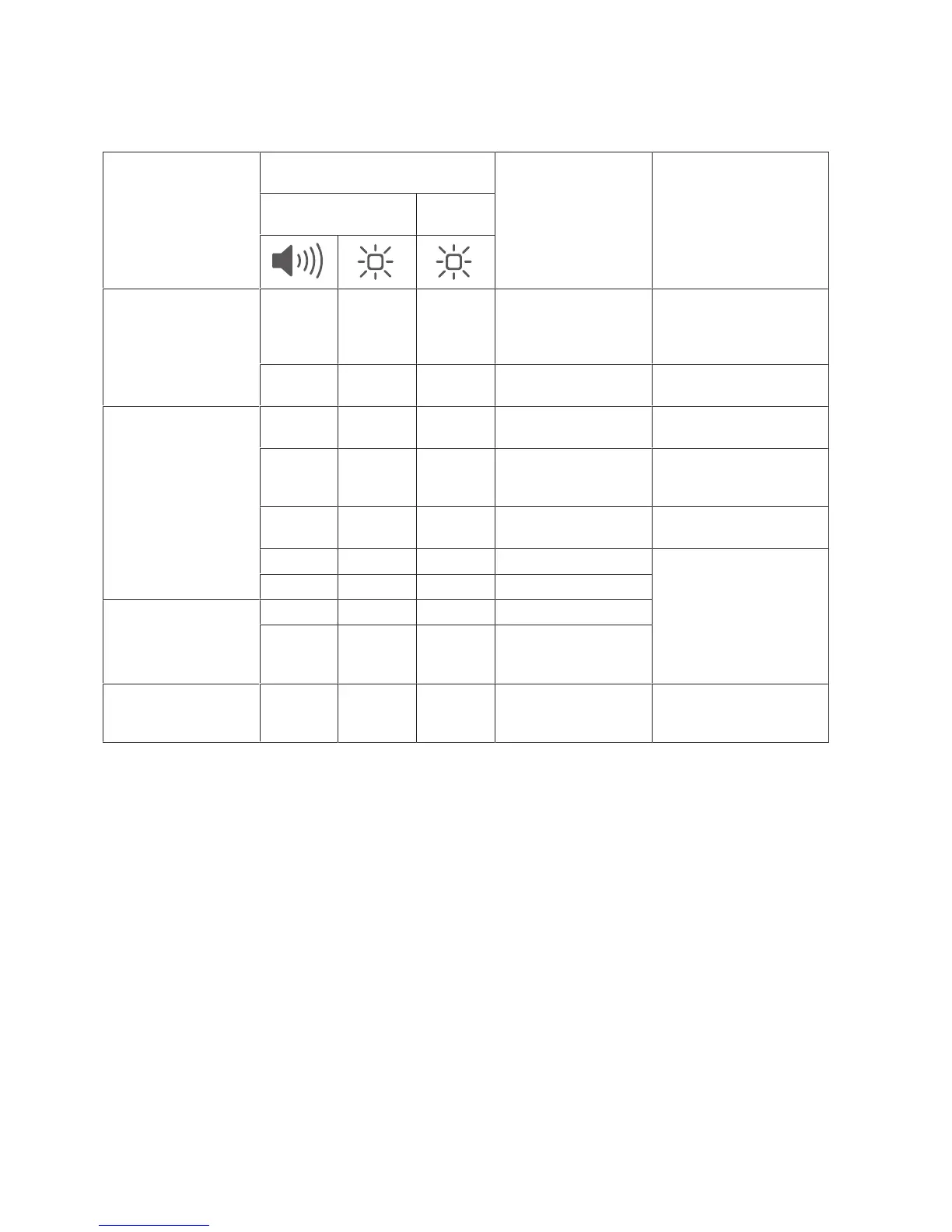
9.2 TouchGo applications error analysis
9.2.1 Operation error analysis
Symptoms Signalling Possible causes Measures
Device Medium
Door slow to open 1 x very
long
9 x very
short red
1 x green
(open)
- Battery in the device
is ‘low’
Replace battery
3 x long
then
1 x green
(open)
2 x red
every 10 s
Battery in the medium
is ‘low’
Replace battery
Door cannot be
opened with a me-
dium
4 x short 4 x red - Medium not pro-
grammed
Program medium
1 x very
long
- - Battery in the device
is ‘empty’
Use the emergency open-
ing and replace the
device’s battery
- - - Medium or device bat-
tery completely empty
Replace medium and/or
device battery
8 x short 8 x red - Faulty device/coupling Operating the device
again
If the fault recurs, call a
qualified technician and
use the emergency open-
ing.
1 x short 1 x green - Device faulty
Door is always open.
The lever handle on
the outside is perman-
ently engaged.
- - - Device faulty
- - - Device is in Office or
Pass Mode, fault in
device
The lever handle on
the outside engages
accidentally
1 x short 1 x green - Device detects an au-
thorised user medium
Increase distance
between user medium
and device



 To Next Page