A
A
-
-
2
2
H
H
o
o
w
w
t
t
o
o
u
u
s
s
e
e
L
L
a
a
n
n
d
d
i
i
n
n
g
g
P
P
a
a
g
g
e
e
F
F
e
e
a
a
t
t
u
u
r
r
e
e
Landing Page is a special feature configured under User Management. It can specify the
message, content to be seen or specify which website to be accessed into when users try to
access into the Internet by passing the authentication. Here, we take Vigor2926 series router
as an example.
E
E
x
x
a
a
m
m
p
p
l
l
e
e
1
1
:
:
U
U
s
s
e
e
r
r
s
s
c
c
a
a
n
n
s
s
e
e
e
e
t
t
h
h
e
e
m
m
e
e
s
s
s
s
a
a
g
g
e
e
f
f
o
o
r
r
l
l
a
a
n
n
d
d
i
i
n
n
g
g
p
p
a
a
g
g
e
e
a
a
f
f
t
t
e
e
r
r
l
l
o
o
g
g
g
g
i
i
n
n
g
g
i
i
n
n
t
t
o
o
I
I
n
n
t
t
e
e
r
r
n
n
e
e
t
t
s
s
u
u
c
c
c
c
e
e
s
s
s
s
f
f
u
u
l
l
l
l
y
y
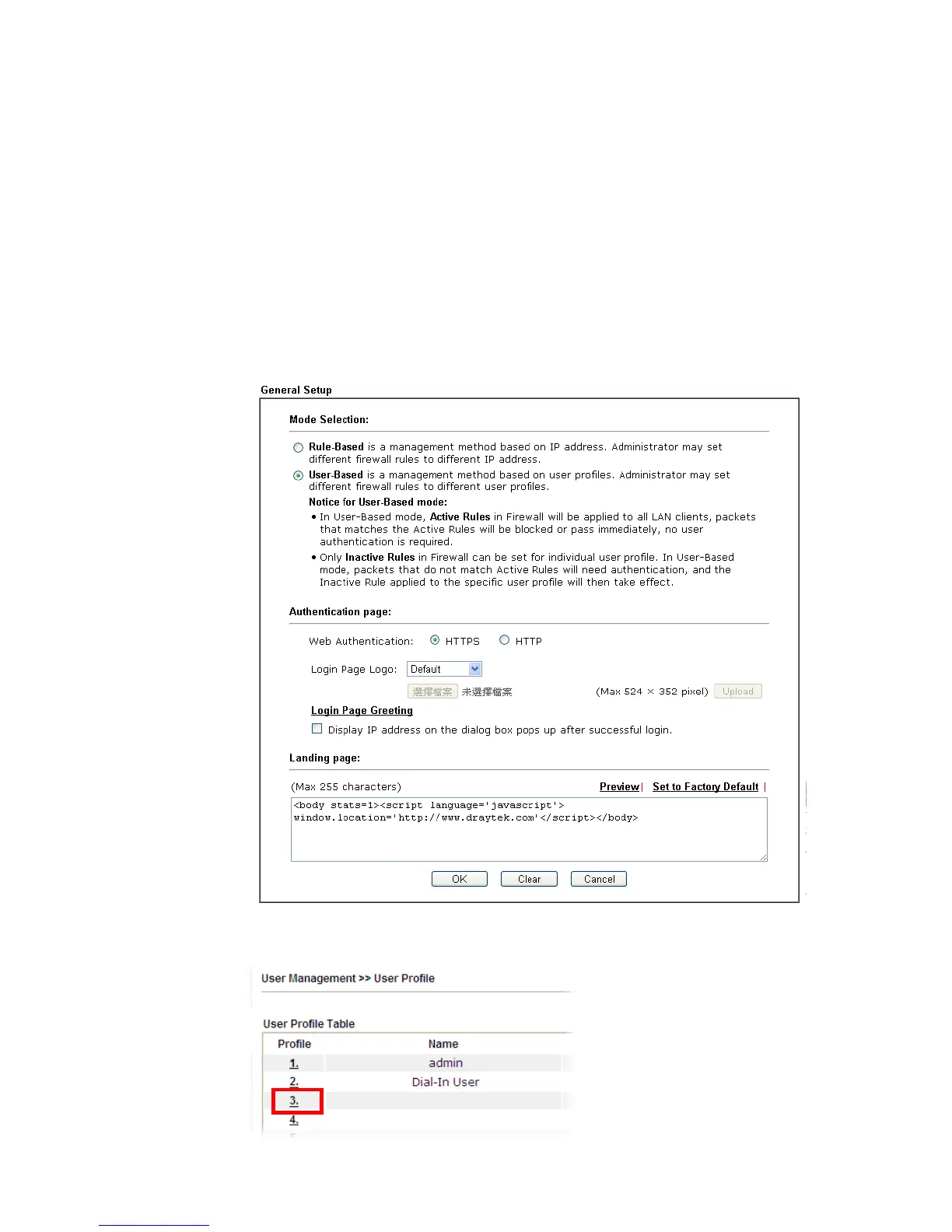
1. Open the web user interface of Vigor2926.
2. Open User Management -> General Setup to get the following page. In the field of
Landing Page, please type the words of “Login Success”. Please note that the
maximum number of characters to be typed here is 255.
3. Now you can enable the Landing Page function. Open User Management -> User Profile
and click one of the index number (e.g., index number 3) links.














 To Next Page