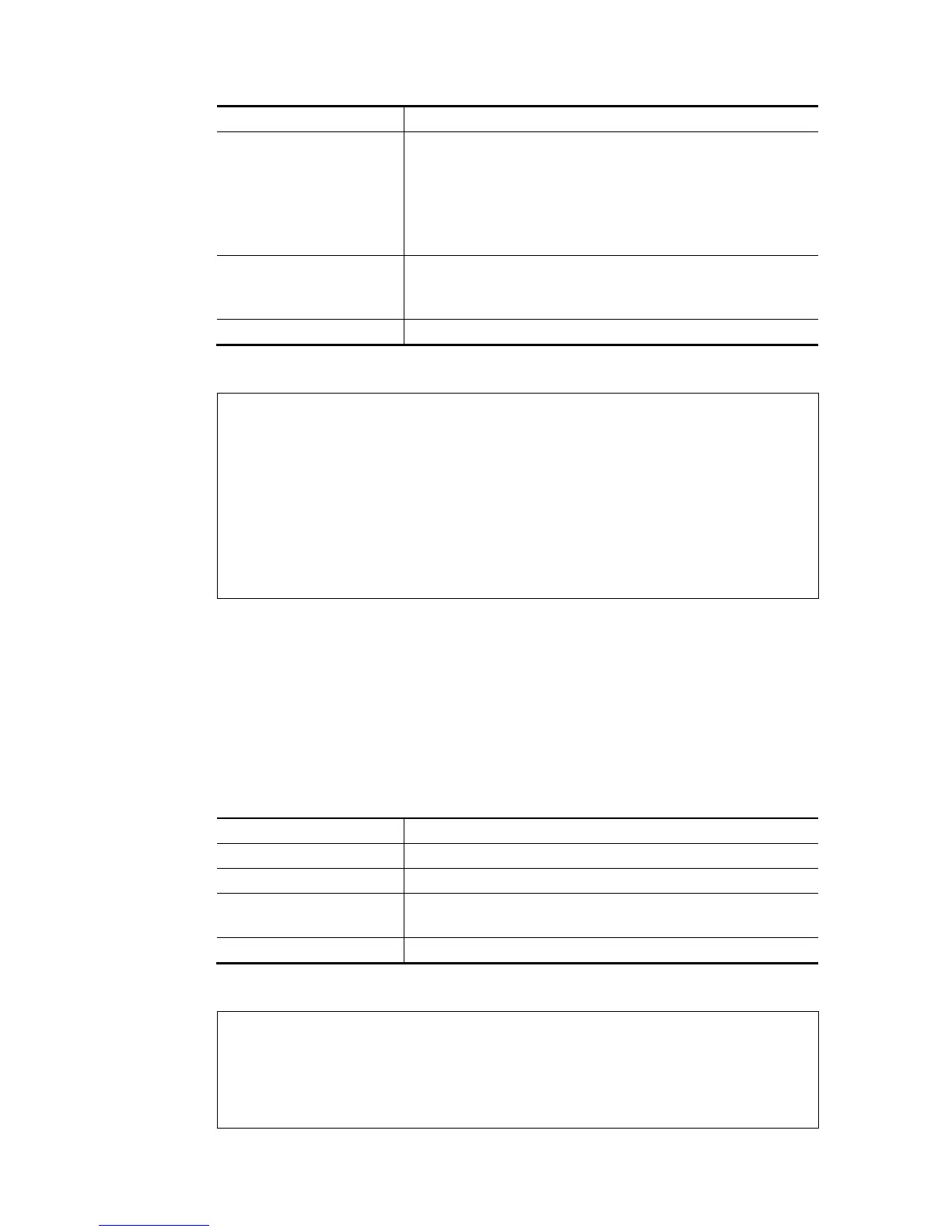
Parameter Description
channel # There are 4 (?) channels including VLAN and PVC.
Available settings are:
1=Channel 1
3=Channel 3
4=Channel 4
5=Channel 5
WAN interface # Type a number to indicate the WAN interface.
1=WAN1
2=WAN2
status It means to display current bridge status.
E
E
x
x
a
a
m
m
p
p
l
l
e
e
> wan multifno 5 1
% Configured channel 5 uplink to WAN1
> wan multifno status
> wan multifno status
% Channel 5 uplink ifno: 3
% Channel 6 uplink ifno: 3
% Channel 7 uplink ifno: 3
% Channel 8 uplink ifno: 3
% Channel 9 uplink ifno: 3
>
T
T
e
e
l
l
n
n
e
e
t
t
C
C
o
o
m
m
m
m
a
a
n
n
d
d
:
:
w
w
a
a
n
n
v
v
l
l
a
a
n
n
This command allows you to configure the VLAN tag of WAN1 or WAN2.
S
S
y
y
n
n
t
t
a
a
x
x
wan vlan wan [#] tag [value]
wan vlan wan [#] [enable/disable]
wan vlan stat
S
S
y
y
n
n
t
t
a
a
x
x
D
D
e
e
s
s
c
c
r
r
i
i
p
p
t
t
i
i
o
o
n
n
Parameter Description
wan [#] Specify which WAN interface will be tagged.
tag [value] Type a number for tagging on WAN interface.
enable/disable Enable: Specified WAN interface will be tagged.
Disable: Disable the function of tagging on WAN interface.
stat Display current VLAN status.
E
E
x
x
a
a
m
m
p
p
l
l
e
e
> wan vlan stat
% Interface Pri Tag Enabled
% ======================================
% WAN1 (ADSL) 0 0
% WAN1 (VDSL) 0 0
% WAN2 0 0














 To Next Page