96
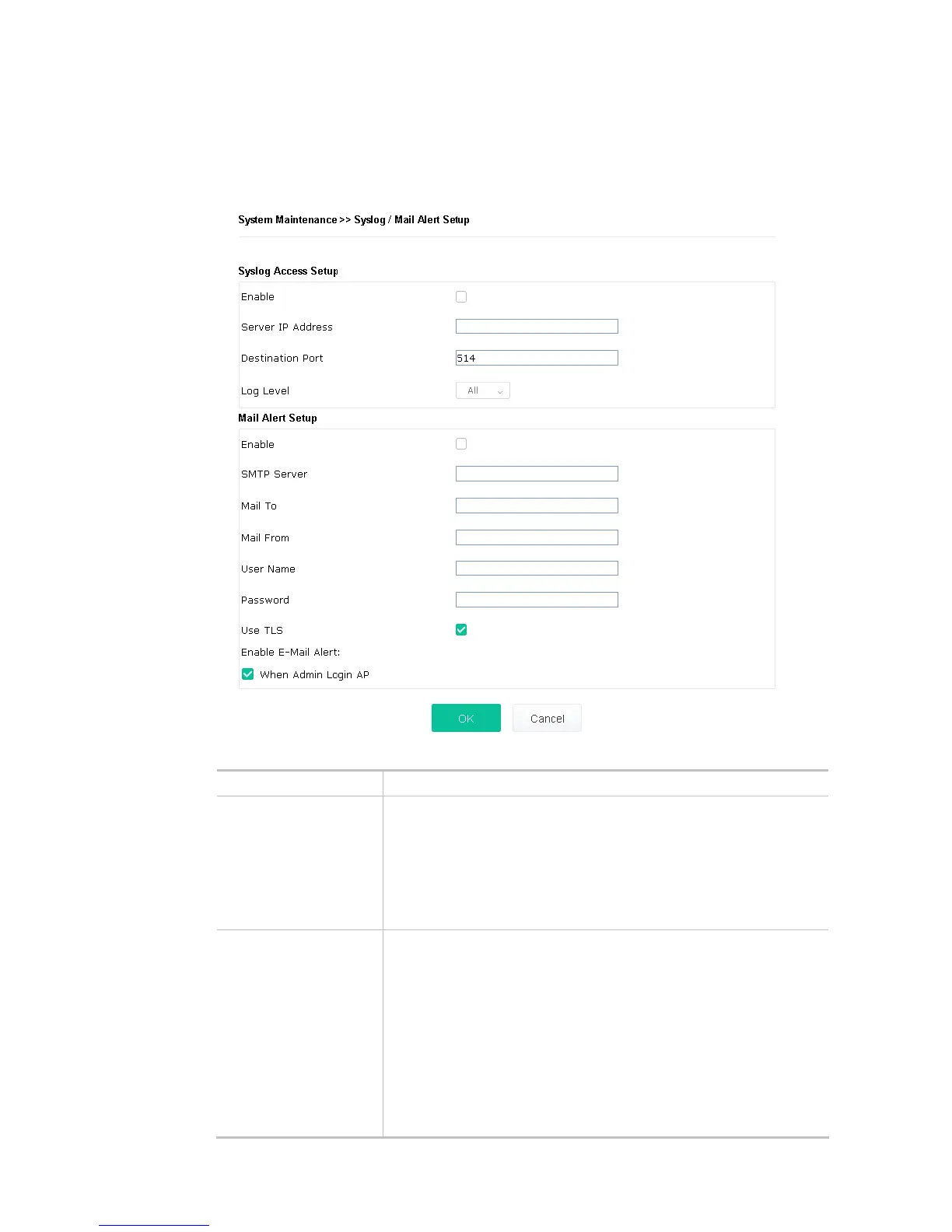
III-1-6 Syslog/Mail Alert
SysLog function is provided for users to monitor AP. There is no bother to directly get into the Web user
interface of the AP or borrow debug equipments.
Available settings are explained as follows:
Item Description
Syslog Access Setup Enable - Check Enable to activate function of Syslog.
Server IP Address -The IP address of the Syslog server.
Destination Port -Assign a port for the Syslog protocol. The default
setting is 514.
Log Level - Specify which level of the severity of the event will be
recorded by Syslog.
Mail Alert Setup Enable - Check Enable to activate function of mail alert.
SMTP Server - The IP address of the SMTP server.
Mail To - Assign a mail address for sending mails out.
Mail From - Assign a path for receiving the mail from outside.
User Name - Type the user name for authentication.
Password - Type the password for authentication.
Use TLS – Check this box to encrypt alert mail. However, if the SMTP
server specified here does not support TLS protocol, the alert mail with
encrypted data will not be received by the receiver.













 To Next Page