UPR700 Microprocessor-Based Pressure/Process Indicator 23
display will show a reading near zero, and the lower display will show the current temperature or
PEAK if the unit does not have secondary input. It may display OPEN if there is no transducer
connected, or if the transducer is amplified.
The keys on the UPR700 must be pressed and released to move about in the configure screens. Do
not press and hold a key unless told to do so; simply press the key and release it to advance to the
next screen. The arrow keys ( or ( may be held down to advance rapidly through the values.
7.3 KEYBOARD DESCRIPTION
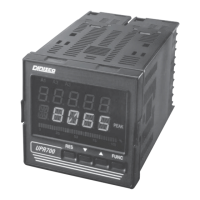
The keyboard is composed of four push buttons, covered by a silicone protective operator, labeled
▼, ▲, FUNC and RESET.
The ▼ is called the “Down Arrow Key”, and is used to increment and decrement the parameter
value.
The ▲ is called the “Up Arrow Key”, and is used to increment and decrement the parameter value. It
also may be used to switch the lower display from the secondary input (if available) to the peak
value (if enabled) and back again. At power up, the lower display shows the secondary input value
(if present) or it shows the peak value. If there is no secondary input and the peak value is disabled,
the lower display is blank.
The FUNC (“function”) key is used to access the parameter to view and modify.
The RESET key is used to reset the stored peak value and to reset the alarms when held for 1
second, (once the alarm condition has cleared beyond the hysteresis value). This function is disabled
when the device is controlled by the serial link. In addition, when checking or changing parameters,
it is used to return to the normal display mode without storing the parameter change.
Pressing ▲ then RESET together, or ▼ then RESET together, may be used to jump to maximum or
minimum parameter values when the instrument is in function mode.
At power up, if the instrument detects a parameter error, the upper display shows
ERR #
, (where
#
is
the error number), and the lower display will show the parameter name. If the wrong parameter is a
run-time parameter (i.e.
AL 1
to
SO.TYP
) pressing the ▲ then ▼ together will cause the instrument
to load the default values for all parameters.
If the wrong parameter is a calibration or code parameter, pressing the FUNC then RESET keys
together, enables the instrument to access the run-time parameters. This function is intended only to
restore a misplaced parameter’s value; however, the performance of the instrument is not
guaranteed. The user is advised to check the stated parameter.
NOTE: All the actions explained above that require two or more pushbuttons, must follow the
pushbutton sequence exactly.


 To Next Page