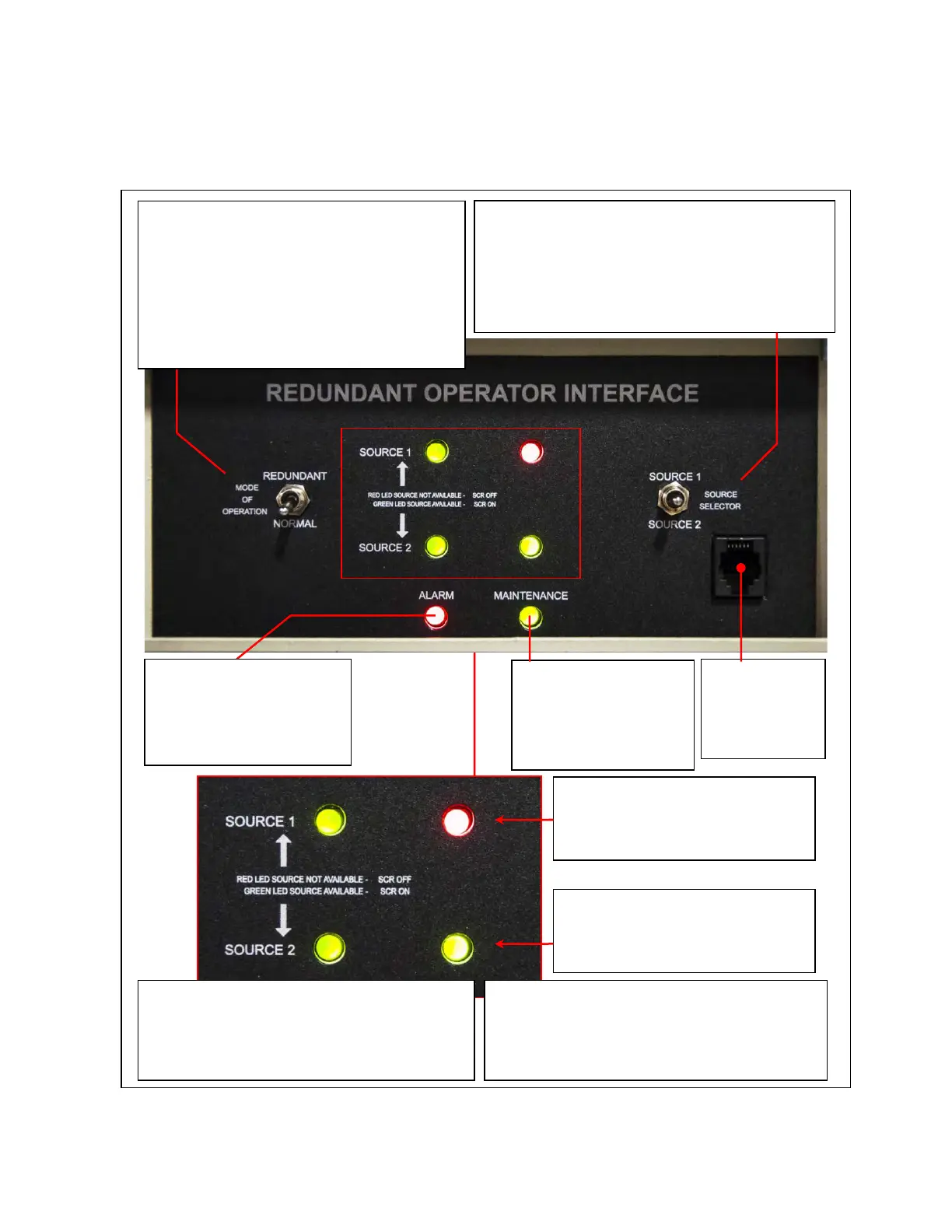
Service Port
(For use by
service
personnel only)
Right-side LEDs show which source is
powering the output load
Green = powering the load (SCR on)
Red = not powering the load (SCR off)
Left-side LEDs show the availability of each
source:
Green = Source is available (within
specification).
Red = Source is not available.
Source 1 is available but is not
currently powering the output
load.
Source 2 is available and is
currently powering the output
load.
SOURCE SELECTOR (Momentary Toggle Switch):
In NORMAL Mode:
Toggle SOURCE 1=Set Preferred Source to Source 1
In REDUNDANT Mode:
Toggle SOURCE 1=Transfer Load to Source 1
MAINTENANCE
Green = Maintenance
Bypass is not engaged
Red = Maintenance
Bypass is engaged.
MODE OF OPERATION (Toggle Switch):
NORMAL = Standard STS operation with normal
transfers using the selected transfer algorithm
REDUNDANT = Use ROI to transfer load; SAS
board performs transfers using its own algorithm
Leave in NORMAL except in emergencies.
ALARM
Green = No Alarms
outstanding
Red = Alarms outstanding














 To Next Page