Eaton Static Transfer Switch 2000A 3-Pole Installation and Operation Manual 164001127—Rev 01 51
99..44 SSeettttiinngg UUpp aa NNeeww UUsseerr
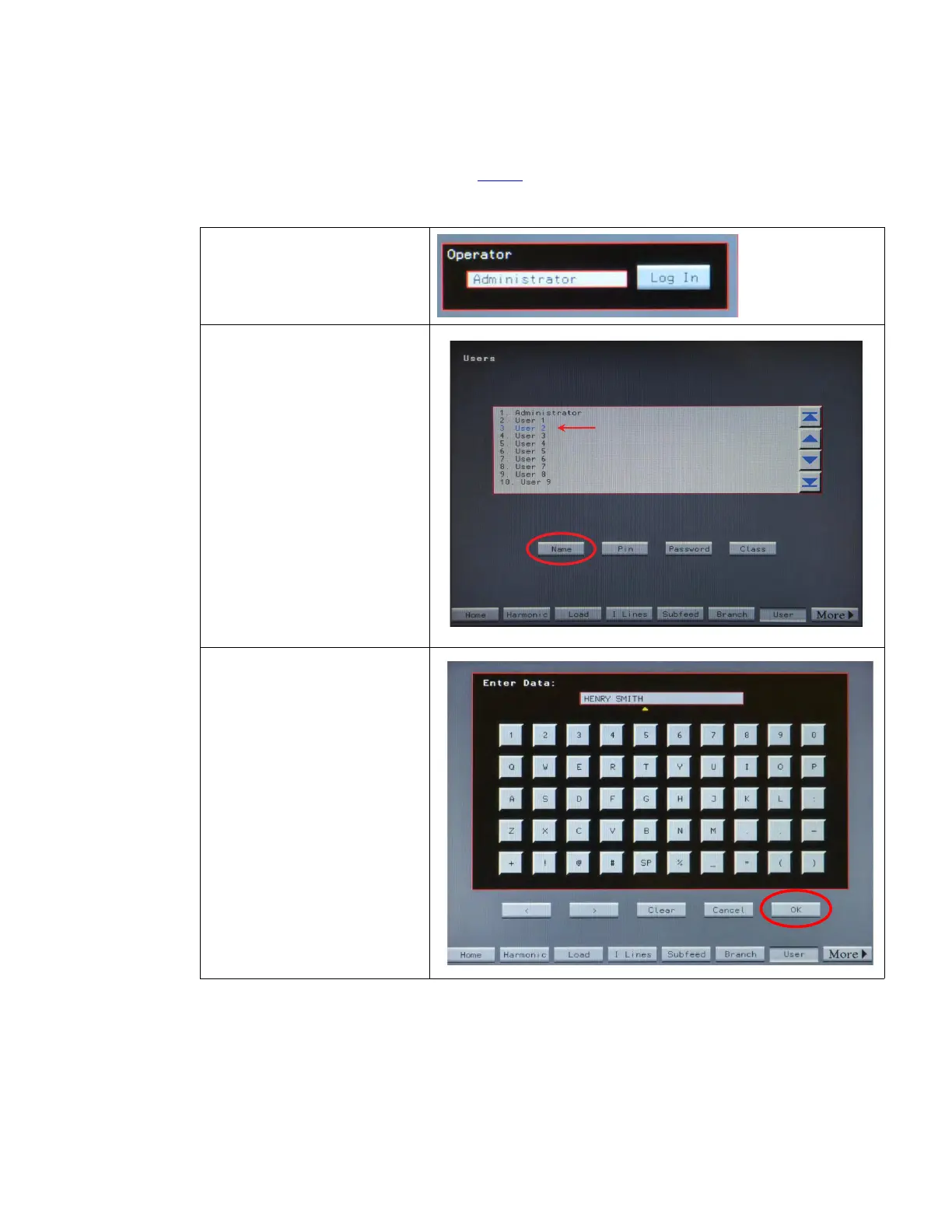
To set up a new STS user follow the steps in Table 3.
Table 3. How to Setup a New User
1. Log in on the Home screen Operator
panel with Administrator or equivalent
level privileges.
2. Touch User button (or More to see
User button) to navigate to the Users
screen.
3. Using scroll bar, scroll down to an
available user entry (in this example,
User 2). The user entry becomes
highlighted, blinking with alternating red/
blue coloring.
The entry can be an existing user, whose
access properties (such as PIN or
password) you wish to modify.
4. Touch Name to bring up the touch
screen keyboard.
5. Enter user name, such as "HENRY
SMITH".
Touch OK to enter name.
____________________
Buttons:
OK button enters data.
Use arrow keys (˂ ˃) to position cursor:
entering data overwrites text at cursor
position; it does not insert text.
Clear button clears entire entry.
Cancel button returns to Users page
without changing data.
System Setup: Administration














 To Next Page