68 Eaton Static Transfer Switch 2000A 3-Pole Installation and Operation Manual 164001127—Rev 01
1122..22..22 AAllaarrmmss SSccrreeeenn
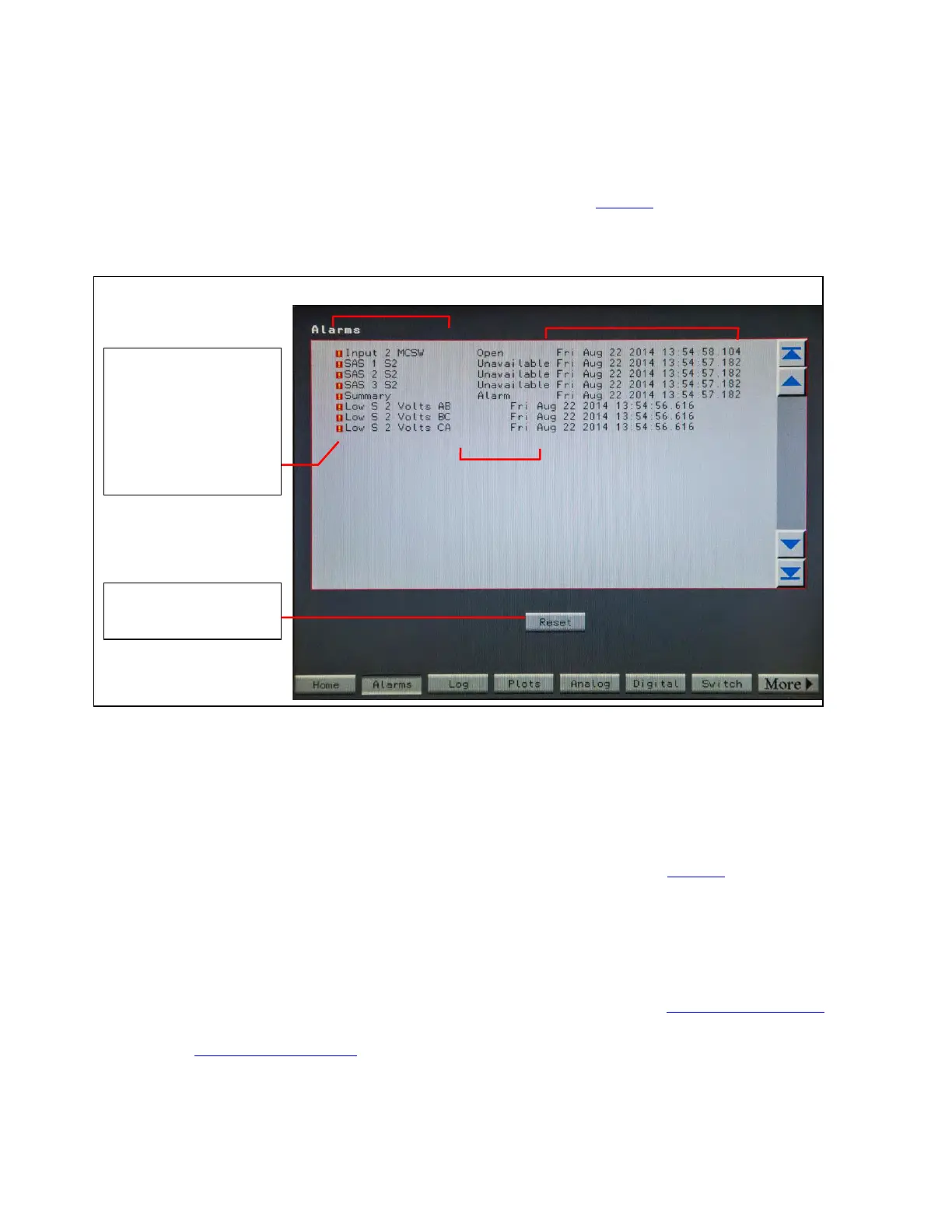
Touch Alarms button alarms on Home or other screens to display the Alarms screen.
When there are alarms indicated, view the Alarms screen at the unit (Figure 30) or in a web browser.
Figure 30. Alarms Screen
Event Date-Time Stamp Point Name
Change in point causing alarm
Reset clears all alarms
in the log
.
Dot indicator is always
red with a yellow
exclamation point for
alarms; the
corresponding point in
the digital or analog
points screen will also
show a red indicator.
The Alarms screen displays all alarms with date-time stamps and the points’ names. The point names are the
same as in the points lists.
Touching the Reset button will clear all points from the Alarms Screen. If the alarm conditions remain active in
the unit after clearing the screen, the alarms will show again.
1122..22..33 EEvveenntt LLoogg SSccrreeeenn
Touch the Log button in the navigation buttons to display the Event Log Screen (Figure 31).
Events include
• Alarms
• Outages
• User login and logout
• Changes in state for digital points (binary states) in the Digital Points list (see 16.1 Digital Screen Points).
• Crossed thresholds for analog points (measurements) in the Analog Points list (see
16.2 Analog Screen Points).
Status, Alarms, and Other Diagnostic Information














 To Next Page