Eaton Static Transfer Switch 2000A 3-Pole Installation and Operation Manual 164001127—Rev 01 59
CChhaapptteerr 1111 SSyysstteemm SSeettuupp:: NNeettwwoorrkkiinngg
The parameters for networking options are mainly found on the Settings screen. The STS has several
networking options, which can all be used simultaneously.
In addition, the STS has several methods to provide summary alarm notifications, including by email and
modem. Dry contacts provide a separate means of communication, using the Contractor Boards (See
Chapter 6 Customer Communications Connections.)
1111..11 SSeettttiinnggss SSccrreeeenn
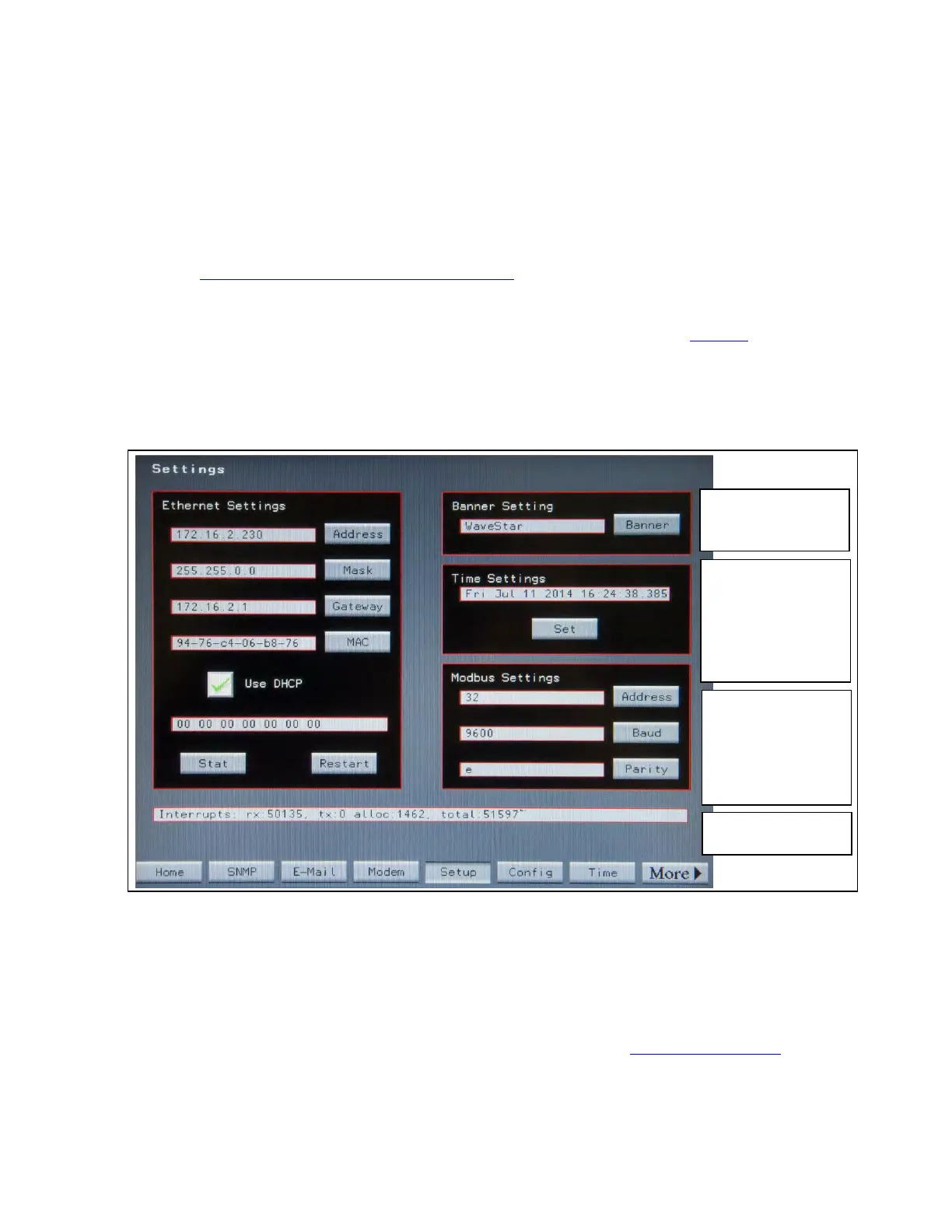
Touch the Settings button on the Home screen to display the Settings Screen (Figure 23).
The Settings screen has panels for Modbus RTU, Ethernet, manual Time setting, and the Home page banner
heading.
Figure 23. Settings Screen
Modbus RTU
settings
Manual Time
Settings
Use Time screen to
use SNTP time
synchronization.
Use Ethernet
Settings for
Modbus TCP/IP.
Home screen
banner or screen
title.
Statistics for service
use
Modbus Settings This Panel is used to set parameters for Modbus RTU: Modbus address, baud rate, and
parity. The Modbus address can be changed by touching the Address button. This will display the Keyboard
Screen for entering the address for the unit. Pressing the other buttons in this panel will allow for the
adjustment of those fields. The parity can be selected from the following: Even (E), Odd (O) or None (N).
1111..22 EEtthheerrnneett
The STS has an Ethernet port and cable. (For physical attachment see 6.2 Ethernet Connection.) The Ethernet
cable must be physically attached to the customer network and STS Ethernet addresses set before ModBus
TCP/IP, SNMP, or SNTP Time Synchronization are configured.














 To Next Page