Eaton Static Transfer Switch 2000A 3-Pole Installation and Operation Manual 164001127—Rev 01 63
1111..66 EEmmaaiill AAllaarrmm NNoottiiffiiccaattiioonn
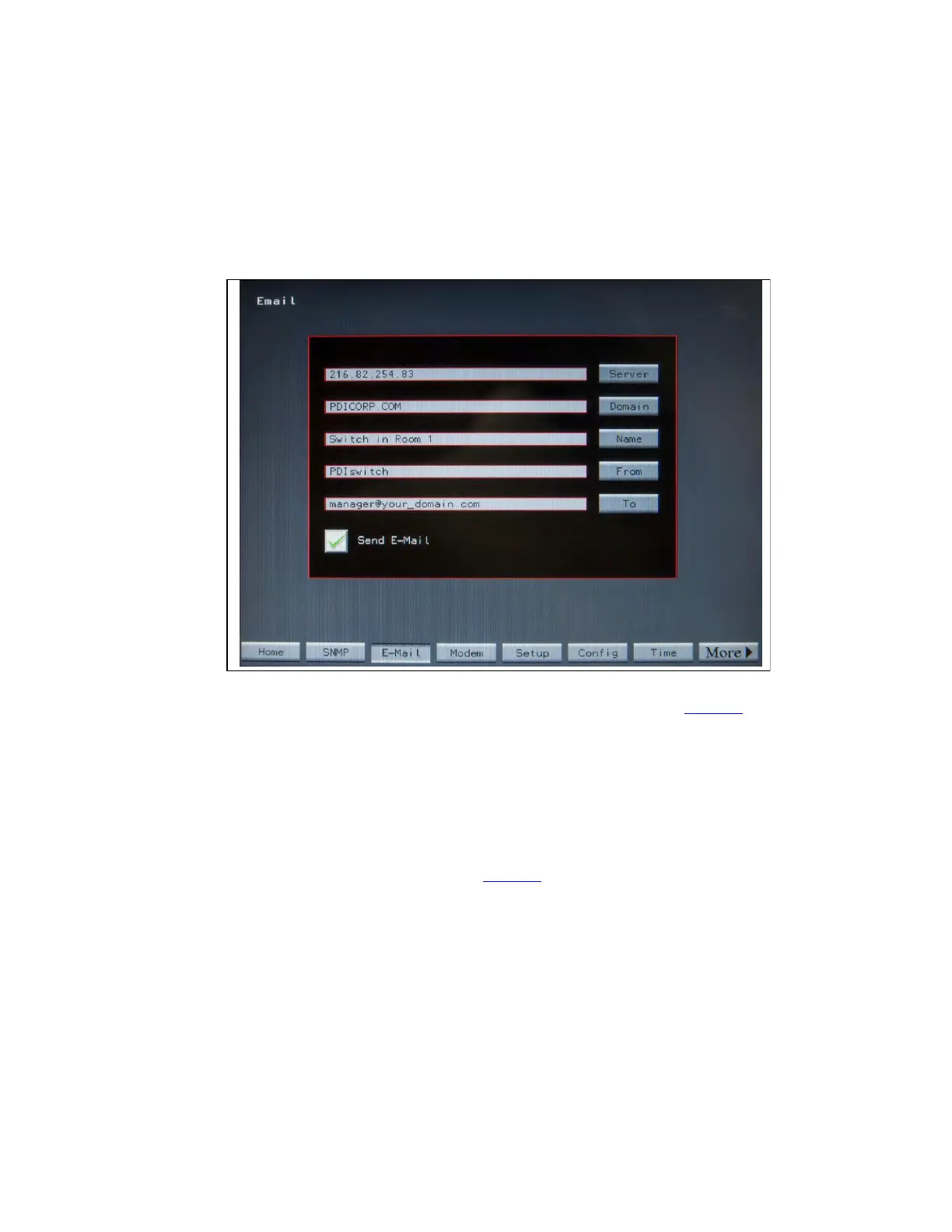
The STS can email a summary alarm notification by SMTP. The IP address of the SMTP server, domain, name,
from email address, and the recipient’s email address can be set from the EMAIL screen. The email will include
a link to the Alarms web page.
Figure 26. Email Screen
Touch the Email button on the navigation buttons to display the Email screen (Figure 26). Enter email Server,
Domain, Name, and email to/from names using screen buttons.
To have emails sent to a list of contacts within an organization, the IT Administrator can set up a group mail
address through your mail portal and this address can be used as the To address on the Email screen.
The Send Email box has a red X when email notification is not enabled. Toggle the box to a green check mark
to send email alarm notifications.
1111..77 MMooddeemm LLaanndd LLiinnee
Touch Modem to display the Modem screen (Figure 27). You can connect a 9600 baud modem to the
Enhanced Contractor Board. The modem can be used to send a summary alarm to one or two specified
destinations.
System Setup: Networking














 To Next Page