64 Eaton Static Transfer Switch 2000A 3-Pole Installation and Operation Manual 164001127—Rev 01
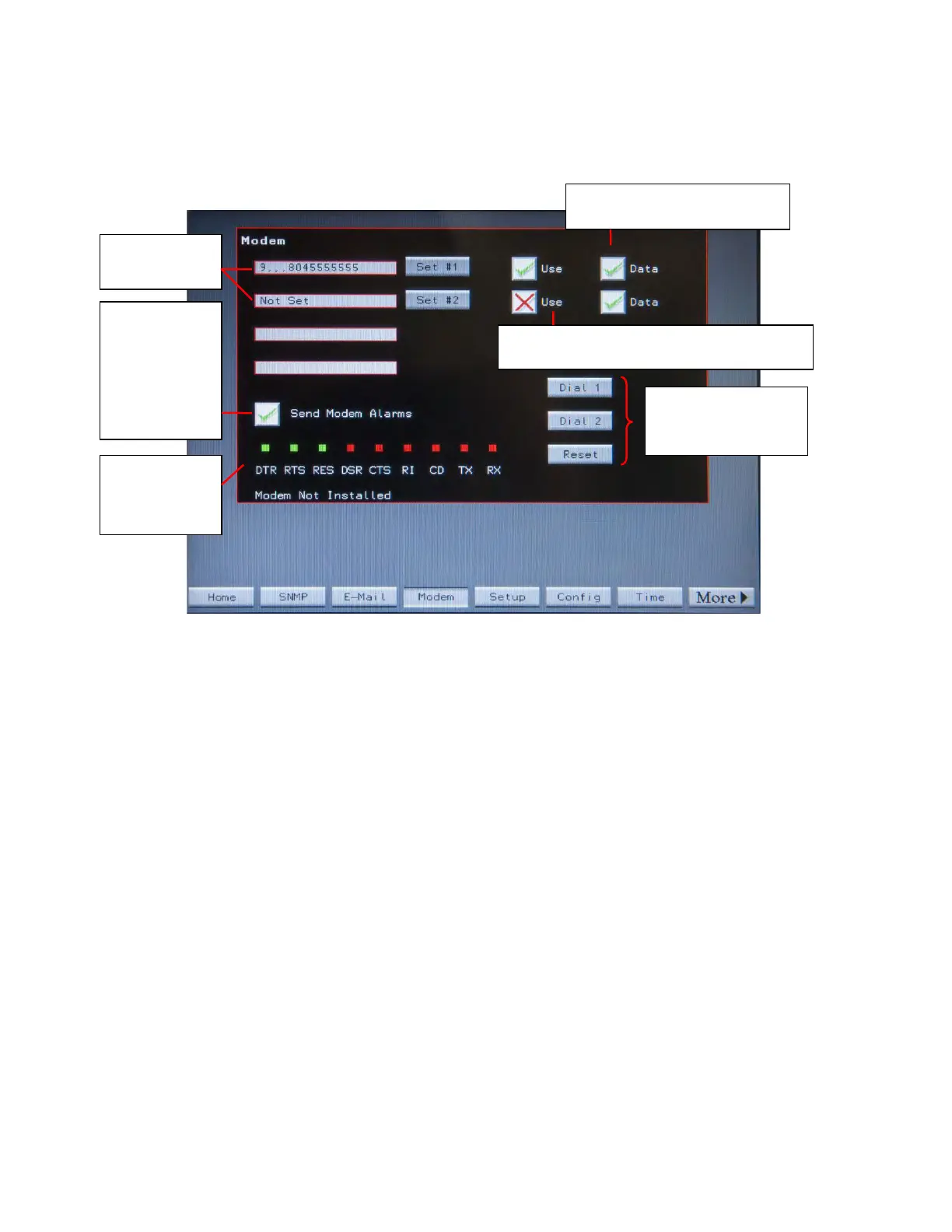
Figure 27. Modem Setup Screen
Set 1 or 2 dial
Test functions:
Dial numbers 1 or 2;
Reset modem
out numbers
To enable this
function, toggle
the Send
Modem
Alarms to a
green check
mark.
Modem
signaling status
is displayed
here.
Toggle Use to green check mark to have
modem send a summary alarm to this number.
Toggle Data to a green check
mark to send data to pager.
Touch Set #1 to enter the number for destination 1. If dialing out with a 9, add commas to pause the modem
slightly before it dials the outside number. Set #2 lets you set a second number.
Toggle Use to a green check mark to enable the number.
Toggle Data to a green check mark to send data to a pager. Add commas after the telephone number (to pause
the modem) and then add numbers to be sent to a pager. The data in the Modem field for dial-out number 1 or
2 will have this format:
9,,,8045551212,,,579802 (Dial out code/commas to pause modem/pager number/commas to pause modem/
numeric data to be sent to pager)
Toggle Send Modem Alarms to green check mark to enable sending a summary alarm via modem.
To test the modem dial out feature, touch Dial 1 or Dial 2 to force the modem to dial number 1 or 2.
Touch Reset to reset the modem.
System Setup: Networking














 To Next Page