Eaton Static Transfer Switch 2000A 3-Pole Installation and Operation Manual 164001127—Rev 01 69
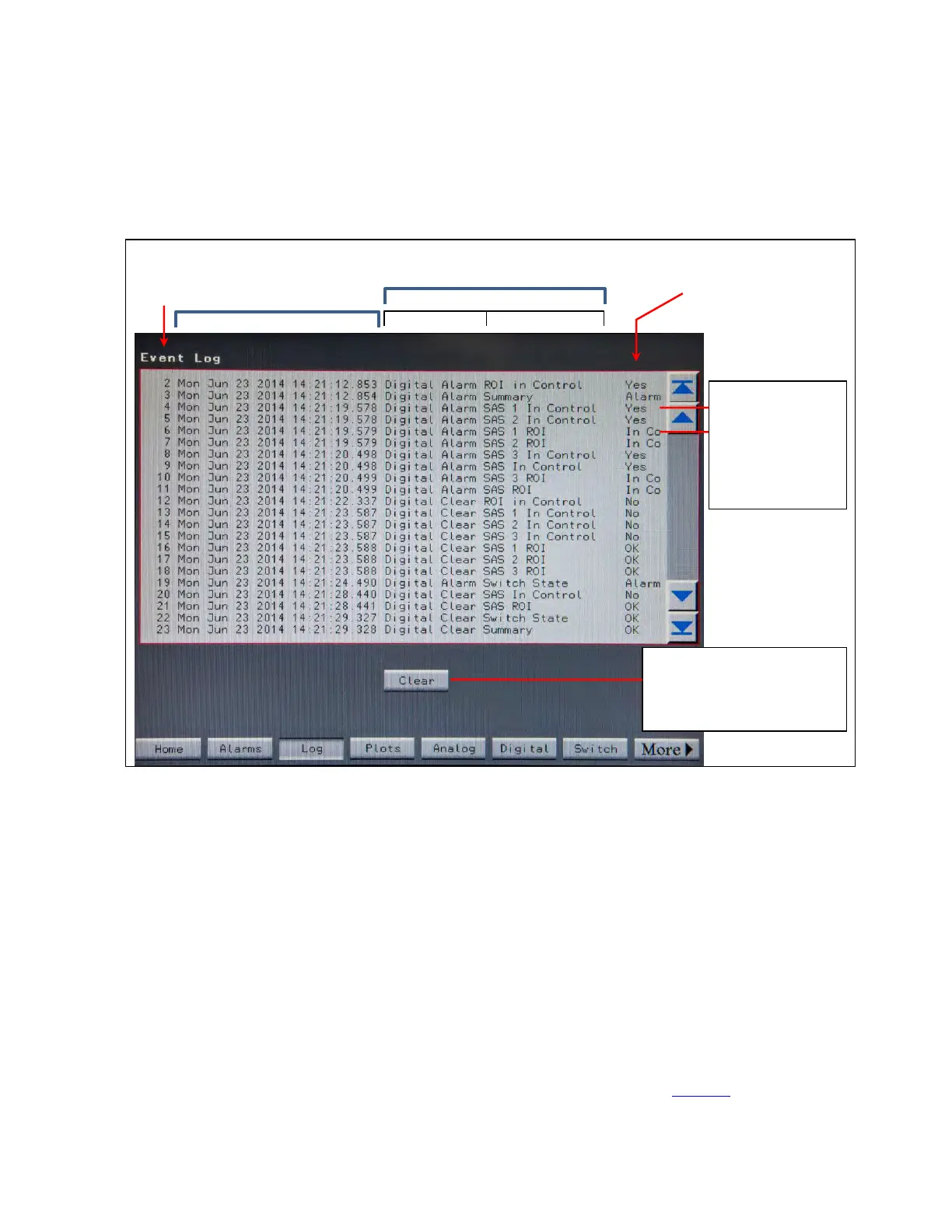
The Event Log is a record of all such events that have taken place while the STS has been operational and
since the Log was last cleared up to a maximum of 512 entries. The Event Log is stored in nonvolatile memory.
Figure 31. Event Log Screen
Date/Time Stamp
Event Description
Event Type
Point
Clear button clears all
events from the log and
requires Administrator
authorization.
Event
No.
Change in Point’s State
The same event
can cause
multiple log
entries,
particularly as
multiple points are
affected.
Each event is date-and-time-stamped in the order of occurrence. Events are described in the center panel. The
same event often causes multiple log entries because multiple points are affected.
Scroll through event entries using the right-side scroll bar.
Touch the Clear button to clear all events in the log. This action requires Administrator-level authorization. Only
the Administrator can clear the Event Log and it must be done from the touchscreen display. (The Event Log
can be viewed remotely in a web browser, but cannot be cleared from a browser.)
1122..22..44 DDoowwnnllooaaddiinngg tthhee EEvveenntt LLoogg FFiillee
A USB port on the front of the touchscreen display compartment lets you download the log file to a PC. When a
PC is connected to this port with a USB cable, a shortcut is created on the PC’s desktop. Clicking this shortcut
will automatically download the Event Log as a CSV file to the PC. For security reasons, no other action is
taken. The PC cannot send input to the STS and cannot request any other information.
1122..22..55 PPlloottss SSccrreeeenn
Touch the Plots button in the navigation buttons to display the Plots screen (Figure 32).
Status, Alarms, and Other Diagnostic Information














 To Next Page