56 Eaton Static Transfer Switch 2000A 3-Pole Installation and Operation Manual 164001127—Rev 01
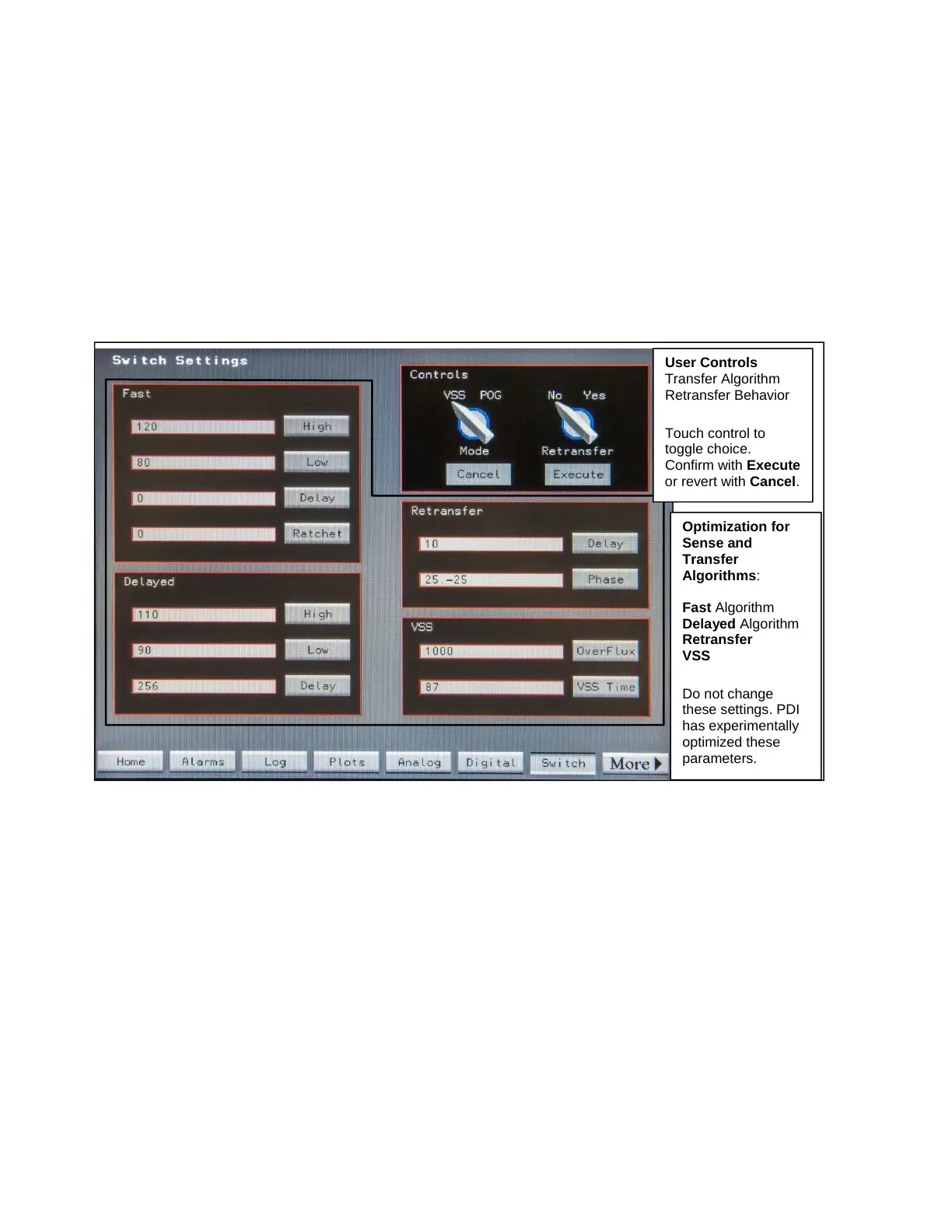
• Retransfer (Yes/No): When Retransfer=Yes, the STS will switch back to the original preferred source
after an outage on that source has ended and the power on this source is within prescribed parameters.
When the Retransfer switch is touched to be moved, Execute is highlighted as a precaution. Touch
Execute to move the virtual switch to the opposite position, or Cancel to revert back to the previous
selection.
The remaining parameters are Optimization parameters for the sense, transfer, and retransfer algorithms.
These parameters have been experimentally set and optimized by Eaton PDI. NOTE: Eaton PDI strongly
recommends that the Fast, Delayed, and Retransfer Delay settings not be changed.
Figure 22. Switch Settings Screen
Optimization for
Sense and
Transfer
Algorithms:
Fast Algorithm
Delayed Algorithm
Retransfer
VSS
Do not change
these settings. PDI
has experimentally
optimized these
parameters.
User Controls
Transfer Algorithm
Retransfer Behavior
Touch control to
toggle choice.
Confirm with Execute
or revert with Cancel.
System Setup: Operation














 To Next Page