Software Overview
Document ID: OMM-00165 Rev. C Pro 32r Operations Guide 64
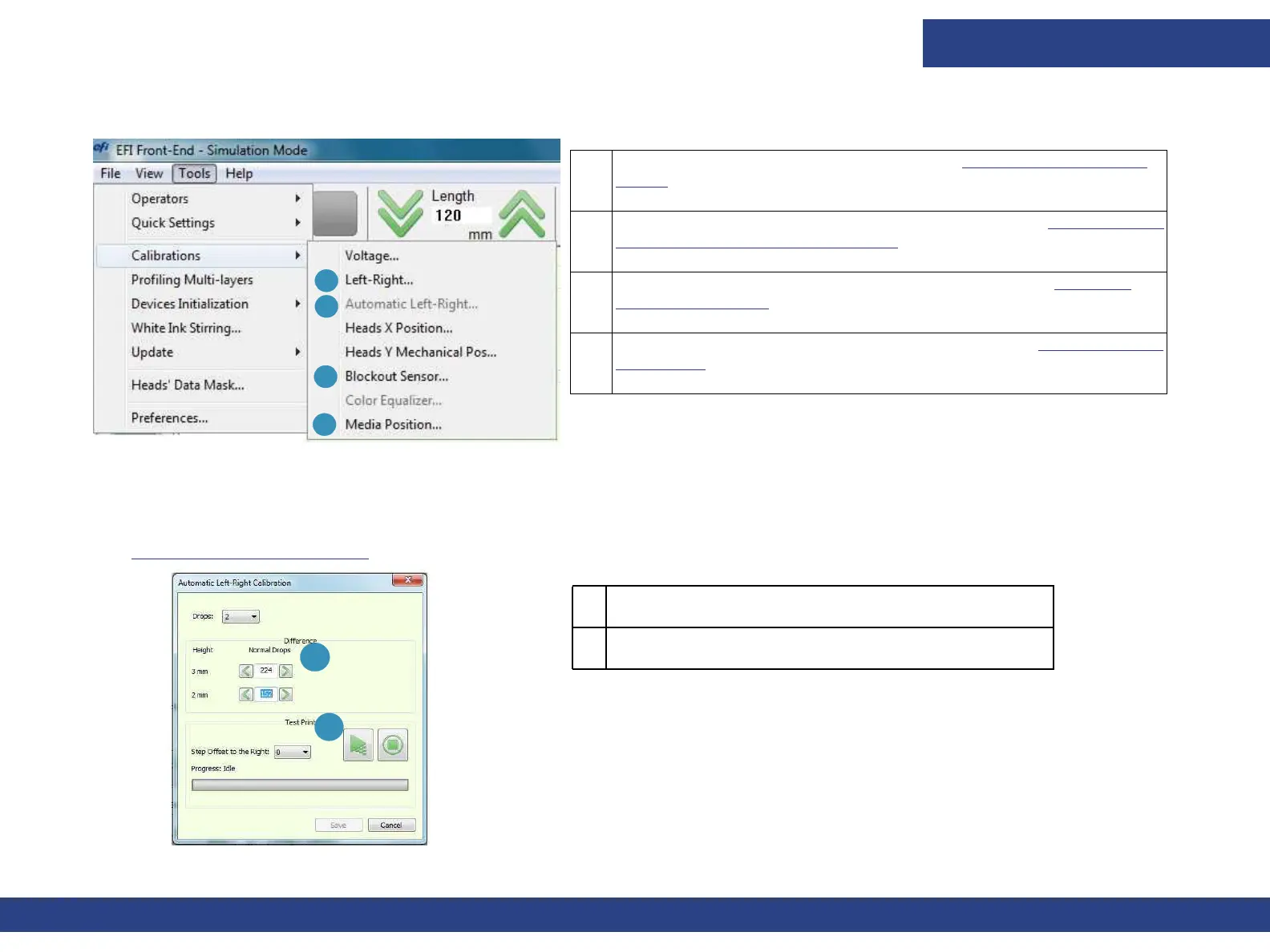
4.6.1 Tools Menu - Calibration Sub-menu
4.6.1.1 Drop Velocity - Automatic Left-Right Calibration
Enables automatic change of the Left–Right value when the user changes the carriage height, especially during printing.
(See
Left-Right Calibration Dialog.)
1 The difference between the left and right offset.
2 To run a Test Print.
1 Opens Left-Right Calibration dialog. See Left-Right Calibration
Dialog for details.
2 Opens Automatic Left-Right Calibration dialog. See Drop Velocity
- Automatic Left-Right Calibration for details.
3 Opens Blockout Sensor Calibration dialog box. See Blockout
Sensor Calibration for details.
4 Opens Media Position Calibration dialog box. See Media Position
Calibration for details.
Figure 4-18 Calibration Sub-menu
3
1
2
4
1
2
Figure 4-19 Left-Right Calibration



 To Next Page