Page 14 / 53
5. Software Introduction
5.1 HELIOS Interface Overview
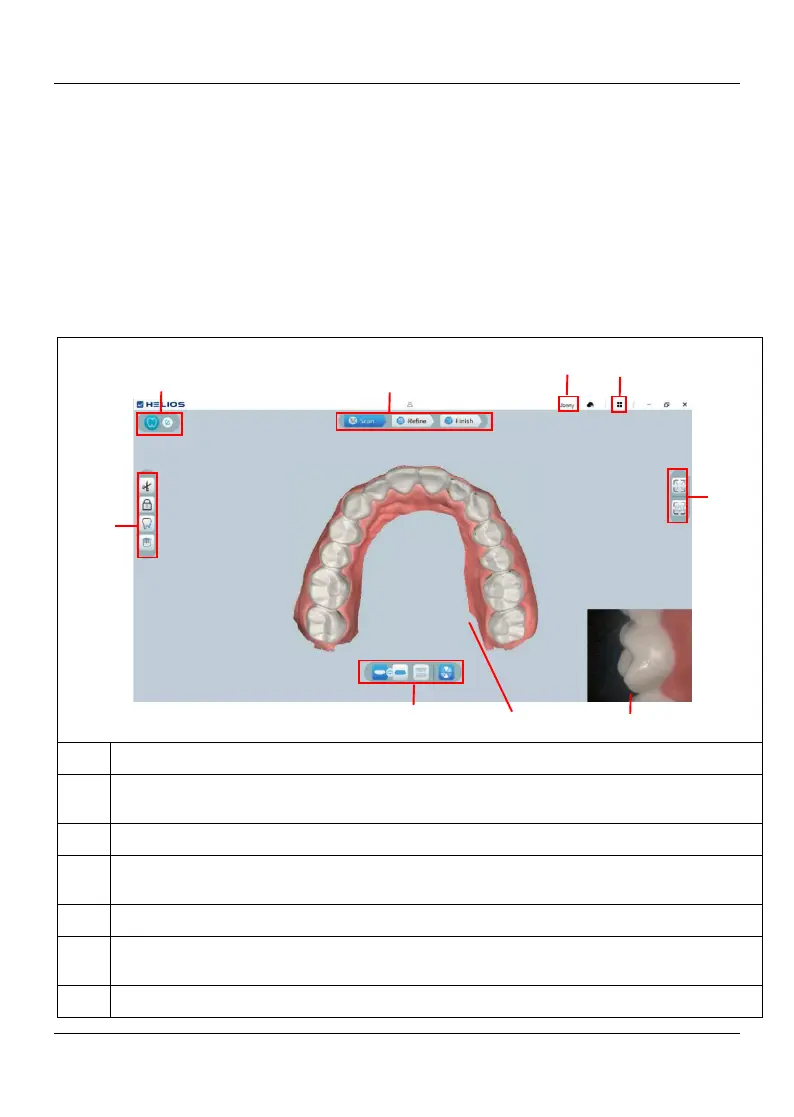
The HELIOS 600 scanner operates with HELIOS software. The HELIOS interface enables
you to acquire 3D models in two ways:
Partial arch scan: Several teeth in the preparation area on both the upper and lower jaws,
and buccal bite registration.
Full arch scan: Upper jaw, lower jaw, and buccal bite registration
Acquisition Step: Displays the current step in the acquisition process.
Implant/ Restoration /Orthodontics Switch: Enables you to select the Implant
model, Restoration model, or Orthodontics Switch model.
Image Toolbar: Enables you to select and manage 3D images.
Jaw/Bite Switch: Enables you to select the upper jaw, lower jaw, or buccal bite
registration.
3D Model Display Screen: Displays the 3D model created from the scan.
Video Preview Screen: Displays live video when scanning, or the scanner status
when not scanning.
Display Toolbar: Enables you to change how the 3D model is displayed.















 To Next Page