Page 37 / 53
10.4.3. Rotate the 3D model if necessary, and mark all the implant areas.
You can click and hold the middle mouse button to rotate the 3D
model when using tools such as Cut , Lock and Mark tooth .
10.4.4. Click the Return button to quit Mark tooth tool.
10.5 Installing and Scanning the Scan Body
After installing the scan body, follow these steps to scan the scan body:
10.5.1. Click the Scan body button to enter the scan body scan.
10.5.2. Wait for the copy scan data process to complete.
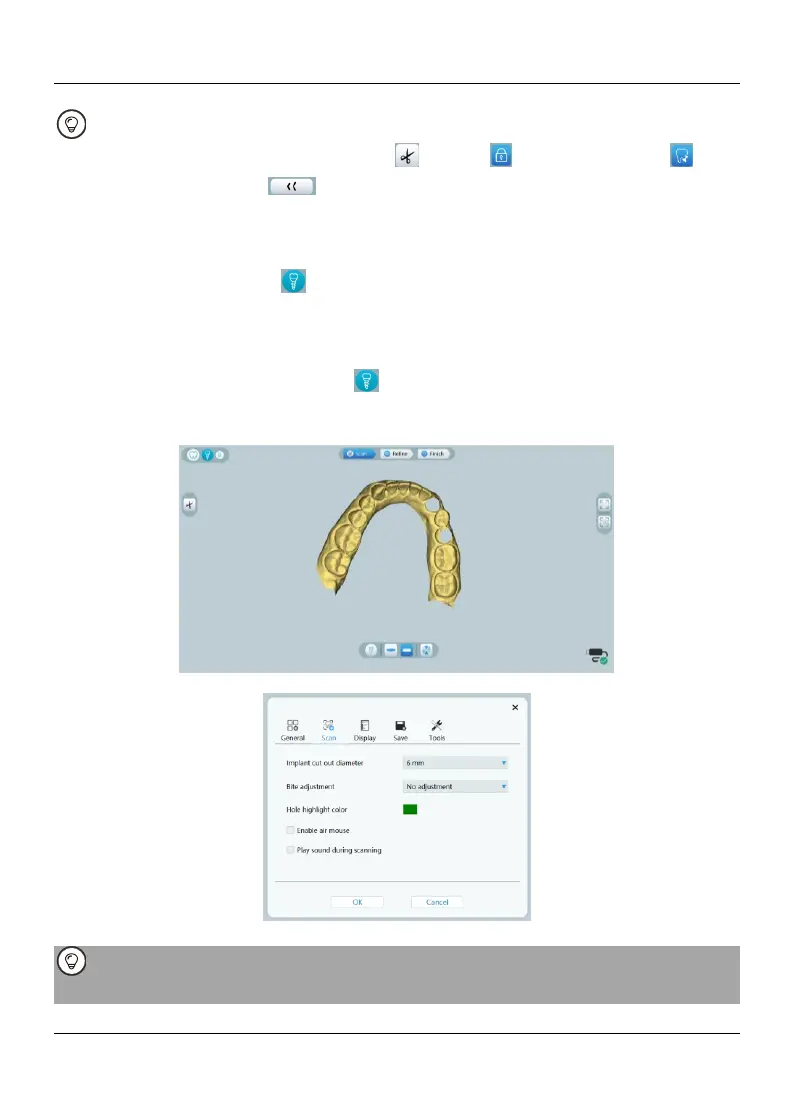
10.5.3. Check whether the region automatically cut out by the software is big enough
to surround the emergence profile and the scan body used. If the region is not big
enough, you can click the Scan body button again to quit scan body scan, and re-
mark the implant areas or adjust the "Implant cut out diameter" to fit the scan body
used. After finishing the adjustment, enter the scan body scan again.
10.5.4. Rescan these implant areas in order to obtain 3D models of the scan body.
Start the scan body scanning from the surface 1-2 teeth away from the scan body,
so that the system can recognize the 3D structure.















 To Next Page