DATA ENTRY
Preceeding any data entry sequence, the counter must be placed in the remote mode (remote enable line
low). Once in remote mode, the input data line is brought low to initiate
a
data read sequence. The data
read
is
normally function data. When the program data line is brought low, the data read will be interpreted
as
program data. The data accept line will go high to indicate that the data has been latched in, and will
remain high while the counter processes this data.
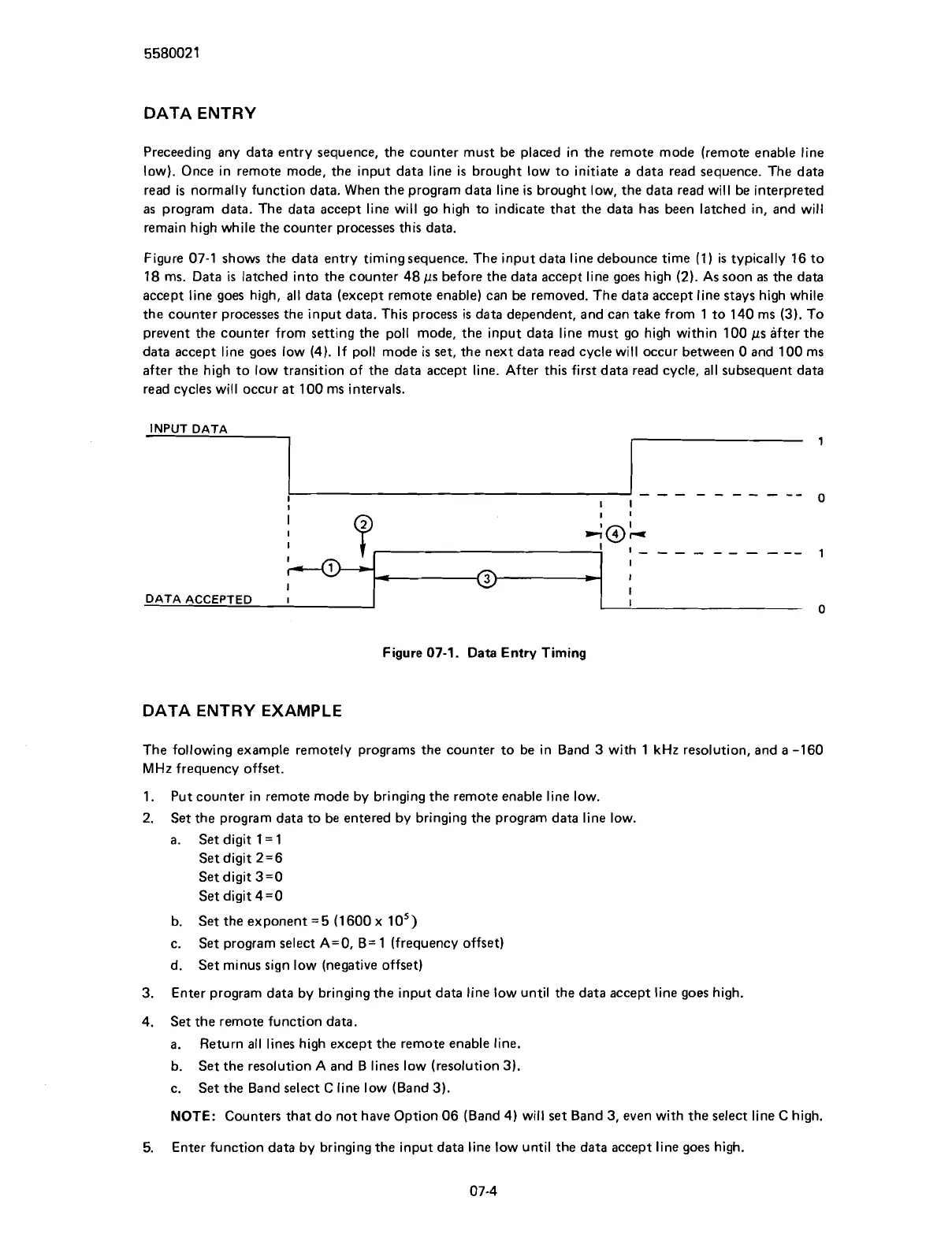
Figure 07-1 shows the data entry timing sequence. The input data line
debounce time (1) is typically 16 to
18 ms. Data
is
latched into the counter 48 ps before the data accept line goes high (2). As soon
as
the data
accept line goes high, all data (except remote enable) can be removed. The data accept line stays high while
the counter processes the input data. This process is data dependent, and can take from 1 to 140 ms (3). To
prevent the counter from setting the poll mode, the input data line must go high within 100
ps after the
data accept line goes low (4). If poll mode is set, the next data read cycle will occur between
0 and 100 ms
after the high to low transition of the data accept line. After this first data read cycle, all subsequent data
read cycles will occur
at
100 ms intervals.
INPUT DATA
1
---
-------
I
I
0
Figure
07-1.
Data
Entry Timing
I
J
I
I
I
-
I
I
I
A@L
I
I
------
----
1
DATA ENTRY EXAMPLE
1
I
DATA ACCEPTED
I
The following example remotely programs the counter to be in Band 3 with 1
kHz
resolution, and
a
-160
MHz
frequency offset.
1.
Put counter in remote mode by bringing the remote enable line low.
2.
Set the program data to be entered by bringing the program data line low.
a.
Set digit 1
=
1
Set digit 2=6
Set digit 3=0
Set digit 4=0
b.
Set the exponent
=
5
(1 600 x 10')
c.
Set program select
A=O, B= 1 (frequency offset)
d.
Set minus sign low (negative offset)
0
4
-
3. Enter program data by bringing the input data line low until the data accept line goes high.
I
I
I
4.
Set the remote function data.
a.
Return all lines high except the remote enable line.
b.
Set the resolution
A
and B lines low (resolution 3).
c.
Set the Band select C line low (Band 3).
NOTE:
Counters that do not have Option 06 (Band 4) will set Band 3, even with the select line C high.
5.
Enter function data by bringing the input data line low until the data accept line goes high.
Scans by ArtekMedia © 2007



 To Next Page