CMeX50 Users Manual English
CMeX50 Users Manual English
Document id: 1090055 Version 1.5
6.1.4.4 Wireless M-Bus telegram with short header
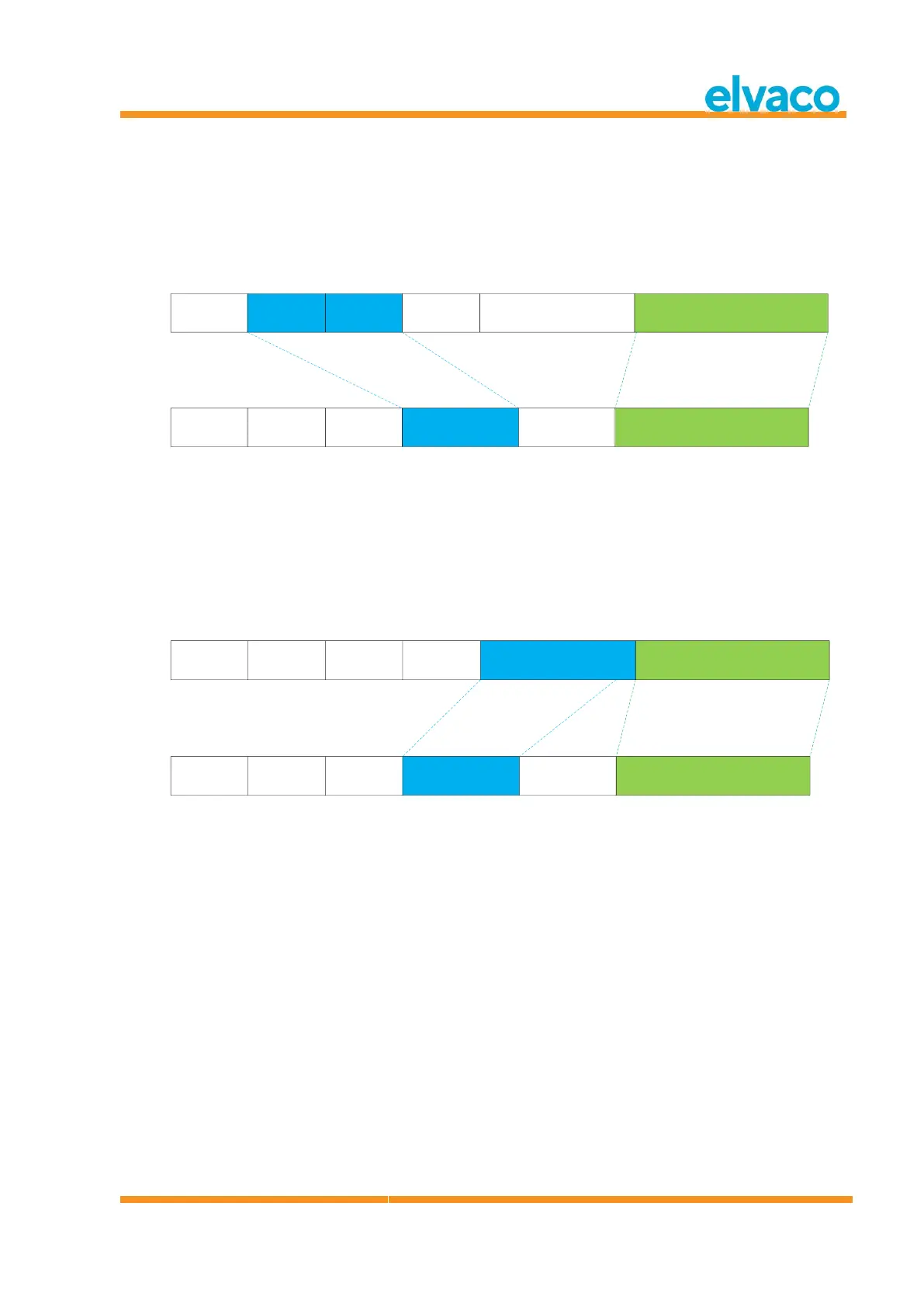
Figure 14 describes how data is mapped from the received wireless M-Bus telegram to the wired M-Bus
telegram. The wired secondary address is taken from the M-Field and A-Field from the wireless M-Bus
telegram. The wired A-Field is automatically assigned upon installation. The short header information
received in the wireless M-Bus telegram is not used on the wired M-Bus interface.
C-Field
0x44|0x46|0x48
M-Field
2 bytes
A-Field
6 bytes
CI-Field
0x7A
Payload
C-Field
0x08
A-Field
0xnn
Payload
CI-Field
0x72
Long header
M-Field + A-Field
Mapped to Long header Mapped to payload data
Wireless M-Bus telegram
4 byte header
Wired M-Bus telegram
with long header
Short header
4 bytes
CMeX50 Info
Figure 14 Wireless M-Bus telegram with short header data mapping
6.1.4.5 Wireless M-Bus telegram with long header
Figure 15 describes how data is mapped from the received wireless M-Bus telegram to the wired M-Bus
telegram. The wired secondary address is taken from the long header from the wireless M-Bus telegram.
The wired A-Field is automatically assigned upon installation.
C-Field
0x44|0x46|0x48
M-Field
2 bytes
A-Field
6 bytes
CI-Field
0x72
Payload
C-Field
0x08
A-Field
0xnn
Payload
CI-Field
0x72
Long header
Id,Man,Version,Device
Mapped to Long header Mapped to payload data
Wireless M-Bus telegram
12 byte header
Wired M-Bus telegram
with long header
Long header
12 bytes
CMeX50 Info
Figure 15 Wireless M-Bus telegram with long header data mapping
6.1.4.6 Wireless M-Bus telegram with extended link layer 0x8C and 0x8D
The actual CI-field contained in the payload data is handled according to previous description of no, short
and long header.
6.1.4.7 Wireless M-Bus telegrams contained in wired M-Bus container
The wireless M-Bus telegram will be placed in an M-Bus container if one or more of the following
criteria’s are met:
1. C- and CI-Field are unknown to the product
2. The wireless M-Bus telegram is encrypted and no key is set
3. The wireless M-Bus telegram is encrypted, private or global key is set, but encryption mode is set
to “None”
4. The wireless M-Bus telegram is encrypted, wrong key or wrong encryption mode is set
5. The global setting for wired mode is set to “Container”



 To Next Page