4 Perform a Test
4 Perform a Test
4.1 Programming the Generator
The same process is used to program the generator for different tests. In the first step, the parameters
should be set according to the requirements of the test.
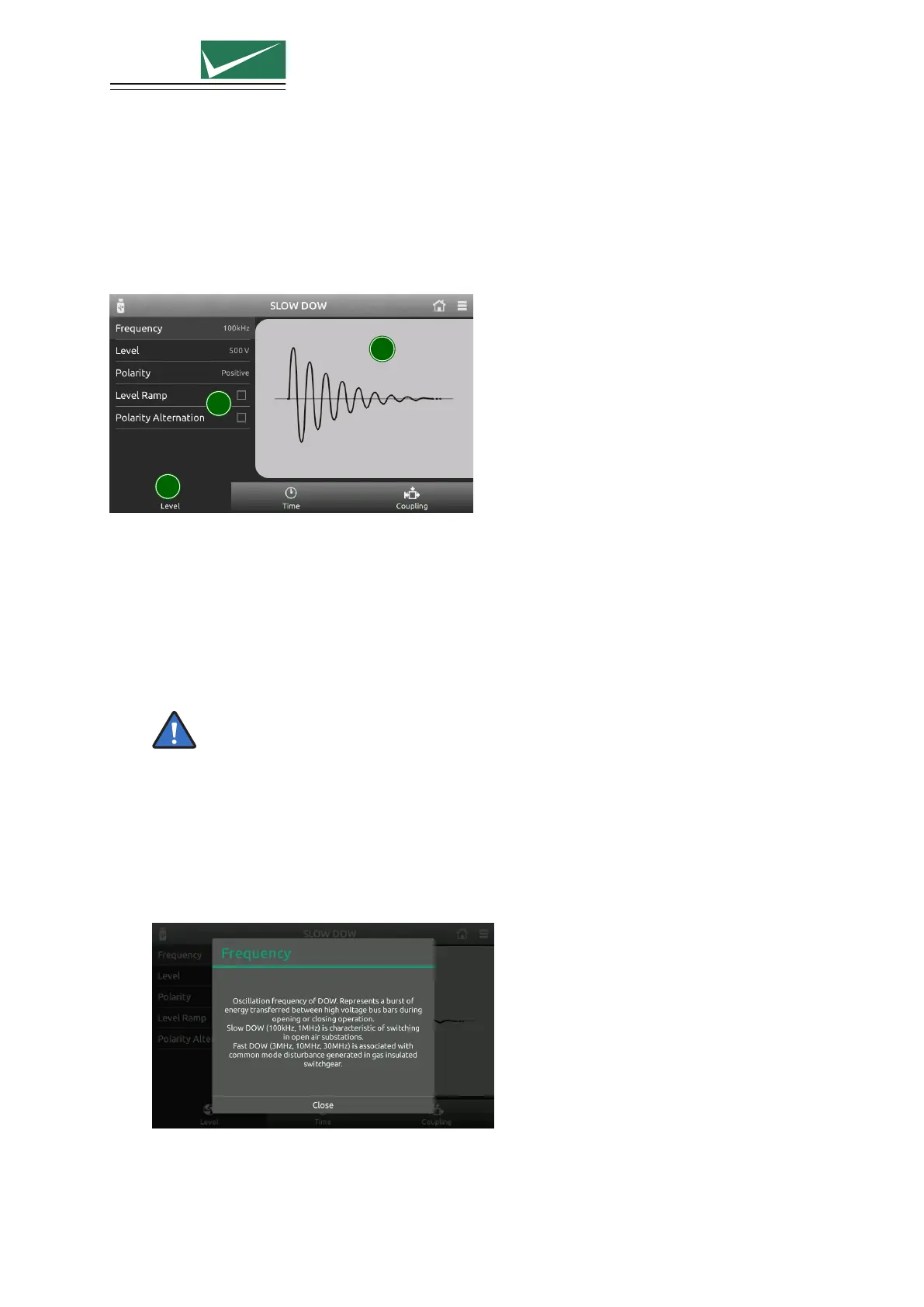
1
2
3
1 Main Category
For quick access, categories at the bottom of the display contain groups of relevant parameters.
Select a category using the touch panel.
2 Parameter List
All parameters from a selected category are shown on a single screen. Click on a parameter to edit
the value.
Press and turn the rotary knob at the same time for a quick parameter change.
All parameters are checked for validity during the entry process. If necessary (for example test
level too high), the system automatically corrects the value. Corrected values are indicated by a
red background.
The system also checks for inconsistencies with other parameters and, where necessary, makes an
adjustment. It is not possible to create a test containing invalid parameters.
For each parameter, an additional help text is provided directly on the generator. Press and hold
a parameter to open the help text in a popup window.
3 Parameter Image
Individual images clarify the effect of each parameter.
Page 18/55


 To Next Page