4 Perform a Test
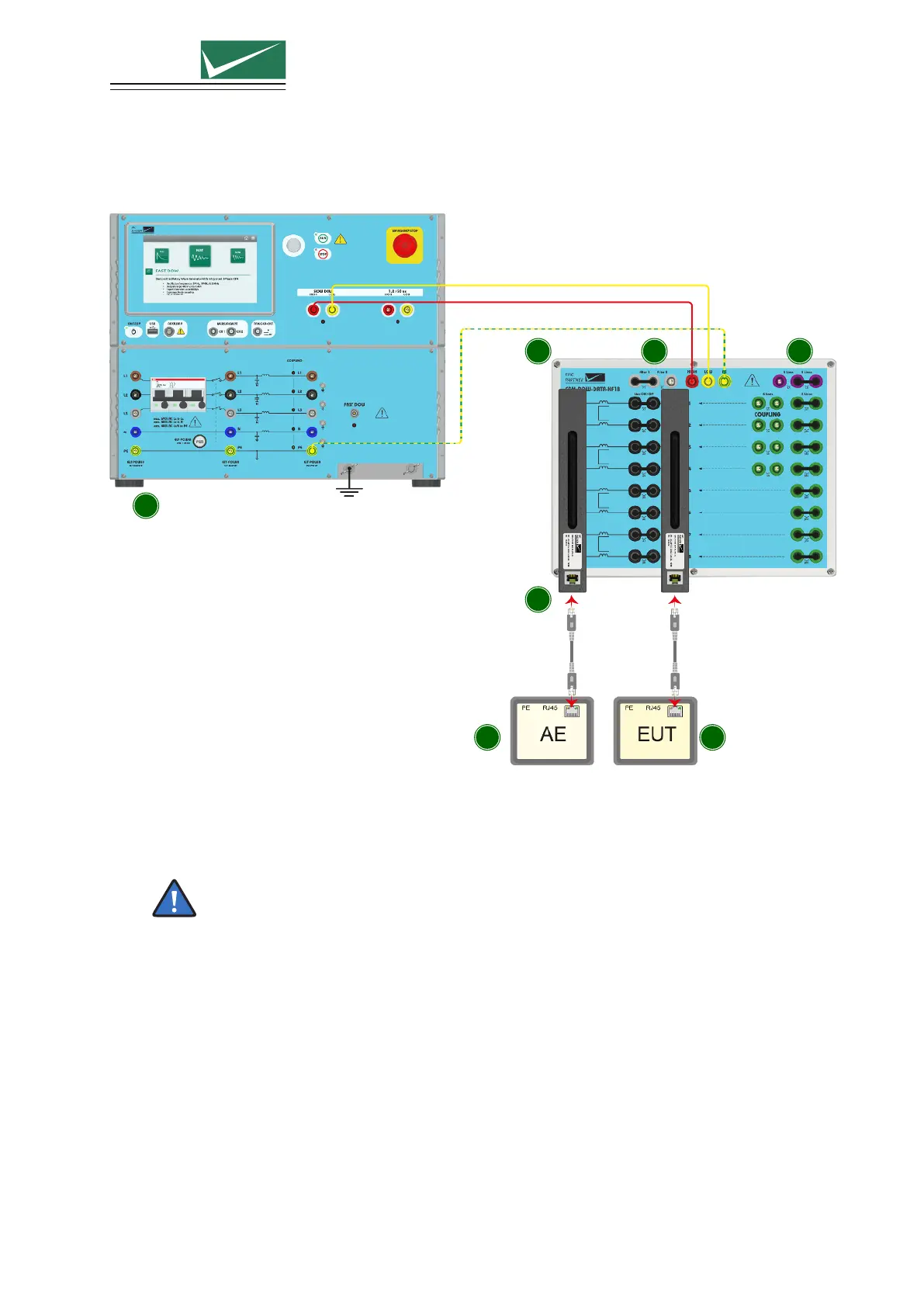
4.6.2 Coupling using CDN-DOW-DATA-HF18 according to IEC 61000-4-18
1
2 34
5
6 7
1 Generator
Select the Slow DOW test and the CDN-DOW-DATA-HF18 as coupling device with the desired
coupling type.
A missing coupling device in the parameter list can be added in the generator main menu.
2 CDN-DOW-DATA-HF18
Connect the CDN with three 0.5 m MC-cables to the generator. Two twisted cables for High and
Low should be connected to the Slow DOW direct output; the third cable should be connected to
the PE CDN output. For optimal results one should try to twist the PE cable as well with the two
other cables.
3 Data line selection
You can select to couple either on 4 lines (2 pairs) or on 8 lines (4 pairs) by placing the MC- bridge
L4 or L8.
All datalines (pairs) can be turned On or Off by placing the MC-bridges X1-X8. These additional
MC ports allows access to individual datalines (pairs) without the need for special cabling.
Page 25/55


 To Next Page