6 Configuration
Risk of network errors
Connection errors can affect the entire network. If the network does not support DHCP,
or dynamic TCP/IP configuration is disabled, assign a valid address information before
connecting the equipment to the LAN. Contact the local network administrator to obtain
a valid IP address.
6.2 Generator
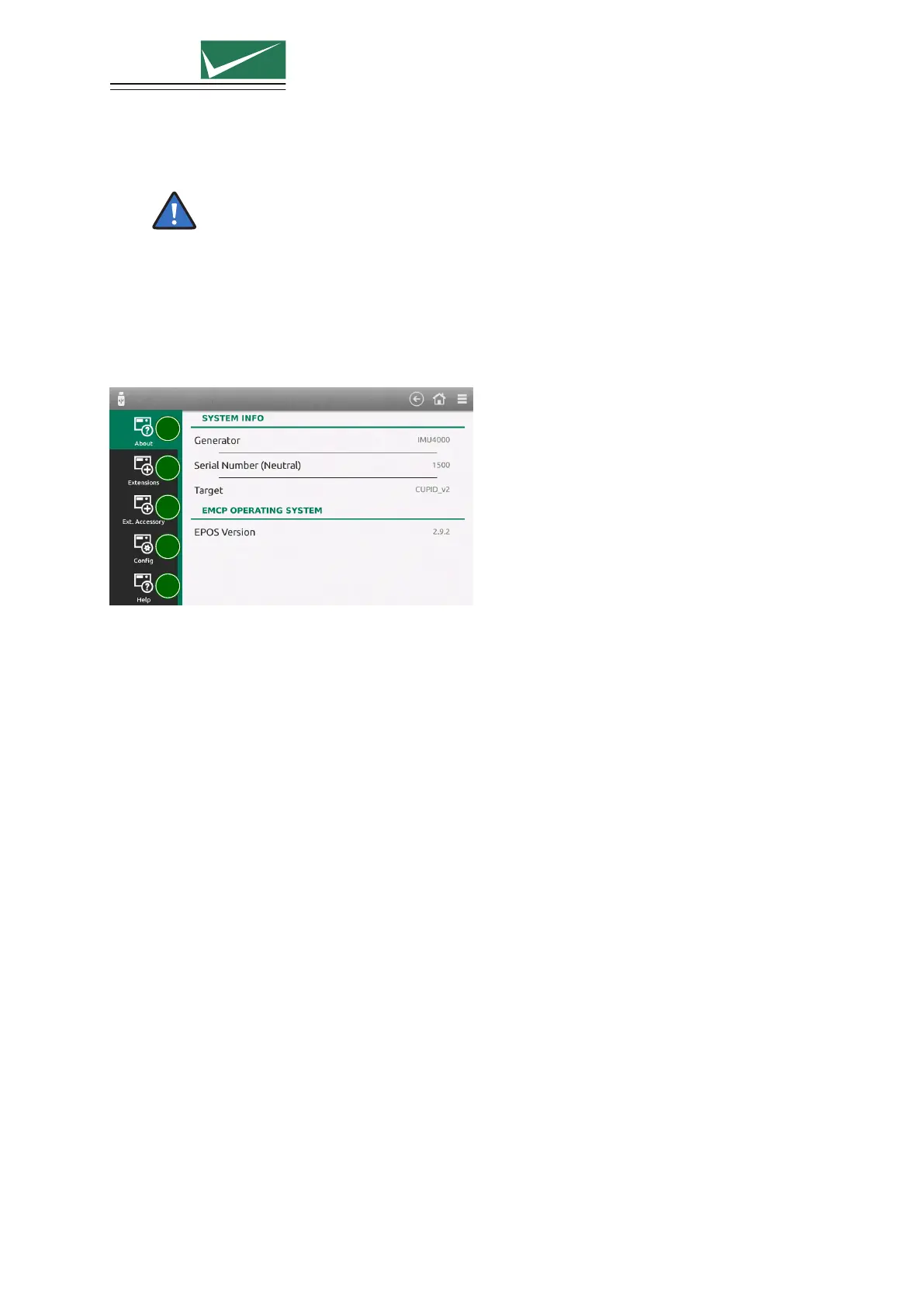
Select ≡ (General Menu) –> Generator
1
2
3
4
5
1 About
Information about the generator (type, serial number) and the current version of the system
software
2 Extension
Name, serial number and firmware version of all currently connected extensions (internal and
external)
3 Ext. Accessory
Only external accessories available for connection to the test equipment are shown in this list. Any
test requiring an external accessory will only be available to the user after correct selection has
been made.
A further advantage is that only those accessories available to the test system will be shown.
Press “Change Accessories” and select all available items. This needs to be done only once when
setting up test equipment for the first time.
4 Config
Save or restore the current configuration of the generator.
5 Help
A factory reset will set the generator to the default configuration
Format SD card will delete all stored user information
Copy information to USB transfers different system information to a connected memory stick. This
is usefull for failure analysis. See chapter Service.
Page 38/55


 To Next Page