Ç
Enter push button:
Entry to the setting up menu.
- Selection of operation functions within a function group.
- Saving set up data.
È
+/- push button:
- Selection of function groups within the menu.
- Setting up parameters and numbers (If the push button is
continuously held down then the number change on this
display increases in speed).
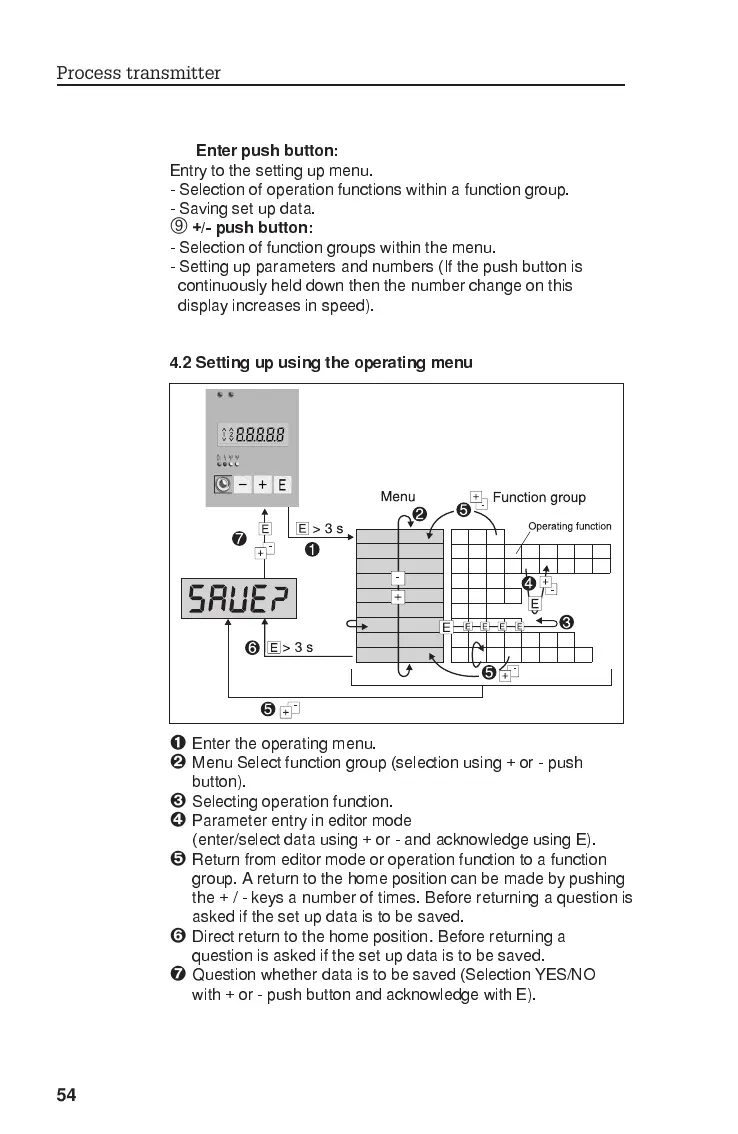
4.2 Setting up using the operating menu
Ê
Enter the operating menu.
Ë
Menu Select function group (selection using + or - push
button).
Ì
Selecting operation function.
Í
Parameter entry in editor mode
(enter/select data using + or - and acknowledge using E).
Î
Return from editor mode or operation function to a function
group. A return to the home position can be made by pushing
the+/-keysanumber of times. Before returning a question is
asked if the set up data is to be saved.
Ï
Direct return to the home position
.
Before returning a
question is asked if the set up data is to be saved.
Ð
Question whether data is to be saved (Selection YES/NO
with + or - push button and acknowledge with E).
Process transmitter
54








 To Next Page