Document number: ED.03783.00.001.ENG rev 4 Page 111 of 153
8. Configure the oil circuits of the system if you want to deviate from the default.
Use the Settings option of the Menu bar [HMI]
7.3.2 Manual operation
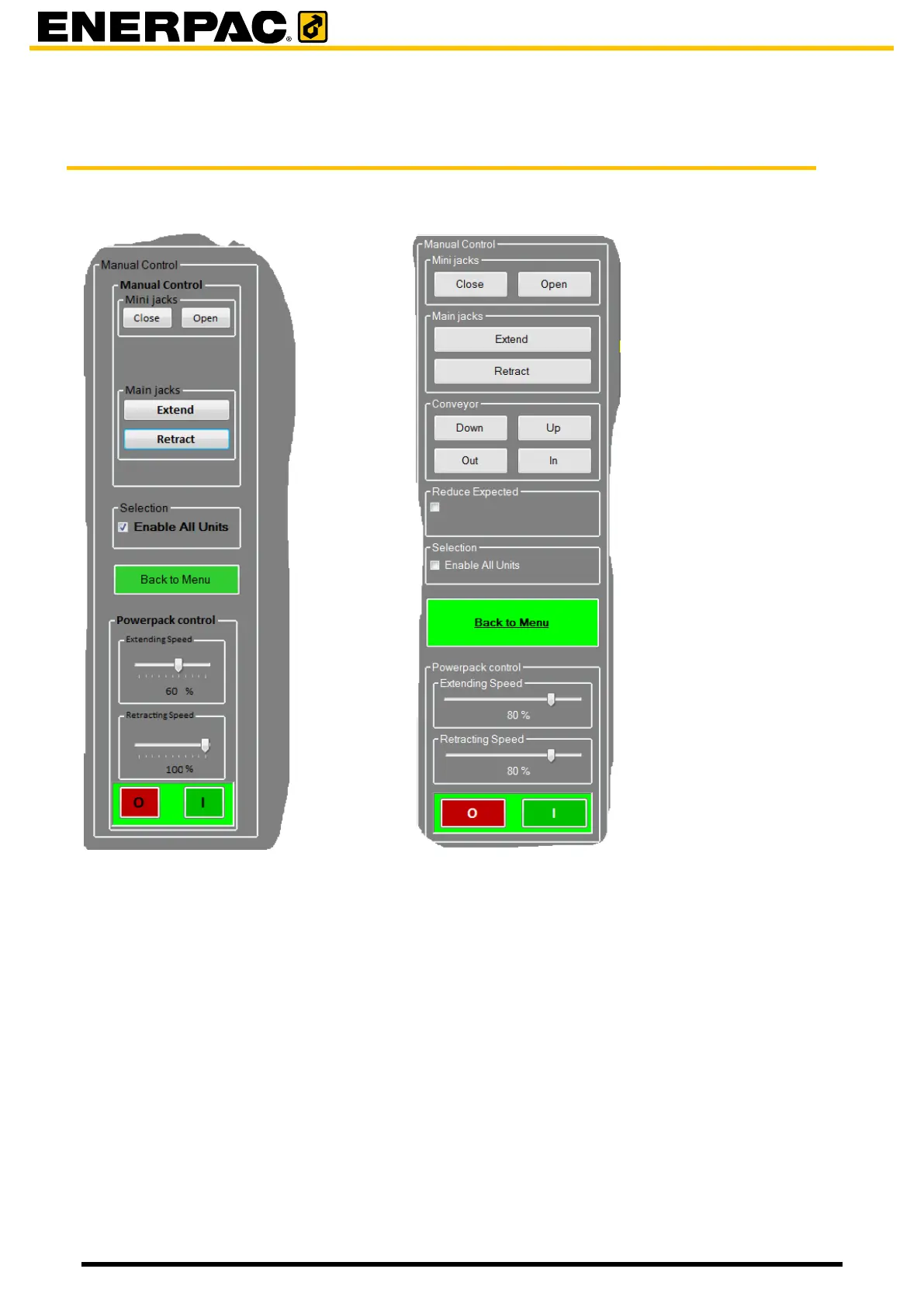
Without automatic insert table With automatic insert table
1. Perform initiating; see par 7.3.1 “Initiating”.
2. Click Manual on the main screen
3. Set the Extending speed and the Retrackting speed of the HPU.
For critical loads or difficult situations choose low values.
4. Click “enable all units”
On the main screen the units turn light grey.
5. Set the Units in Remote
6. Switch the HPU on; use the button on the HMI.
7. Use the buttons Close and Open to control the mini-jacks.
Use the buttons Down, Up, Out and In to control the automatic insert tabel (conveyor).
Use the buttons Extend and Retract to control the main jacks
Use the button Set Expected Load (no visible in the picture above).
Hold the load for 30 seconds after each movement to verify that the load in the cylinder and the
stroke of the cylinders does not change. Significant changes of cylinder load and/or stroke may
indicate a leaking (piston) seal. Lower the load such that the load is resting on the barrel resting


 To Next Page