Document number: ED.03783.00.001.ENG rev 4 Page 93 of 153
6.4.2.5 Settings / Calibration settings
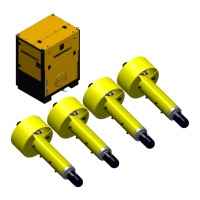
To use the Settings function click on Settings in the menu bar. Then click System settings.
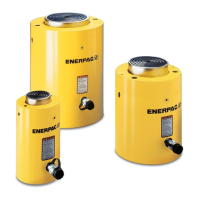
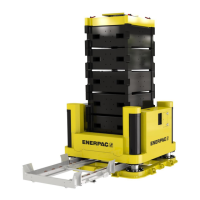
The following window pops up:
JS125 and JS250
Digital value reflecting the minimal stroke of the
cylinder
Digital value reflecting the maximal stroke of the
cylinder
If the stroke gets less than this value, an alarm
is raised.
If the stroke exceeds this value, an alarm is
raised.
The shown Ad min values are taken as the
minimal values for the selected units
The shown Ad max values are taken as the
minimal values for the selected units


 To Next Page