Show diagnostic data
Page 70
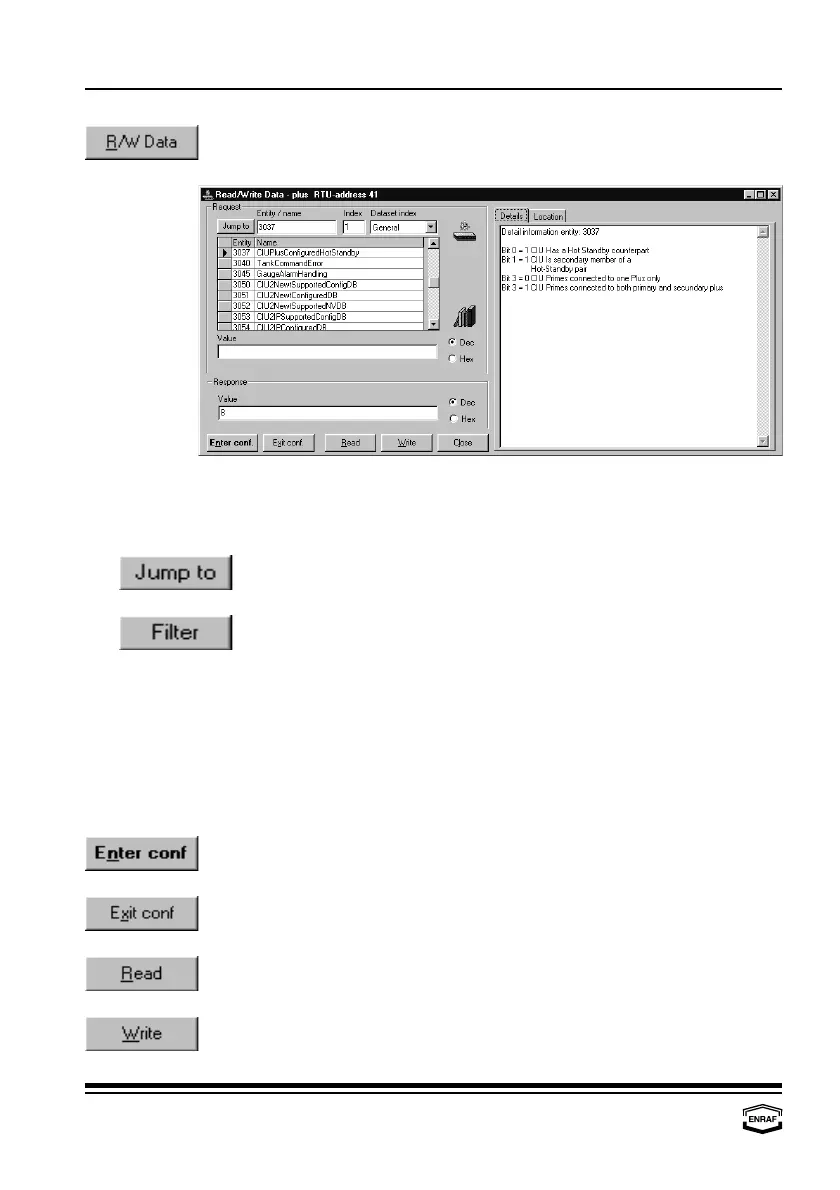
Press the ‘R/W Data’-button to read from and/or write to the
CIU Prime/Plus:
The entity detail information can be enabled by pressing the “books” icon.
Request
Press the ‘Jump to’-button to select the entity, matching the number in
the field ‘Entity’. The text of the ‘Jump to’ button will change into ‘Filter’
Press the ‘Filter’-button to select the entities, starting with the number
in the field ‘Entity’.
Entity
Enter the required entity number.
Index
Enter the entity’s index value.
Data set index
Select the tank number where this index relates to.
Value
Enter the value to be written. This can be either in Dec. or Hex.
Response
Value
Here the response to the request above is given.
Press the ‘Enter conf’-button to go into configuration mode. It is now
possible to write entities.
Press the ‘Exit conf’-button to go out of configuration mode. It is now
not possible o write entities.
Press the ‘Read’-button to retrieve the value of the requested entity.
Press the ‘Write’-button to overwrite the value of the requested entity.
This is only possible in configuration mode.



 To Next Page